Chapter 2
MicrOS 410 Installation Guide 21
Connecting Power and Data Cables
The MicrOS 410 supports wired clients connected to either or both Ethernet or serial interfaces.
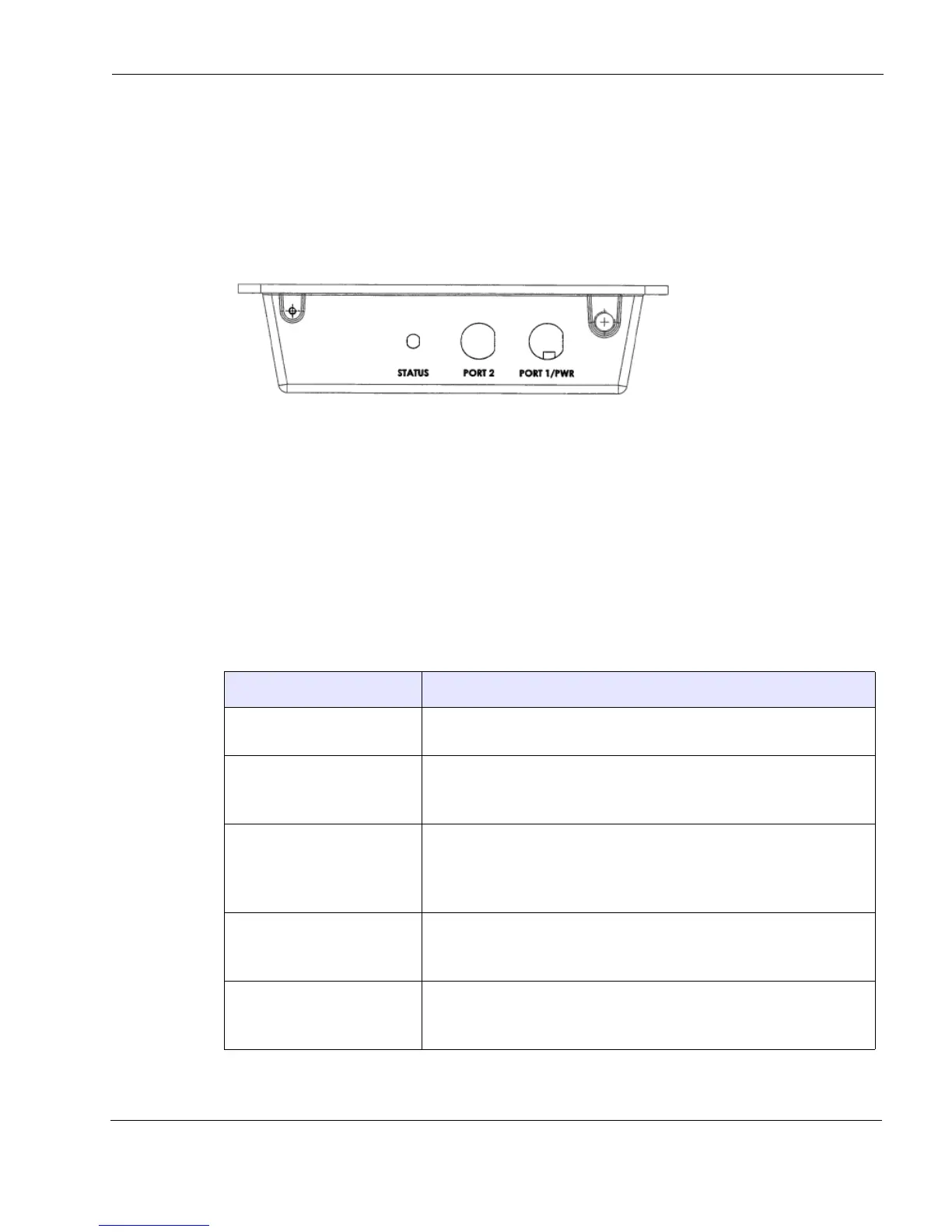
The MicrOS 410 is equipped with two RJ-45 connectors that are used for Ethernet and serial
interfaces and for powering the MicrOS 410 through the use of watertight glands.
Figure 4 Data Port Connection
Determine whether you have a MicrOS 410 with two Ethernet ports or one Ethernet port and one
serial port (see
Table 1).
Depending on the specific application, the use of one or both connectors may be required.
If you have a MicrOS 410 equipped with two Ethernet ports, either or both ports can be used for
Ethernet clients. Power must be applied on port 1.
Table 5 describes the possible wired client scenarios for a MicrOS 410 equipped with serial
interfaces.
Table 5 Wired Client Scenarios
Wired Client Scenario Recommended wiring
One Ethernet client • Connect the Ethernet client to Port 1 (Ethernet) on the MicrOS 410
• Provide power to the MicrOS 410 on Port 1
One Ethernet client
One RS-232 serial client
• Connect the Ethernet client to Port 1 (Ethernet) on the MicrOS 410
• Connect the RS-232 serial client to Port 2 (serial) on the MicrOS 410
• Provide power to the MicrOS 410 on Port 1
One Ethernet client
Two RS-232 serial clients
• Connect the Ethernet client to Port 1 (Ethernet) on the MicrOS 410
• Connect the RS-232 serial clients to Port 2 (serial) on the MicrOS
410
• Provide power to the MicrOS 410 on Port 1
One Ethernet client
One RS-485 serial client
• Connect the Ethernet client to Port 1 (Ethernet) on the MicrOS 410
• Connect the RS-485 serial client to Port 2 (serial) on the MicrOS 410
• Provide power to the MicrOS 410 on Port 1
One Ethernet client
One RS-232 serial client
One RS-485 serial client
• Connect the Ethernet client to Port 1 (Ethernet) on the MicrOS 410
• Connect the RS-232 and RS-485 clients to Port 2
• Provide power to the MicrOS 410 on Port 1



 To Next Page