Chapter 2
MicrOS 410 Installation Guide 25
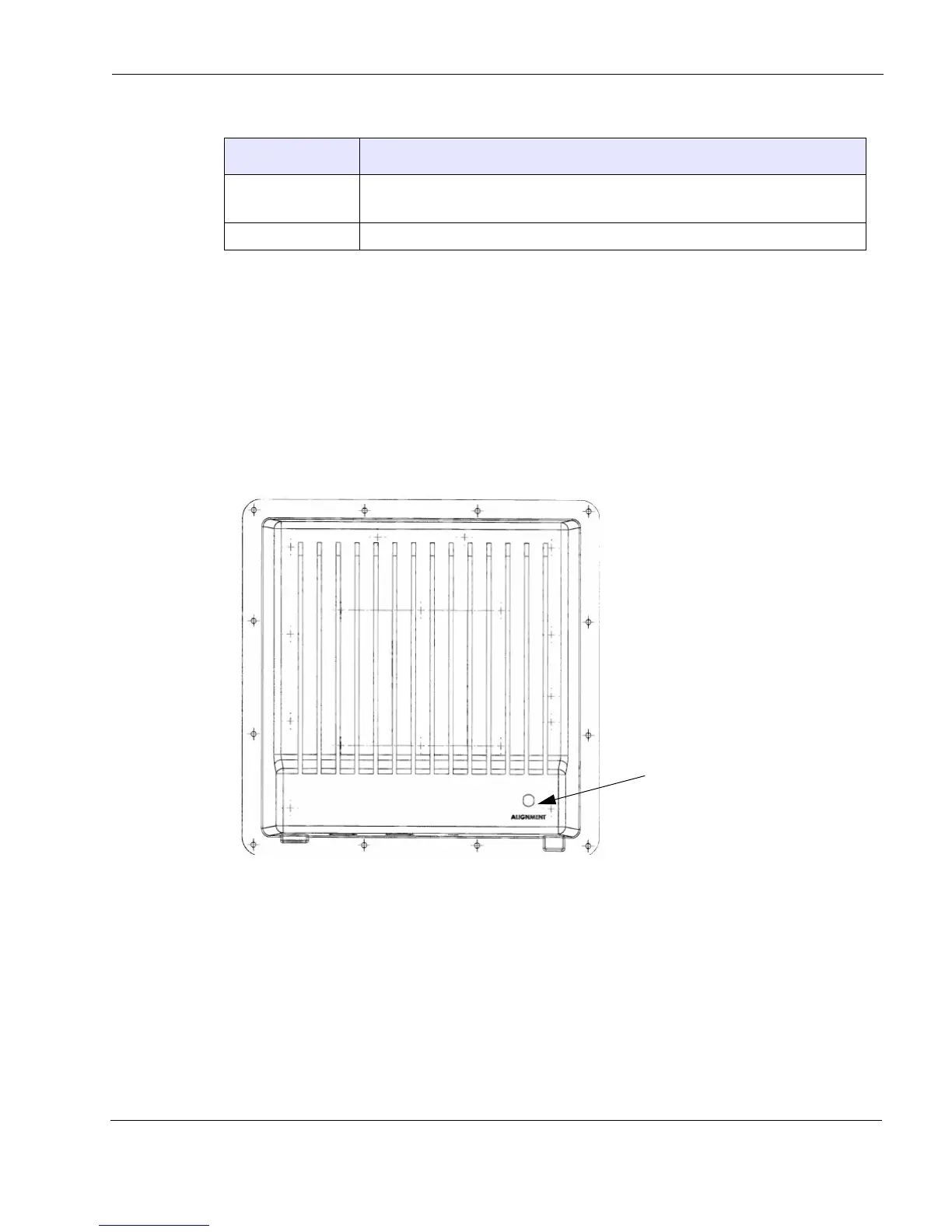
Alignment LED
The MicrOS 410 has an alignment LED on the back of the unit. This LED helps the installer
optimally aim the MicrOS 410 at the Wi-Fi router to which it will communicate. The MicrOS
410 directional antenna has a 3dB beam width of 30
o
and a 6dB beam width of 35
o
. This wide
range makes the unit easy to align. The alignment LED is useful in getting maximum
performance.
Figure 6 Alignment LED
The MicrOS 412 must first associate with a router before the alignment LED can be used. Use
the following procedure to properly align the MicrOS 410:
1. Install the MicrOS 410 and aim it in the general direction of the router you want it to
associate to.
2. Move the MicrOS 410, if necessary, until it associates with the router. See
Table 8 (the
Status LED must be solid green).
Flashing The unit has power but is not ready. It may be in the process of associating with
the network or it may not be able to associate with a network.
On The unit is associated with the network and operating properly.
Table 8 LED Indicator States
State
Description



 To Next Page