EasyManua.ls Logo

ABB MMCO-2 - Page 8

ABB MMCO-2
42 pages
Print Icon
To Next Page IconTo Next Page
To Previous Page IconTo Previous Page
Loading...
I
.
L
.
41
-
121.2
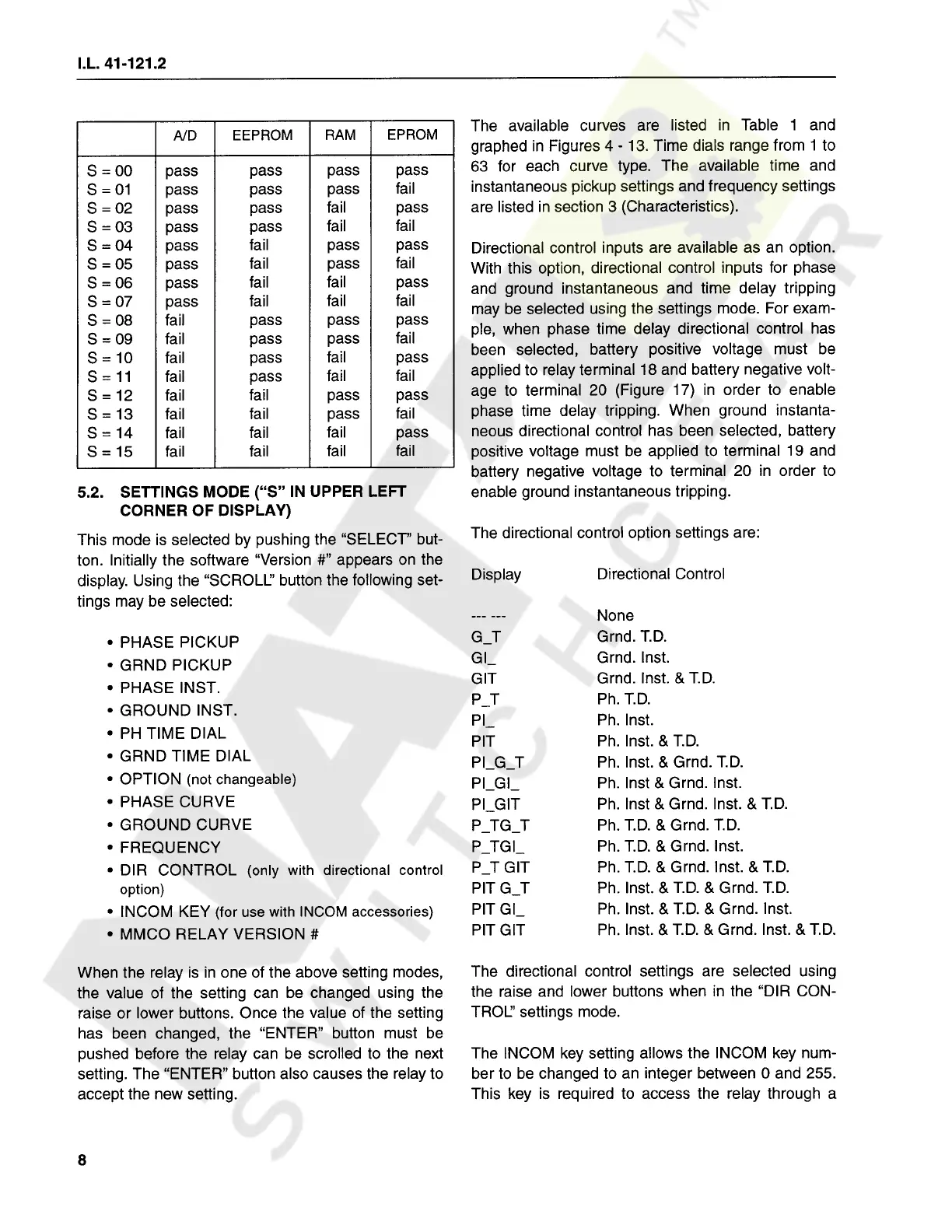
The
available
curves
are
listed
in
Table
1
and
graphed
in
Figures
4
-
13
.
Time
dials
range
from
1
to
63
for
each
curve
type
.
The
available
time
and
instantaneous
pickup
settings
and
frequency
settings
are
listed
in
section
3
(
Characteristics
)
.
EEPROM
RAM
EPROM
A
/
D
S
=
00
S
=
01
S
=
02
S
=
03
S
=
04
S
=
05
S
=
06
S
=
07
S
=
08
S
=
09
S
=
10
S
=
11
S
=
12
S
=
13
S
=
14
S
=
15
pass
pass
pass
pass
pass
pass
pass
pass
pass
pass
pass
pass
pass
pass
pass
fail
fail
pass
fail
fail
fail
pass
pass
pass
Directional
control
inputs
are
available
as
an
option
.
With
this
option
,
directional
control
inputs
for
phase
and
ground
instantaneous
and
time
delay
tripping
may
be
selected
using
the
settings
mode
.
For
exam
-
ple
,
when
phase
time
delay
directional
control
has
been
selected
,
battery
positive
voltage
must
be
applied
to
relay
terminal
18
and
battery
negative
volt
-
age
to
terminal
20
(
Figure
17
)
in
order
to
enable
phase
time
delay
tripping
.
When
ground
instanta
-
neous
directional
control
has
been
selected
,
battery
positive
voltage
must
be
applied
to
terminal
19
and
battery
negative
voltage
to
terminal
20
in
order
to
enable
ground
instantaneous
tripping
.
fail
fail
fail
fail
pass
fail
fail
fail
fail
pass
pass
pass
pass
pass
pass
pass
fail
fail
fail
fail
pass
fail
fail
fail
fail
fail
pass
pass
pass
fail
fail
fail
fail
fail
fail
pass
fail
fail
fail
fail
5.2
.
SETTINGS
MODE
(
S
IN
UPPER
LEFT
CORNER
OF
DISPLAY
)
This
mode
is
selected
by
pushing
the
SELECT
but
-
ton
.
Initially
the
software
Version
#
"
appears
on
the
display
.
Using
the
SCROLL
button
the
following
set
-
tings
may
be
selected
:
The
directional
control
option
settings
are
:
Directional
Control
Display
None
Grnd
.
T
.
D
.
Grnd
.
Inst
.
Grnd
.
Inst
.
&
T
.
D
.
Ph
.
T
.
D
.
Ph
.
Inst
.
Ph
.
Inst
.
&
T
.
D
.
Ph
.
Inst
.
&
Grnd
.
T
.
D
.
Ph
.
Inst
&
Grnd
.
Inst
.
Ph
.
Inst
&
Grnd
.
Inst
.
&
T
.
D
.
Ph
.
T
.
D
.
&
Grnd
.
T
.
D
.
Ph
.
T
.
D
.
&
Grnd
.
Inst
.
Ph
.
T
.
D
.
&
Grnd
.
Inst
.
&
T
.
D
.
Ph
.
Inst
.
&
T
.
D
.
&
Grnd
.
T
.
D
.
Ph
.
Inst
.
&
T
.
D
.
&
Grnd
.
Inst
.
Ph
.
Inst
.
&
T
.
D
.
&
Grnd
.
Inst
.
&
T
.
D
.
G
T
PHASE
PICKUP
GRND
PICKUP
PHASE
INST
.
GROUND
INST
.
PH
TIME
DIAL
GRND
TIME
DIAL
OPTION
(
not
changeable
)
PHASE
CURVE
GROUND
CURVE
FREQUENCY
DIR
CONTROL
(
only
with
directional
control
option
)
INCOM
KEY
(
for
use
with
INCOM
accessories
)
MMCO
RELAY
VERSION
#
Gl
GIT
P
T
PI
PIT
PI
_
G
_
T
PI
_
GI
_
PLGIT
P
_
TG
_
T
P
_
TGI
_
P
_
T
GIT
PIT
G
_
T
PIT
Gl
_
PIT
GIT
The
directional
control
settings
are
selected
using
the
raise
and
lower
buttons
when
in
the
DIR
CON
-
TROL
settings
mode
.
When
the
relay
is
in
one
of
the
above
setting
modes
,
the
value
of
the
setting
can
be
changed
using
the
raise
or
lower
buttons
.
Once
the
value
of
the
setting
has
been
changed
,
the
ENTER
button
must
be
pushed
before
the
relay
can
be
scrolled
to
the
next
setting
.
The
ENTER
button
also
causes
the
relay
to
accept
the
new
setting
.
The
INCOM
key
setting
allows
the
INCOM
key
num
-
ber
to
be
changed
to
an
integer
between
0
and
255
.
This
key
is
required
to
access
the
relay
through
a
8
Courtesy of NationalSwitchgear.com

Related product manuals