29
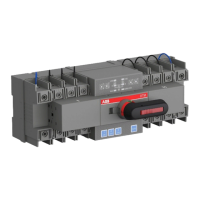
AUTOMATIC TRANSFER SWITCH, OTM_C_21D
To ensure the operation reliability of switches, regular switching tests should be performed (once
every 3 months) to confirm normal function.
No Fault Description Fault Analysis Troubleshooting Method
Power supply functioning normally,
but LED not on
Control unit power supply
terminal not connected with
switch wiring terminal
Check and connect the power line
Power supply LED functioning
normally but "AUTO" LED off, or no
response with “AUTO” button pressed
Handle not pulled out or
electrical padlock not removed
Pull out the handle or remove the padlock,
and then press the "AUTO" button
Switching failure in case of faulty
power supply
1. Switch not operating in
automatic mode
2. Both power supplies
malfunctioning
Make sure the switch working in automatic
mode; check and make sure both
power supplies are not malfunctioning
simultaneously
EMRG OFF function failure 1. Check if the EMRG OFF signal
is 24V DC
2. Too short duration of EMRG
OFF signal
Correctly switch on the EMRG OFF signal,
which should only be 24V DC with the
"AUTO" LED blinking 1.DIP switch setting is invalid
2.Generator is ON in no priority
mode.
Check if the DIP switch setup matches the
power supply.
Turn off generator in no priority mode.
"I" or "II" LED blinking Execution rejected during
switching operation, thus
expected result not achieved
Manually set the switch to Position “O”,
and press the “AUTO” button to reset
Power supply functioning normally
and LED blinks
Wrong connection of the N wire Re-connect the wires.
OTM_C21D cannot be controlled to
transfer by Modbus module
OTM_C21D is in Local
monitoring mode, remote
control is not available
Modify OTM_C21D to Remote control
mode then remote transfer commands are
available
OTM_C21D Modbus parameters
cannot be modified
OTM_C21D is in Local
monitoring mode, parameters
modification is not available
Modify OTM_C21D to Remote control mode
then parameters modification is available
—
8. Maintenance and common
troubleshooting
—
8.1 Maintenance
—
8.2 Common troubleshooting
Table 10. Troubleshooting


 To Next Page