9
1
2
3
4
5
6
7
8
20
Prinng Results immediately aer Analysis
This opon is only available if a USB Printer is aached to the Pima
Analyser via the USB port. For informaon on Pima accessories,
please view www.globalpointofcare.abbo and refer to the USB Printer
User Guide (UG-m-PIMA-02).
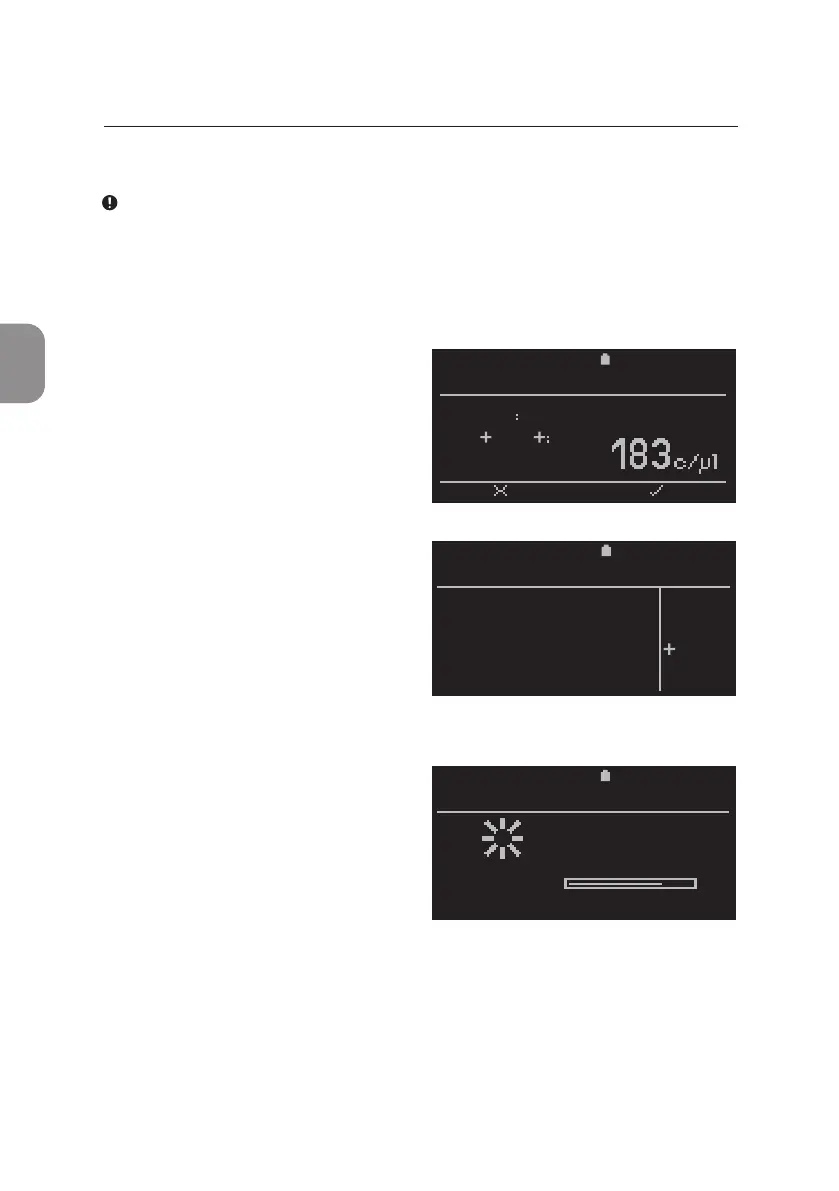
• A Pima Test Report can be printed
from any of the four Pima test
result windows by pressing 〈.
• The «Print» window appears
and «YES» is selected by default.
Conrm with 〈 and the current
result is printed. Press ⌨ or
select «NO» to exit this window and
return tothe Pima test
result window.
• The prinng status is indicated
by a progress bar. Prinng can
be aborted at any me this window
is shown on the screen.
Refer to secon 4 on how to abort
prinng.
2020-11-01 11:25
Sample
CD3 CD4
PIMA CD4
BACK PRINT
67352
2020-11-01 11:25
Do you want to
print the
current result?
PRINT
YES
NO
2020-11-01 11:25
Printing
results
PRINT RESULTS
TOTAL:
3 RUNNING A TEST



 To Next Page