1-6 AX78
1.6 Connecting Chassis Components
1.6.1 ATX Power Connectors
For a fully configured system, we recommend that
you use a power supply of ATX12V 2.0 (or newer)
specification compliant and of providing minimum
400W power output capability.
※ The following motherboard photos are
served for DEMO only, and may not be
the same type or model as the one
described in this user’s manual.
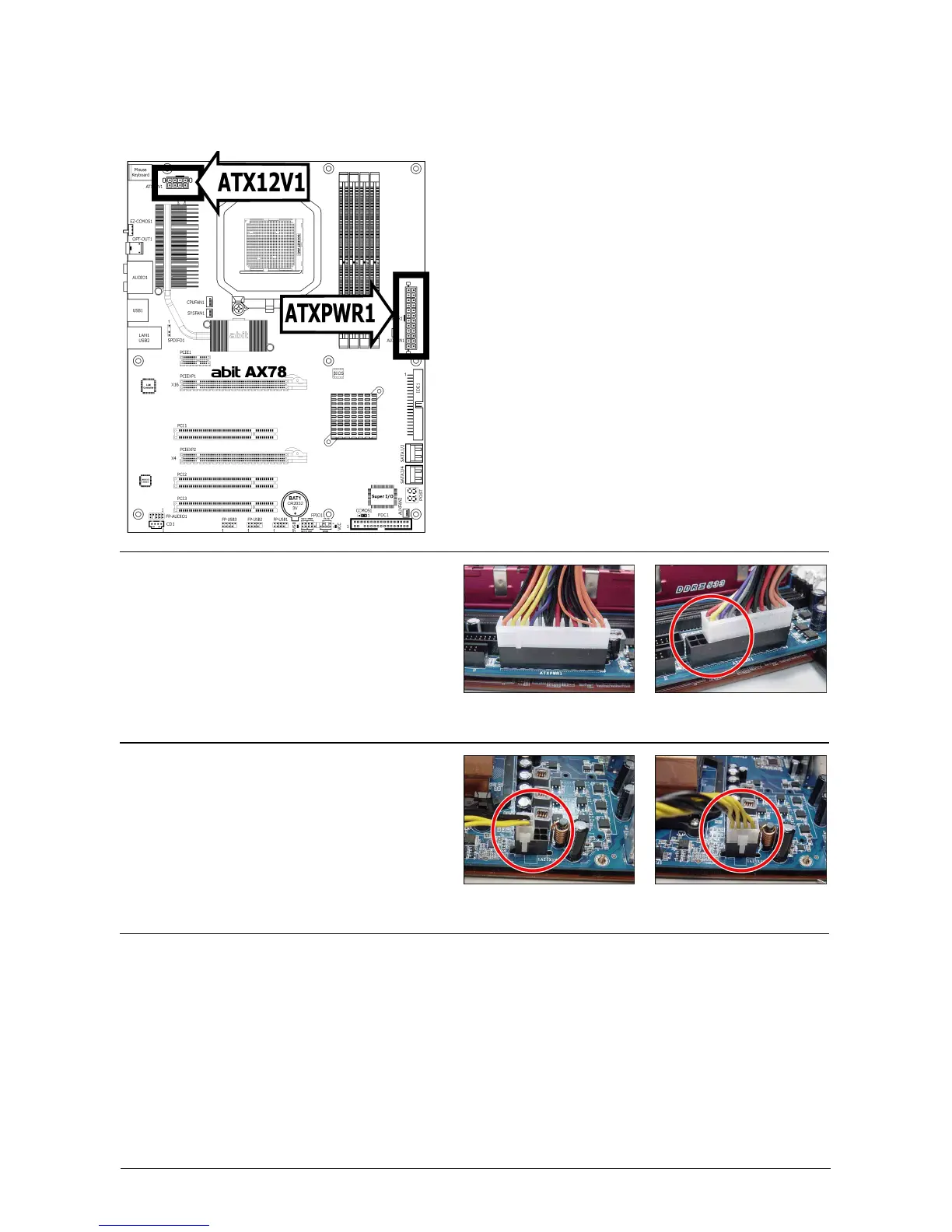
[ATXPWR1]: 24-pin power connector
You may connect either a 20-pin (ATX12V
1.3) or 24-pin (ATX12V 2.0) power source.
However, it is recommended to connect the
24-pin ATX12V power source to meet the
240VA protection limits.
Plugged from a 24-pin
ATX12V power.
Plugged from a 20-pin
ATX12V power.
[ATX12V1]: 8-pin power connector
This connector supplies +12V power to CPU.
You may connect either a 4-pin ATX12V or
an 8-pin EPS12V power source. However, it
is recommended to connect the 8-pin
EPS12V power source to meet the 240VA
protection limits.
Plugged from a 4-pin
ATX12V power.
Plugged from an 8-pin
EPS12V power.



 To Next Page