1-16 AX78
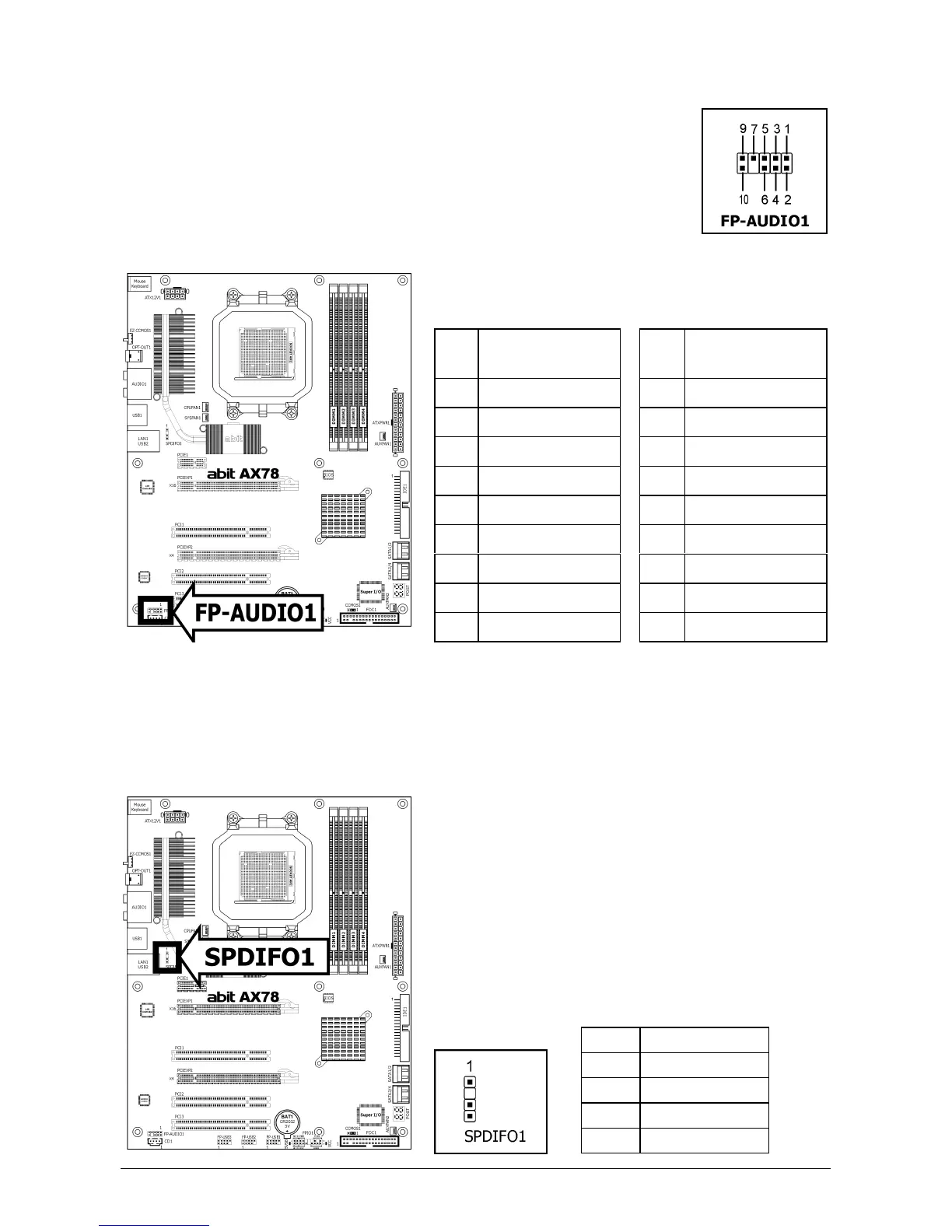
1.8.5 Front Panel Audio Connection Header
This header provides the front panel connection for HD (High Definition)
Audio, yet for AC’97 Audio CODEC connection, you must carefully check the
pin assignment before connecting from the front panel module. An incorrect
connection may cause malfunction or even damage the motherboard.
※ Please do not connect the “Ground” cable or “USB VCC” cable
from the front panel module to the Pin 4 “AVCC” of this
header.
Pin
Pin Assignment
(HD AUDIO)
Pin
Pin Assignment
(AC’97 AUDIO)
1 MIC2 L 1 MIC In
2 AGND 2 GND
3 MIC2 R 3 MIC Power
4 AVCC 4NC
5 FRO-R 5 Line Out (R)
6 MIC2_JD 6 NC
7F_IO_SEN 7 NC
9 FRO-L 9 Line Out (L)
10 LINE2_JD 10 NC
※ To configure AC’97 front panel audio connection, please enter the BIOS setup
menu and select the option [AC97] via route: “Integrated Peripherals”
“FP-Audio”.
1.8.6 S/PDIF Output Connection Header
This header provides the S/PDIF output connection to your add-on HDMI VGA card.
Pin Pin Assignment
1 VCC (5V)
2 x
3 S/PDIF Out
4 Ground



 To Next Page