EasyManua.ls Logo

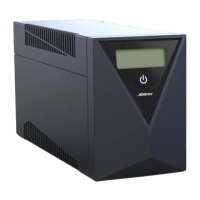
Ablerex MSRT-Pro 1KVA - User Manual

Default Icon
28 pages
Print Icon
To Next Page IconTo Next Page
Loading...
1K/1.5K/2K/3KVA
Intelligent True On-Line UPS
For Corporate & IT User
User manual
1
Table of Contents
1.
Important Safety Instruction....................................................................2
1.1. An Important Notice................................................................................2
1.2. Storage Instruction .................................................................................3
2. Product Introduction ...............................................................................4
2.1. General Characteristics..........................................................................4
2.2. Special Features.....................................................................................5
3. UPS Functional Descriptions..................................................................6
3.1. UPS Front Panel Display Descriptions...................................................6
3.2. Real Panel Descriptions .........................................................................9
3.3. Operating Modes & Voltage System Configurations............................11
3.4. Communication Port Explanation.........................................................15
4. Installation and Operation.....................................................................17
4.1. Unpacking.............................................................................................17
4.2. Selecting Installation Position...............................................................18
4.3. Set up ...................................................................................................19
4.4. Operation..............................................................................................23
5. UPS Working Principle .........................................................................36
5.1. UPS System Block Diagram.................................................................36
5.2. When Utility is Normal ..........................................................................37
5.3. When Utility is Abnormal/Absent..........................................................38
5.4. Overload Condition...............................................................................39
5.5. Inverter Failure .....................................................................................40
5.6. Inverter/Internal Over temperature .......................................................41
5.7. Inverter Over.........................................................................................41
6. Maintenance Guide ..............................................................................42
6.1. Trouble Shooting ..................................................................................42
6.2. Error Codes and Their Descriptions.....................................................44
6.3. Maintenance .........................................................................................45
7. Bundle Software Installation Guide ......................................................46
7.1. Hardware Installation............................................................................46
7.2. Software Installation .............................................................................46
8. Optional Communication Cards ...........................................................47
8.1. R2E (2nd RS-232 ) card.......................................................................47
8.2. USE (USB) card ...................................................................................47
8.3. DCE (Dry Contact) card........................................................................48
8.4. SNMP Cards.........................................................................................49
9. Specifications .......................................................................................50

Questions and Answers

Summary

Important Safety Instruction

General Safety Precautions

Essential safety warnings and guidelines for operating and handling the UPS unit, including warnings about opening the case and self-repair.

Product Introduction

General Characteristics

Key features and general attributes of the Intelligent True On-Line UPS, such as true online technology and PWM sine-wave topology.

Special Features

Highlights advanced functionalities including transformer-less technology, digital logic control, wide voltage tolerance, and battery management.

UPS Functional Descriptions

Front Panel Display and Controls

Detailed explanation of the LCD display, LEDs, and buttons on the UPS front panel for monitoring and operation.

Rear Panel Component Identification

Identification and description of all ports, connectors, and components located on the rear panel of the UPS unit.

Operating Modes and Voltage Configuration

Guidance on selecting operating modes and configuring voltage system settings using the UPS Setting Tool software.

Programmable Outlet Configuration

Instructions for setting up and managing the two programmable outlets for load shedding and power sequencing.

Communication Port Explanations

Explanation of standard and optional communication ports (RS232, USB, EPO) for UPS monitoring and control.

USB and EPO Port Specifications

Detailed pin assignments and specifications for the USB communication port and the EPO (Emergency Power Off) input.

Installation and Operation

Selecting Installation Position

Criteria for choosing a suitable location for UPS installation, focusing on ventilation, stability, and environmental conditions.

Setup Procedures

Step-by-step instructions for setting up the UPS, including tower and rack configurations.

UPS Operation and Startup

Procedures for starting up the UPS in normal AC mode and in battery mode (cold start) using the front panel controls.

UPS Shutdown and Self-Test

Instructions for properly shutting down the UPS in AC and DC modes, and performing self-tests.

LCD Display Indicators and Error Codes

Explanation of LCD display patterns during startup, fault conditions, and error messages displayed on the front panel.

Cold Start and Measured Value Checks

Detailed steps for cold starting the UPS and checking various measured operational values via the LCD panel.

Default Settings and Function Execution

Guide to accessing and modifying default UPS settings, including buzzer, self-test, bypass window, and frequency synchronization.

Troubleshooting Unknown UPS Shutdowns

Steps to diagnose and resolve situations where the UPS unexpectedly shuts down or locks itself.

Status and Alarm Buzzer Definitions

Table defining common UPS statuses and their corresponding buzzer beep patterns for quick problem identification.

UPS Working Principle

System Block Diagram and Modules

Overview of the UPS architecture, detailing major modules like rectifier, inverter, battery charger, and bypass.

Operation During Utility Abnormalities

Explanation of how the UPS functions when the utility power is abnormal, absent, or when the battery is low.

Handling Overload Conditions

Description of the UPS's response to overload situations, including transfer to bypass and shutdown.

Inverter Failure and Overload Protection

Details on how the UPS handles inverter failures, short circuits, and bypass loop overload protection.

Over-temperature and Over-current Protection

Explanation of UPS protection mechanisms against internal over-temperature and inverter over-current.

Maintenance Guide

Troubleshooting Common UPS Faults

Guide to diagnosing and resolving common UPS malfunctions based on error codes and symptoms.

UPS Error Code Reference

A comprehensive list of error codes, their descriptions, and potential causes for UPS faults.

Routine Maintenance Tasks

Recommended maintenance activities for the UPS, including cleaning and battery testing for optimal performance.

Bundle Software Installation Guide

Hardware Setup for Monitoring Software

Instructions for connecting the UPS to a computer via RS232/USB cables for software installation.

Software Installation Guide

Steps for installing the bundled UPS monitoring software from the provided CD-ROM.

Optional Communication Cards

RS232 and USB Communication Cards

Details on installing and using optional RS232 (R2E) and USB (USE) communication cards for extended connectivity.

Dry Contact and SNMP Card Options

Information on installing DCE (Dry Contact) cards and SNMP/WEB cards for advanced communication and control.

Specifications

Rating, Power, and Efficiency Specs

Detailed specifications for VA rating, active power, power factor, topology, efficiency, and agency approvals.

Battery System and Transfer Time Specs

Specifications related to the battery system, including type, backup time, recharging, and transfer times between modes.

Output Voltage and Frequency Specifications

Technical details on output voltage, voltage regulation, and frequency synchronization range and settings.

Physical, Environmental, and Interface Specs

Specifications covering physical dimensions, weight, environmental operating conditions, and interface ports.

Safety, Performance, and EMC Standards

Information on the safety, performance, and electromagnetic compatibility (EMC) standards the UPS complies with.

Ablerex MSRT-Pro 1KVA Specifications

General IconGeneral
ModelMSRT-Pro 1KVA
Power800 W
Input Voltage230 VAC
Output Voltage230 VAC
Output Frequency50/60 Hz
WaveformPure Sine Wave
Transfer Time0 ms
TopologyLine Interactive
Operating Temperature0-40°C
Capacity1000 VA
Battery TypeSealed Lead-Acid (SLA)
Typical Recharge Time4-6 hours
Communication InterfaceUSB/RS-232
Storage Temperature-15°C to 50°C
Humidity0-95% (Non-condensing)

Related product manuals