SW2
When Relay card is installed in Slot2, please switch to “Slot” position.
When SNMP card is installed in Slot2, please switch to “SNMP” position.
SW3--the switch for terminal resistor of parallel communication
To ensure good parallel communication quality please set the Switch of the two
farthest UPS to the “ON” position. Please refer to section 2-6 for detail.
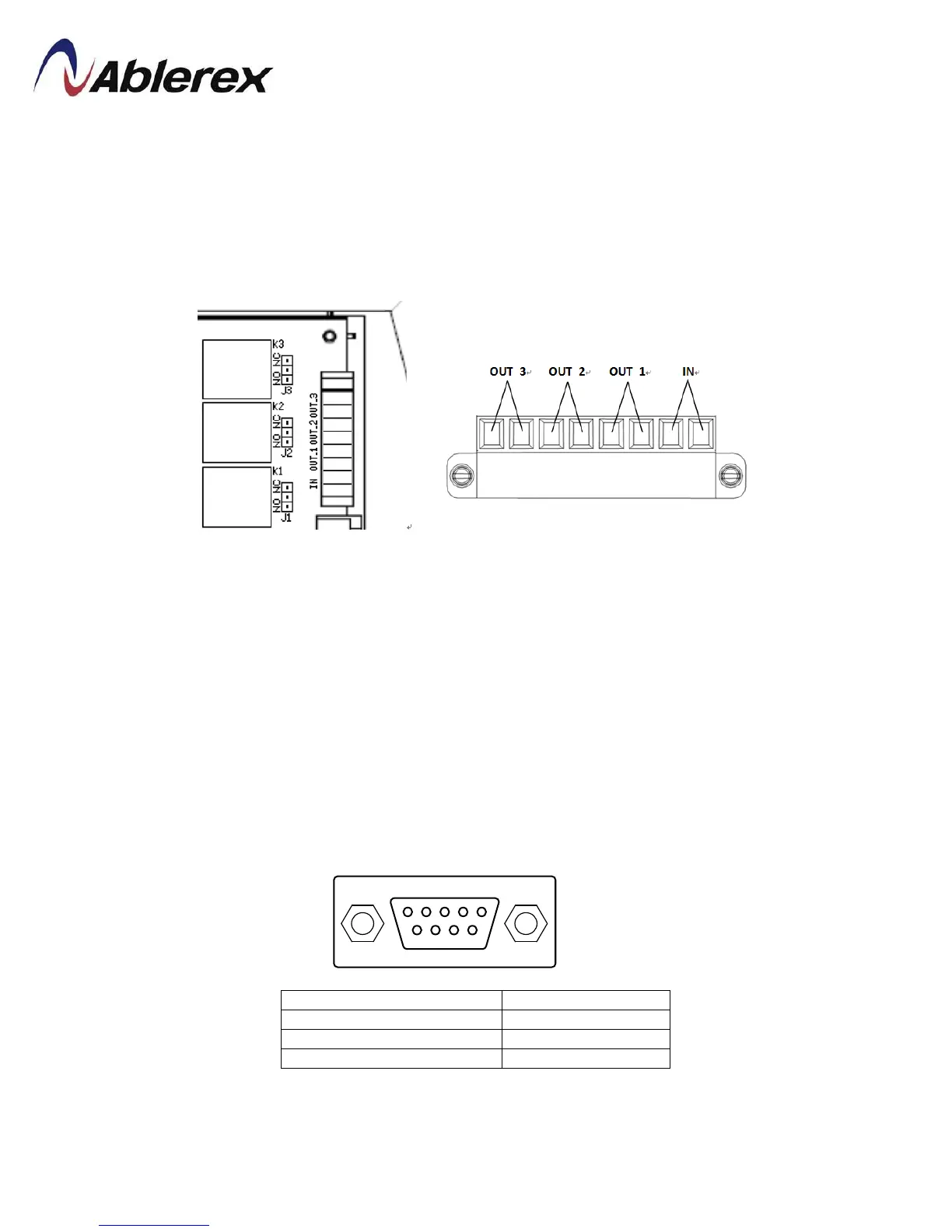
Output & Input Contacts
The UPS provides 3 output dry contacts and1 input contact.
Specification of Output dry contact:250 VAC/ 2 A; 30 VDC/2 A
There have 3 jumpers (J1~J3) to set NC/NO for each output contact.
To short the input contact for send a command to UPS.
The user can change the definition for each contact, please contact the local
authorized service agent to change the setting.
RS-232
Pin Assignment:
This port is available for change the setting of UPS by setting software.
3RX (IN)
5Ground
36
192321262008007








 To Next Page