EasyManua.ls Logo

Abus HDCC81000 - User Manual

Abus HDCC81000
110 pages
Go to English
Print Icon
To Next Page IconTo Next Page
Loading...
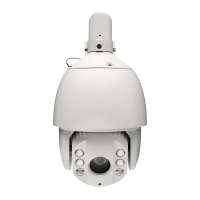
Analog HD PTZ Dome
D Bedienungsanleitung
User manual
F Manuel utilisateur
Gebruikershandleiding
Brugerhåndbog
Version 09/2017
Originalbedienungsanleitung in deutscher Sprache. Für künftige Verwendung aufbewahren!
HDCC81000
HDCC82500

Table of Contents

Other manuals for Abus HDCC81000

Question and Answer IconNeed help?

Do you have a question about the Abus HDCC81000 and is the answer not in the manual?

Summary

Critical Safety Guidelines

Installation

Hardware Connections

Power Supply Wiring

Details the wiring for the 24 V AC power supply, including earth connection.

RS-485 Control Wiring

Describes the wiring for the optional RS-485 control line, specifying Minus and Plus connections.

DIP Switch Settings (HDCC81000)

Dome ID Configuration

Configures the Dome ID using DIP switches SW 1 through 5 for the HDCC81000 model.

Baud Rate Configuration

Sets the baud rate for communication using DIP switches SW 6 and 7 for the HDCC81000 model.

Protocol Configuration

Configures the control protocol using DIP switches SW 8 and 9 for the HDCC81000 model.

DIP Switch Settings (SW1 & SW2)

Dome ID DIP Switch Settings

Details the DIP switch configurations for setting the Dome ID (address) on SW1.

Baud Rate DIP Switch Settings

Details DIP switch configurations for baud rate setting on SW2.

System Info OSD Settings

Camera Settings Configuration

Focus and Zoom Control

Configures focus variants (AF, MF, HAF) and zoom limit settings.

Speed and Low Light Settings

Sets zoom speed and the slow shutter function for low light conditions.

Day;Night Switching Settings

Configures the IR cut filter for day/night switching and the D/N level threshold.

Image Sharpness Control

Adjusts the sharpness of the video image using software.

Motion Control Settings

Preset Management

Patrol Setup

Scheduled Task Configuration

Pattern Setup

Summary

Critical Safety Guidelines

Installation

Hardware Connections

Power Supply Wiring

Details the wiring for the 24 V AC power supply, including earth connection.

RS-485 Control Wiring

Describes the wiring for the optional RS-485 control line, specifying Minus and Plus connections.

DIP Switch Settings (HDCC81000)

Dome ID Configuration

Configures the Dome ID using DIP switches SW 1 through 5 for the HDCC81000 model.

Baud Rate Configuration

Sets the baud rate for communication using DIP switches SW 6 and 7 for the HDCC81000 model.

Protocol Configuration

Configures the control protocol using DIP switches SW 8 and 9 for the HDCC81000 model.

DIP Switch Settings (SW1 & SW2)

Dome ID DIP Switch Settings

Details the DIP switch configurations for setting the Dome ID (address) on SW1.

Baud Rate DIP Switch Settings

Details DIP switch configurations for baud rate setting on SW2.

System Info OSD Settings

Camera Settings Configuration

Focus and Zoom Control

Configures focus variants (AF, MF, HAF) and zoom limit settings.

Speed and Low Light Settings

Sets zoom speed and the slow shutter function for low light conditions.

Day;Night Switching Settings

Configures the IR cut filter for day/night switching and the D/N level threshold.

Image Sharpness Control

Adjusts the sharpness of the video image using software.

Motion Control Settings

Preset Management

Patrol Setup

Scheduled Task Configuration

Pattern Setup

Abus HDCC81000 Specifications

General IconGeneral
BrandAbus
ModelHDCC81000
CategorySecurity Camera
LanguageEnglish

Related product manuals