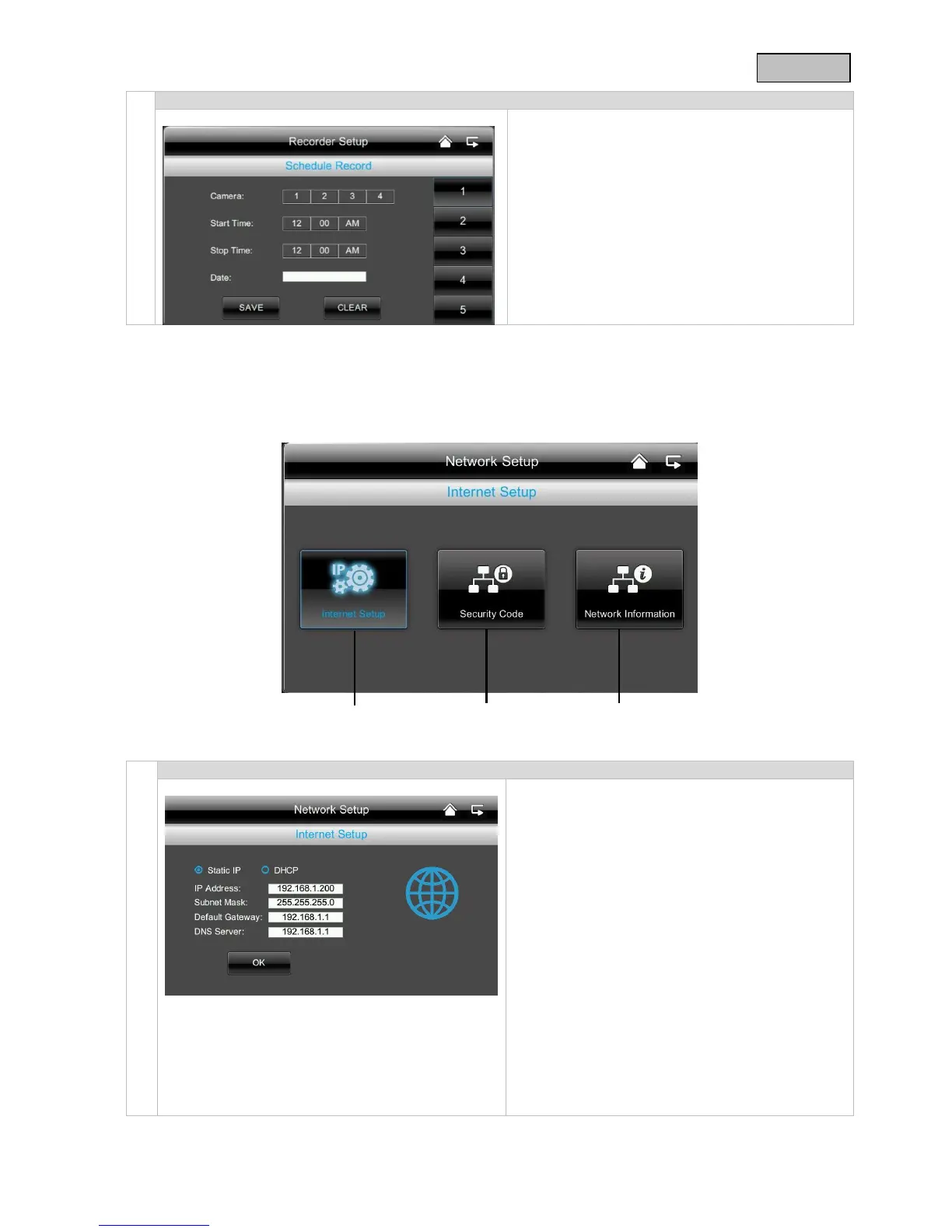
You can save a recording time to start recording at
a very specific time.
You can save up to 5 recording procedures.
1. First select the number of the camera.
2. Set the start and stop time. To do this use the
arrow buttons.
3. Select the required date from the calendar.
4. Press “Save” to save the procedure or
“Delete” to reset.
5. As soon as a timed recording has been saved,
the symbol for recording appears.
To establish a connection with the internet so that
you can access the camera with the app, close the
docking station using the network cable on your
router.
Choose between static IP and DHCP.
Then confirm with “OK”.
Information:
An IP address is an address in the computer
network. It is assigned to devices which are linked
in a network and makes the device identifiable,
allowing it to be reached.
DHCP:
A DHCP is a dynamic IP address which is
allocated automatically.
Stat. IP:
You can find the data for a static IP in your router
settings.



 To Next Page