The AC Infinity Controller 63 is a wireless variable controller designed to manage the speed of compatible devices, primarily fans, within a grow environment. This user manual outlines the installation, operation, and warranty information for the Controller 63.
Function Description
The Controller 63 serves as a remote control for AC Infinity devices, allowing users to wirelessly adjust the operational speed of their connected equipment. It operates on a wireless signal, eliminating the need for direct cable connections between the controller and the device for speed adjustments. The system comprises two main components: the wireless variable controller itself and a wireless receiver. The receiver plugs into the device to be controlled, while the handheld controller allows for remote adjustments. This setup provides flexibility in placing the controller, enabling users to manage their devices from a convenient location without being tethered to the equipment. The controller offers ten distinct speed levels, providing granular control over the connected device's output.
Usage Features
The Controller 63 is designed for straightforward installation and intuitive operation.
Installation:
- Connecting the Wireless Receiver: The first step involves connecting the wireless receiver to your AC Infinity device. For devices equipped with a USB Type-C connector, simply plug the receiver's USB Type-C end directly into the device.
- Molex Connector Compatibility: If your device utilizes a 4-pin Molex connector instead of USB Type-C, the Controller 63 kit includes a Molex adapter. In this scenario, you would plug your device's 4-pin Molex connector into the adapter, and then connect the wireless receiver into the USB Type-C end of the adapter. This ensures broad compatibility with various AC Infinity devices.
- Inserting Batteries into the Controller: The handheld wireless controller requires two AAA batteries for operation. These batteries are included with the product. Users need to insert them into the designated battery compartment of the controller.
- Pairing the Controller and Receiver: To establish a connection between the controller and the receiver, both units feature a set of sliders with numbers. Users must adjust these sliders on both the controller and the receiver so that their numerical settings match. This matching process ensures that the controller communicates with the correct receiver. Once the settings match and the controller's battery door is closed, the receiver's indicator light will flash, confirming a successful connection.
Operational Control:
The wireless controller features a single button and a series of ten LED lights that indicate the current speed level.
- Powering On and Adjusting Speed: Pressing the button on the controller will turn the connected device on at speed level 1. Subsequent presses of the button will cycle through the ten available speed levels (1 through 10). Each press increases the speed by one level.
- Speed Level Indication: The ten LED lights on the controller serve as a visual indicator of the current speed level. When the button is pressed, the LEDs will briefly light up to show the selected speed before turning off to conserve battery power. Pressing the button again will illuminate the LEDs to display the new speed setting.
- Powering Off: To turn the device off, users need to hold down the button on the controller. This action will shut down the connected device.
- Returning to Last Setting: If the device has been turned off by holding the button, pressing the button again will return the device to its last active speed setting before it was powered off.
- Cycling Through to Off: Alternatively, if the device is at speed level 10, pressing the button one more time after reaching the maximum speed will also turn the device off.
Multi-Device and Multi-Controller Scenarios:
The Controller 63 system offers flexibility for managing multiple devices or using multiple controllers:
- Controlling Multiple Devices with One Controller: Any number of AC Infinity devices can be controlled using a single wireless controller. The key requirement is that the slider settings on all the receivers connected to these devices must match the slider settings on the controller. This allows for synchronized control of multiple fans or other compatible equipment.
- Controlling One Device with Multiple Controllers: Conversely, a single AC Infinity device can be controlled by multiple wireless controllers. In this setup, the slider settings on all the controllers must match the slider settings on the receiver connected to the device. This is useful in situations where control is needed from different locations within a space.
Maintenance Features
The Controller 63 is designed for minimal maintenance, focusing on ease of use and durability.
- Battery Replacement: The primary maintenance task for the wireless controller is the replacement of the two AAA batteries when they are depleted. The battery compartment is easily accessible for this purpose.
- Cleaning: The controller and receiver can be wiped clean with a soft, dry cloth to remove dust or smudges. Avoid using harsh chemicals or abrasive materials that could damage the surface or internal components.
- Wireless Connection: The pairing mechanism using the numbered sliders is a simple and effective way to establish and re-establish connections if needed. If the connection is lost, ensuring the slider settings match on both the controller and receiver, and checking the controller's batteries, are the first troubleshooting steps.
- Durability: AC Infinity products are committed to quality, and the Controller 63 is built to withstand regular use in its intended environment. The warranty program covers defects in manufacturing for two years, indicating confidence in the product's construction. However, it's important to protect the device from physical damage, submersion in water, and incorrect voltage input, as these are not covered under warranty.
In summary, the AC Infinity Controller 63 provides a convenient and flexible solution for wirelessly managing the speed of compatible AC Infinity devices. Its simple installation, intuitive button-based operation, and multi-device/multi-controller capabilities make it a practical tool for optimizing environmental control in various settings.

 Need help?
 General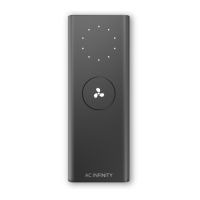

 To Next Page