Accent 800 User’s Guide: NuVoice 25
Attaching a Carry Strap
The strap included with your device adjusts from 28 inches to 36 inches. PRC offers a longer strap that
adjusts from 38 inches to 60 inches. For details and pricing for this longer strap, please call PRC inside sales
at 800-262-1933 or visit https://store.prentrom.com and select Accessories and then Carry Case & Strap.
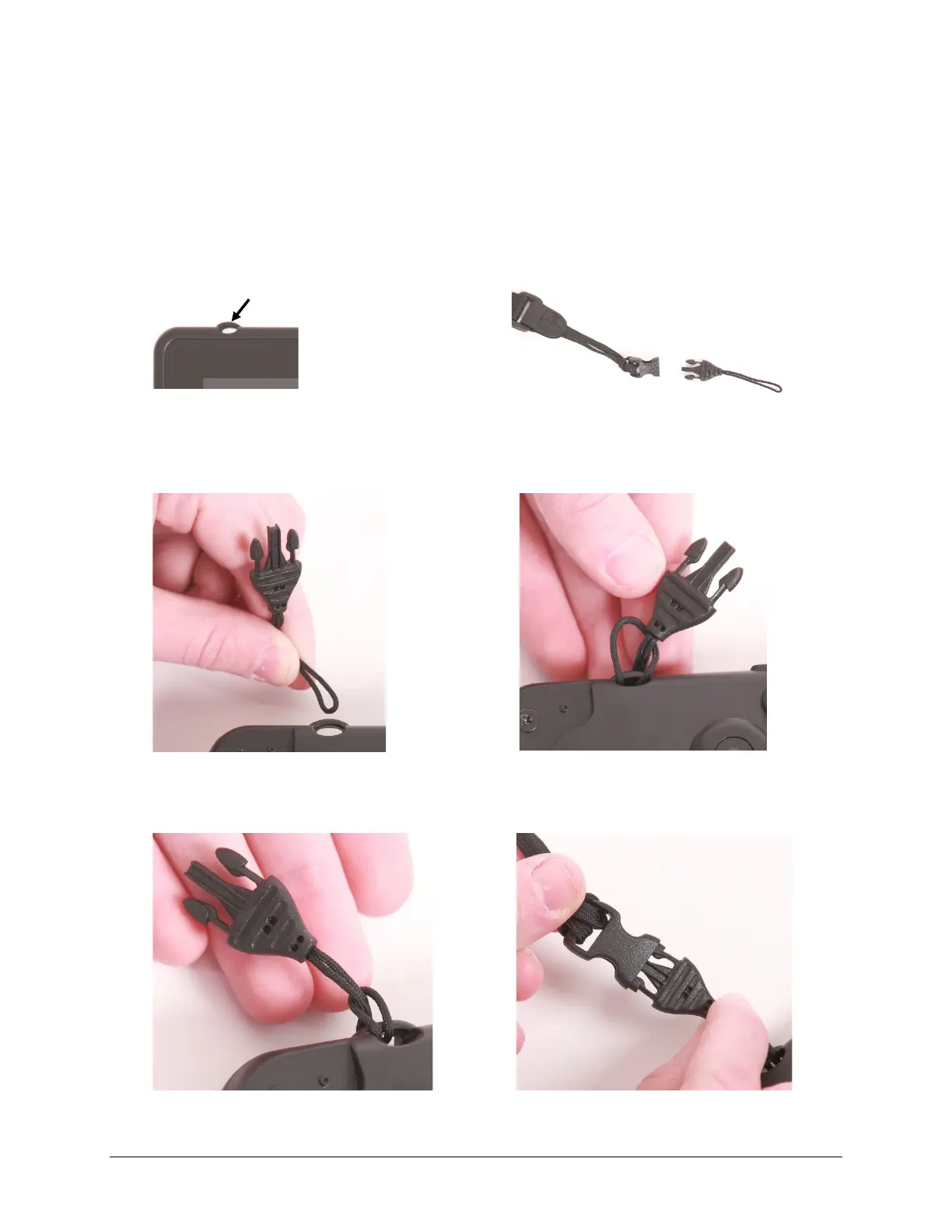
At each end of the strap there is a loop connector with a quick-release connector on the strap side. The
device strap holders are located on the top and bottom of the device.
1. Decide whether to connect the carry strap to
the top or bottom holders on the device.
2. Detach the loop connector from the strap by
pressing in on the sides of the quick-release
connector.
3. Thread the loop through a strap holder on the
device. A small straight object like a needle may
be helpful to pull the loop through the holder.
4. Thread the loop connector through the loop.
5. Pull the connector through until it is tied
securely to the device.
6. Insert the loop connector into the strap
connector until they click and hold together.
7. Repeat these steps to connect the other end of the strap to the device.



 To Next Page