30
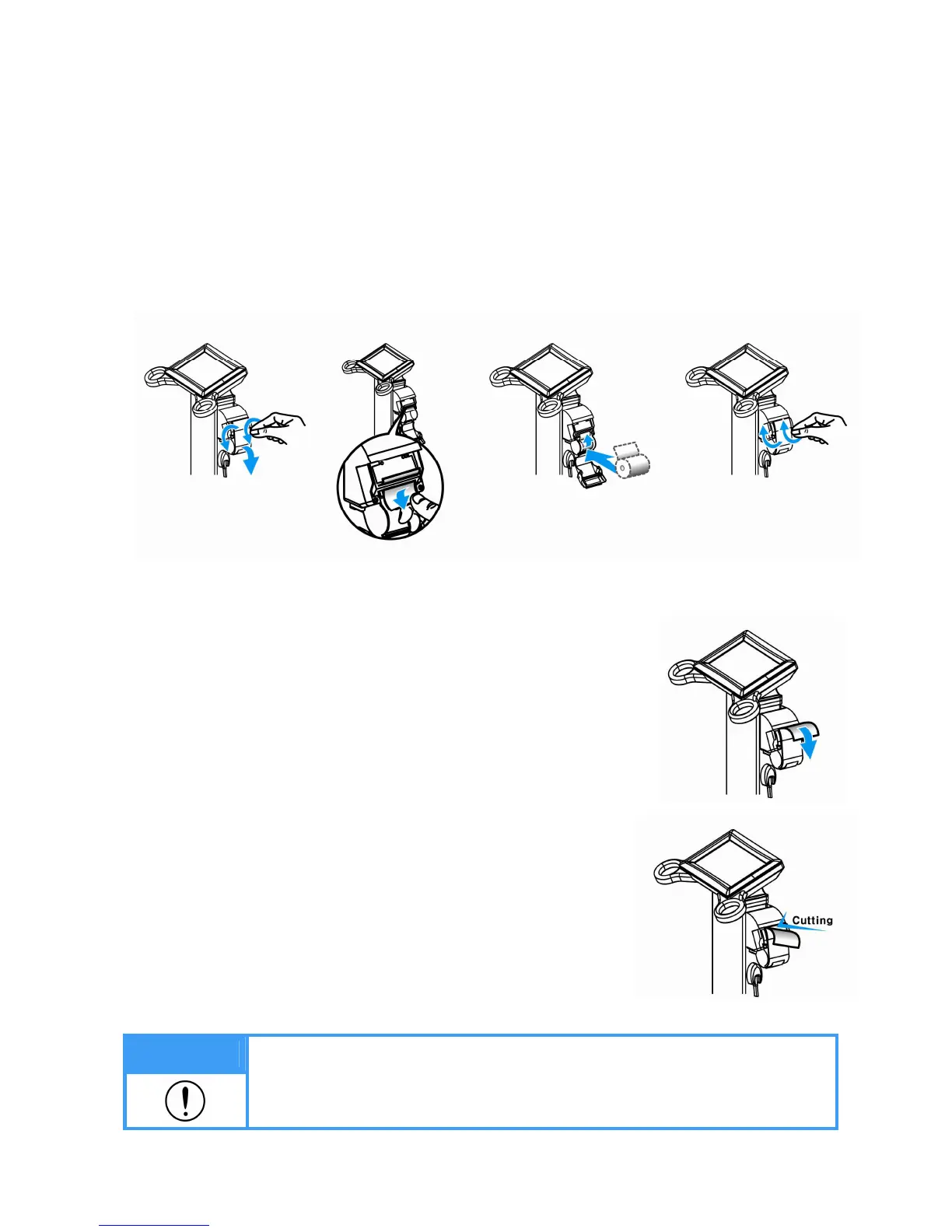
5) Replacing of thermal paper (Option)
Replace thermal paper while the power is on.
① Turn the screws counterclockwise and open the cover as shown in the picture.
② Insert the thermal paper to the direction as shown in the picture.
③ Slightly insert the edge of thermal paper to the printer slot. Thermal paper will be printed out
and it automatically cuts out.
④ Close the cover and fix the printer cover by turning the screws clockwise.
5-1) FEED/CUT functions of thermal printer
• FEED Function
Press upper left corner for 5seconds on the initial screen.
Password window will pop up.
Press ‘0000’ on the password window.
Thermal paper will be printed.
• CUT Function
Press upper left corner for 5seconds on the initial screen.
Password window will pop up.
Press ‘5555’ on the password window.
Paper will be cut.
Note
Do not pull thermal paper while printing. Paper will be cut automatically when
printing is completed.


 To Next Page