‘SYSTEM SETUP' allows the users to change the setting of operational parameters.
1. Entering SYSTEM SETUP
On the initial display, press ‘ ’ button on LCD for 3~5 second to enter System Set up.
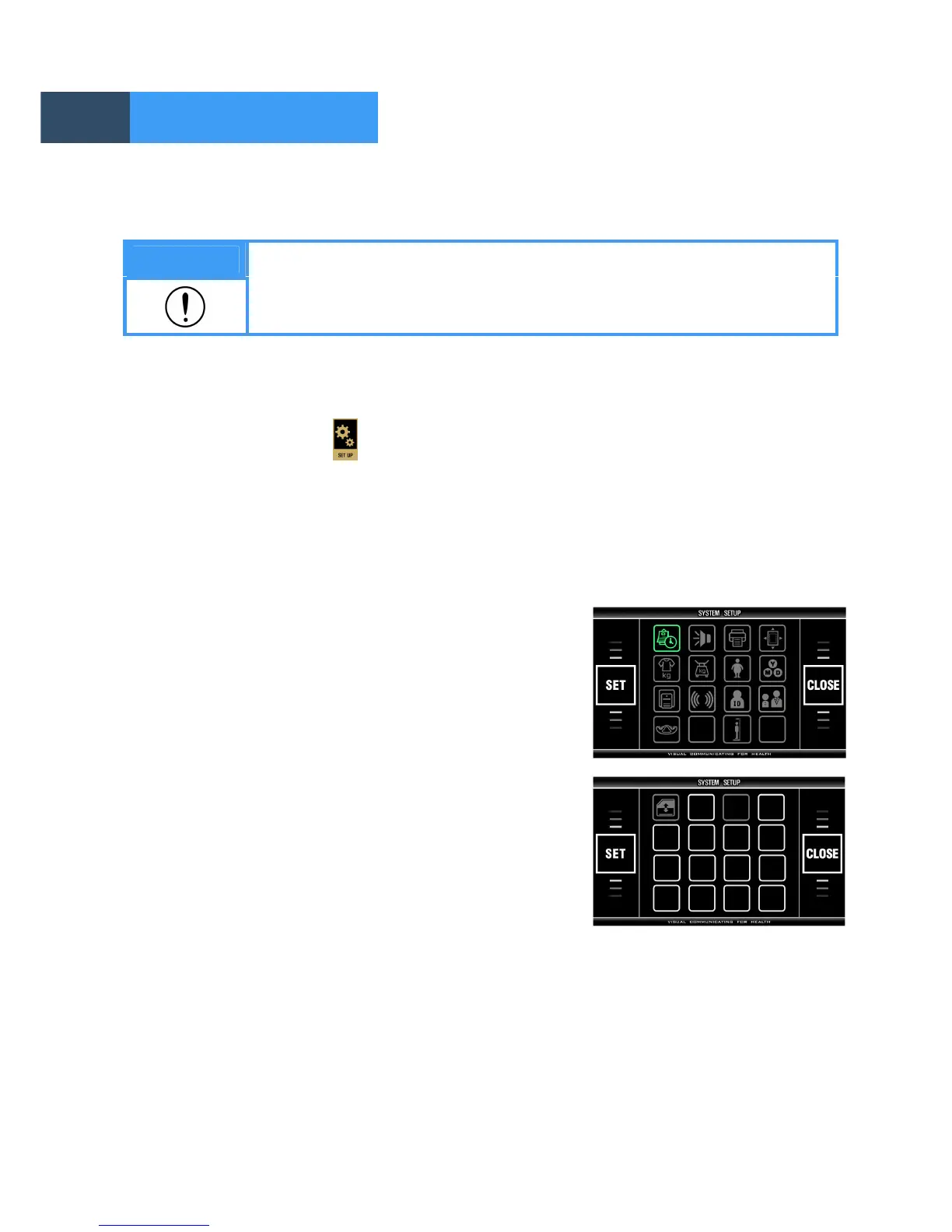
2. Menu in SYSTEM SETUP
Menu items are displayed. The function of each icon is as follows.
1. DATE/TIME
2. VOLUME
3. PRINT
4. PRINT POSITION
5. CLOTHES
6. SCALE OFFSET
7. ABDOMINAL FATNESS
8. DATE TYPE
9. THERMAL PRINT
10. COMMUNICATION
11. ID USAGE
12. CHILD/ADULT/AUTO
13. PLATE/ANKLE
14. HEIGHT METER
15. DATABASE BACKUP/RESTORE
Note
For the purpose of improvement, the contents in SYSTEM SETUP can be
changed.
1. 2. 3. 4.
5. 6. 7. 8.


 To Next Page