40
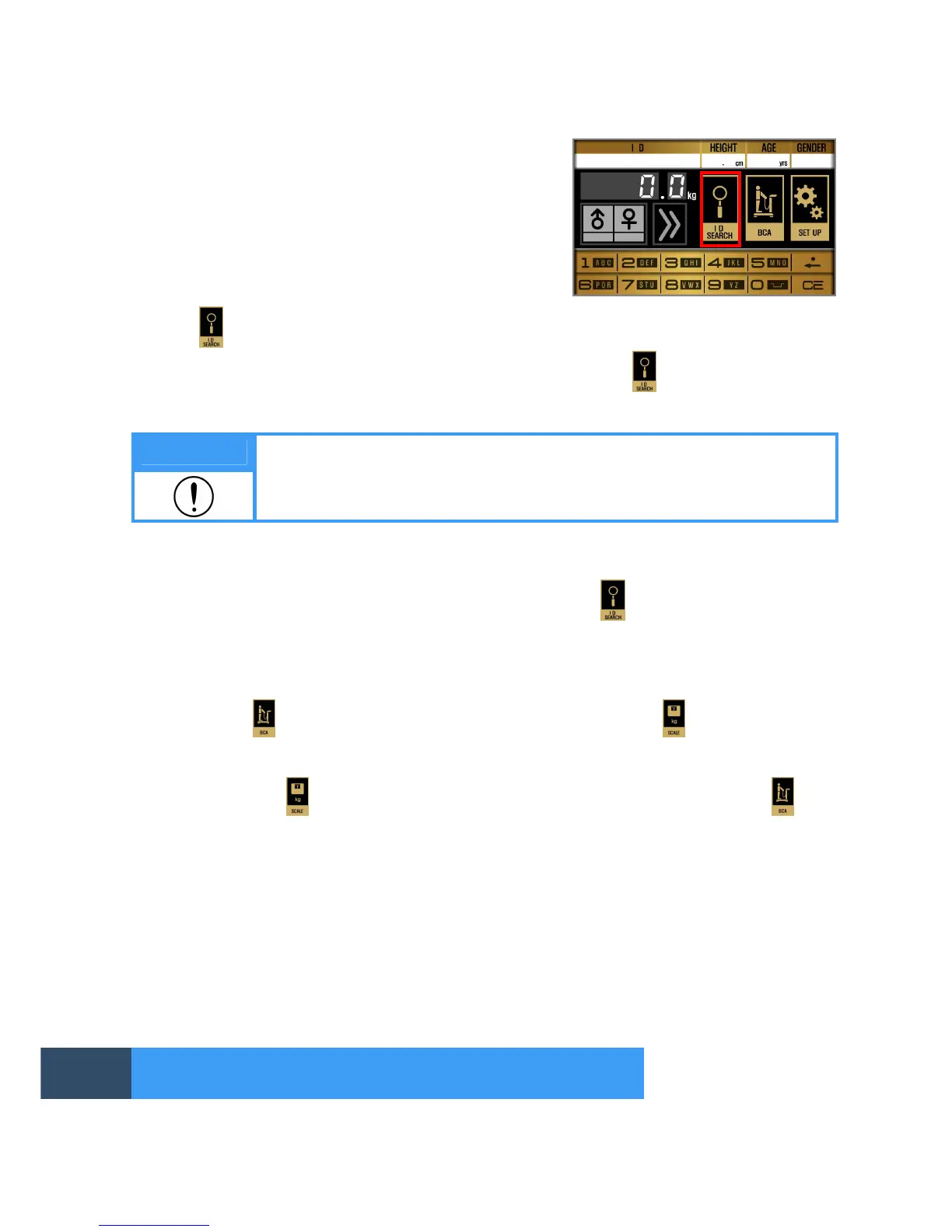
Once turning on the device, you can see the screen same
as right picture.
1. ID search
Press ‘ ’ button on the initial screen.
Enter a 20-digit ID with alphabets and numbers mixed and press ‘ ’ button. You can see the
results of the ID or print them.
Note
An ID can be searched when ‘ID USAGE’ is set in “YES”.
2. INDEX search
In case of not using ID, INDEX search can be used on the left upper side of the screen.
Press ID on the screen and enter an index number and press ‘ ’ button. Then you can search
or see the results and print them.
3. Setting a measurement mode
Users can select one of ‘SCALE’ and ‘BCA’ modes.
Long press ‘ ’ button for 3~5 seconds, then the icon will change to and you can use the
device in SCALE mode. In this case, you can only use the device as a scale so it will not start to
analyze body composition.
If you long press button from 3~5 seconds again, the mode will be changed to (BCA
mode).
MEASUREMENT AND ANALYSIS


 To Next Page