Installation & Operation Manual - Model AVC5000
Contents of this Manual are Subject to Change Without Notification Page 45
6.6.7.1 Alarm Configuration
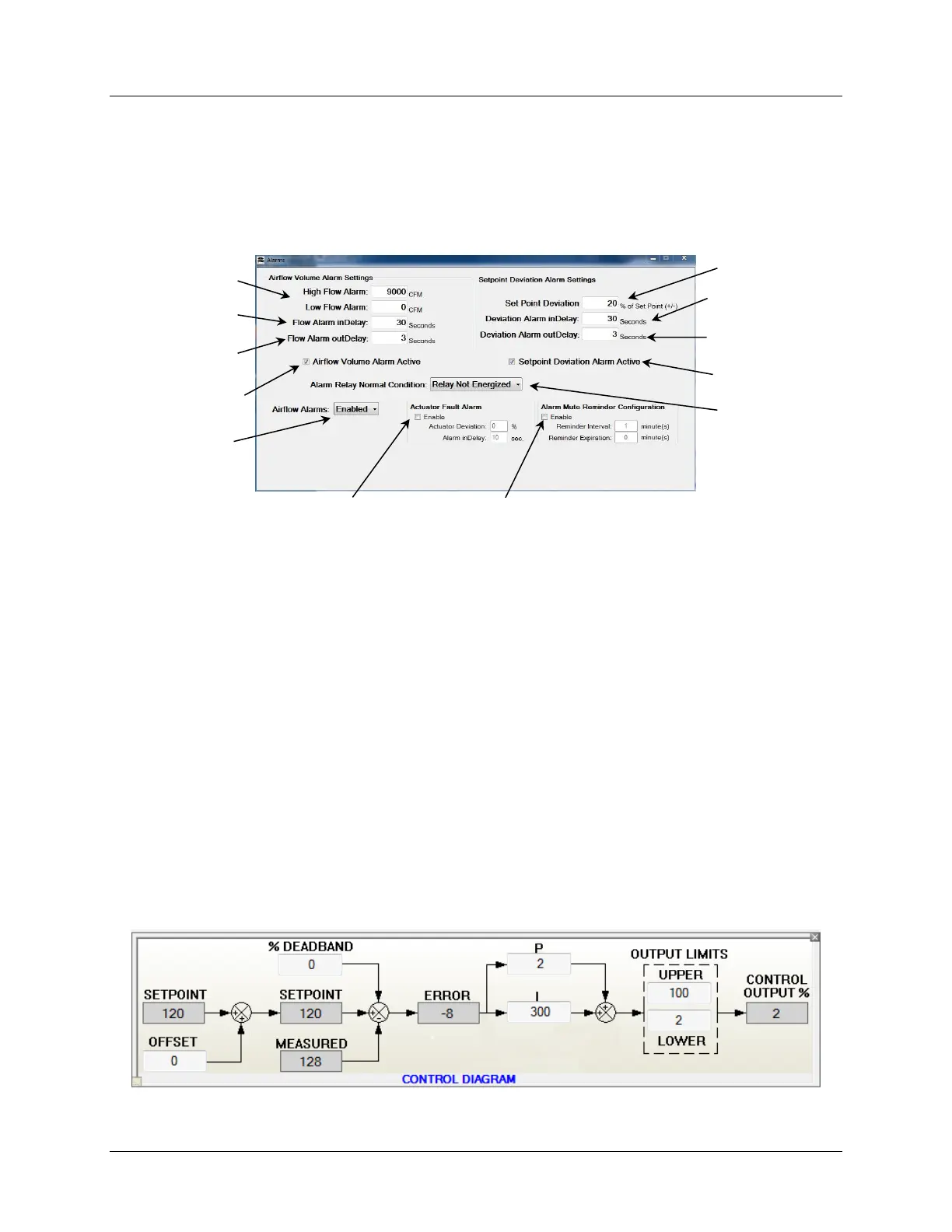
When the “CONFIG” button is selected the Alarm Configuration Screen that appears will be
based on the current Operating Mode. The Alarm Configuration Screen for Setpoint Mode is
described below. For Fume Hood Mode, reference Section 6.6.4.2.5. To modify any of the
alarm parameters, click in the appropriate box and enter the desired value in the boxes that are
to be modified. To save the changes, select “Update Controller”.
The Actuator Fault Alarm indicates when the actuator feedback signal deviates from the control
input signal by more than the programmed value.
The Alarm Mute Reminder is for applications that use one of the local Display Modules which
are compatible with the AVC5000 product. When an alarm condition is present and the
Display Module audible horn sounds, pressing the Mute button on the display will silence the
audible horn until the Mute button is pressed again or the alarm condition is cleared. The Mute
Reminder feature will provide a periodic reminder chirp at regular intervals to remind the local
occupants that the alarm condition still exists. The interval rate of the reminder chirp and the
expiration of the reminder are both programmable using Insight.
6.6.8 Control Diagram
The Control Diagram provides real-time data of all parameters associated with the Closed-Loop
Control Function. Configurable parameters are displayed in the white boxes and non-
configurable parameters are displayed in gray boxes. A brief description of each control
parameter is provided below the Control Diagram.
• SETPOINT: The SETPOINT value is based on the controller “Operating Mode” and is not a
configurable parameter in the CONTROL OBJECT. The Min and Max Volume Setpoint values



 To Next Page