Installation & Operation Manual - Model AVC5000
Contents of this Manual are Subject to Change Without Notification Page 47
6.6.8.1 Changing Configurable Control Parameters
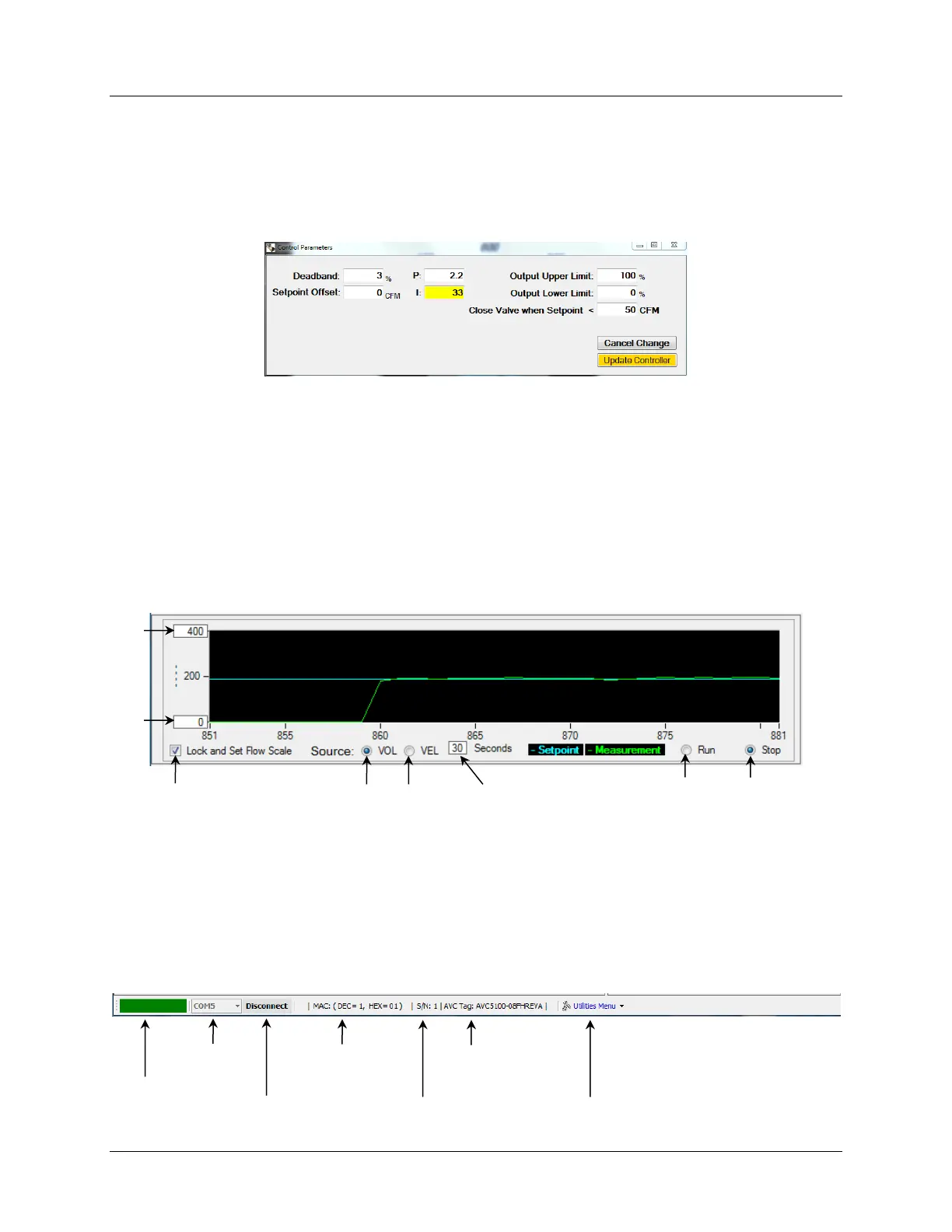
Open the Control Parameters window by double-clicking in the Control Diagram inside one of
the white boxes. To modify any of the configuration parameters, click in the relevant box and
enter the desired value in the boxes that are to be modified. To save the changes, select
“Update Controller”.
In addition to the parameters described in section 6.6.8, the Control Parameters window
includes a value titled “Close Valve when Setpoint < ____”. When the Setpoint is less than this
value, the controller will drive the valve to the fully closed position.
6.6.9 Strip Chart
The Strip Chart provides a real-time x-y strip chart plot of the Airflow Setpoint and
Measurement values with respect to time. The Strip Chart is a useful tool for troubleshooting
and evaluating the controller performance. The time scale (x axis) is adjustable between 10 and
300 seconds and the airflow volume scale (y axis) can either be set for auto range or bounded
by upper and lower limits.
6.6.10 Dashboard Task Bar
The Task Bar located along the bottom of Dashboard provides a USB Connection Button & COM
Port Status indicator, a device MAC Address indicator, a Serial Number indicator, Tag Number
Indicator and a Pull-up Utilities Menu which provides access to additional AVC Insight
Functions.



 To Next Page