EasyManua.ls Logo

ACLAS PP7X - Connecting the Cables; RS232 (D9)

ACLAS PP7X
28 pages
Print Icon
To Next Page IconTo Next Page
To Previous Page IconTo Previous Page
Loading...
12
4 SELF TEST
Press key Feed and hold it, and then power on the machine at the same time, it will print a piece of Test Page.
The information of this Test Page includes the printers model, version, IP address (Ethernet port), ID and the
default setting of the dip switch when leave factory.
5 CONNECTING THE CABLES
NOTE: Before connecting any of the cables, make sure that both the printer and the host are turned off.
5.1 Serial Interface
There are four kinds of serial interface. Details are as follows:
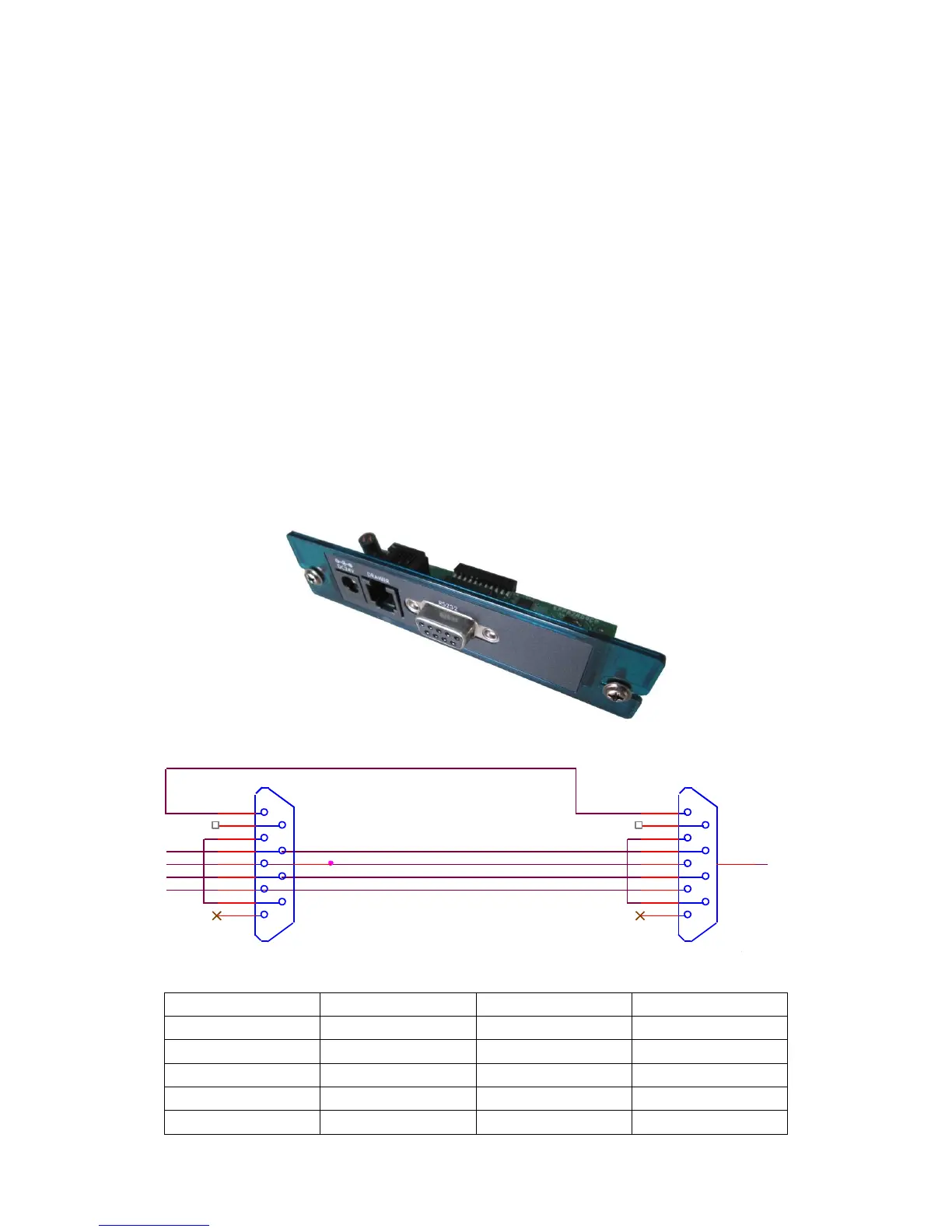
5.1.1 RS232 (D9)

Pin No.
Signal Name
Direction
Function
2
TXD
Output
Transmit Data
3
RXD
Input
Receive Data
5
GND
———
Frame Ground
7
CTS
Input
Clear to Send
8
RTS
Output
Ready To Send
Printer side
Host side
The definition of D9-P9
GND
RS232
DSUB 9PIN/母座焊接型
1
2
3
4
5
6
7
8
9
HOLE1
/CTS
/TXD
/RTS
RS233
DSUB 9PIN/公座焊接型
1
2
3
4
5
6
7
8
9
HOLE1
/RXD
/RTS
/TXD
/RXD
/CTS
GND

Related product manuals