LPB-4P
6B
:
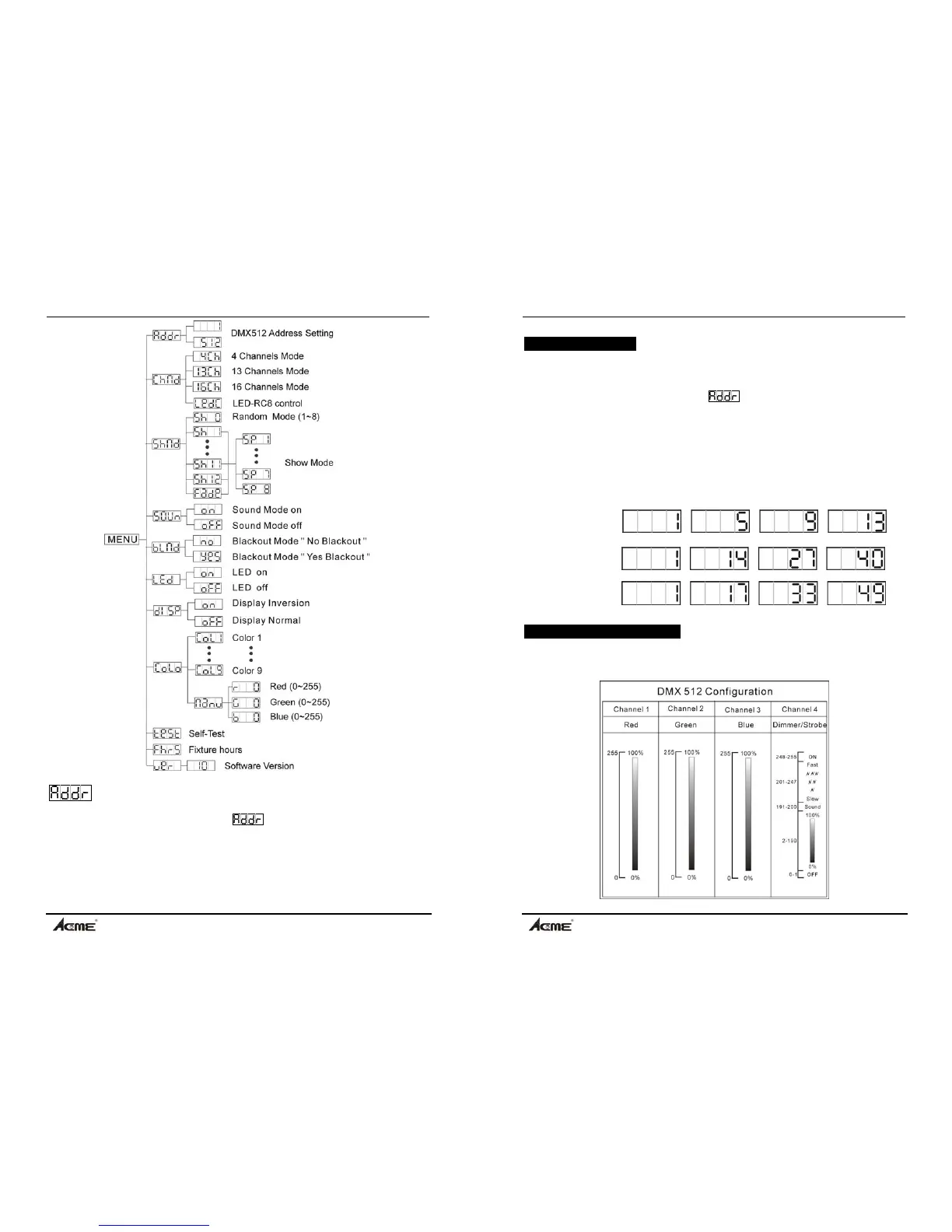
DMX 512 Address Setting
Press the MENU button up to when the
is showing on the display. Pressing
ENTER button and the display will blink. Use DOWN and UP button to change the
DMX512 address. Once the address has been selected, press the ENTER button to
store. (or automatically return to the auto show without any change after one minute)
To go back to the last function without any change press the MENU button.
LPB-4P
11B
4.4 DMX Controller
Use universal DMX controller to control the packages, you have to set DMX address
from 1 to 512 channel so that the packages can receive DMX signal.
Press the MENU button up to when the is showing on the display. Pressing
ENTER button and the display will blink. Use DOWN and UP button to change the
DMX512 address. Once the address has been selected, press ENTER button to
store. To go back to the functions without any change press the MENU button.
Please refer to the following diagram to address your DMX512 channel for the first 4
packages.
4 channels mode:
13 channels mode:
16 channels mode:
4.5 DMX 512 Configuration
4 Channels Mode:


 To Next Page