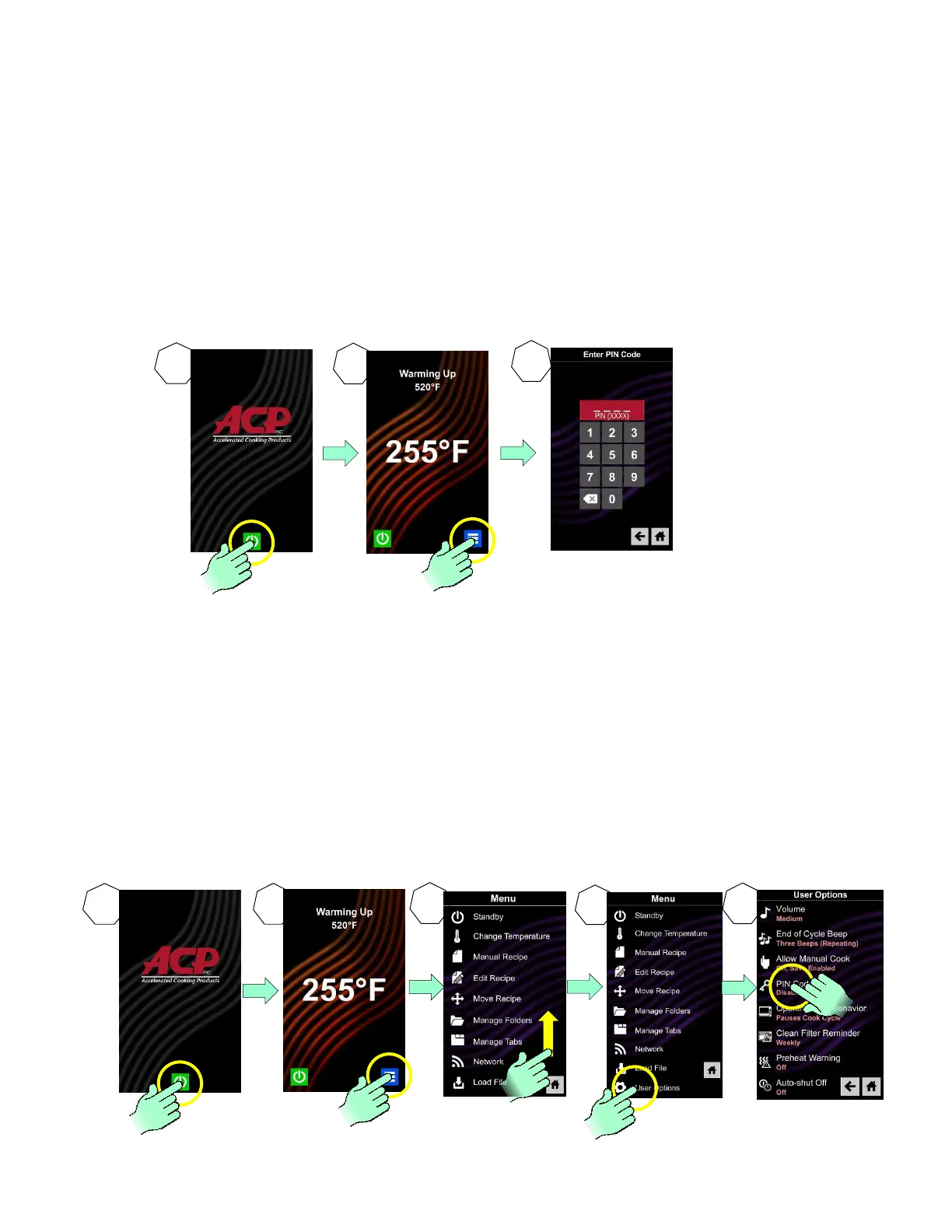
The Service Mode is a useful tool to aid in diagnosing any service issue. To access the oven’s service
test mode, the PIN Code must be enabled. If the PIN Code is not enabled, enable it (See Below).
To determine if the PIN CODE is enabled, press the blue menu icon. If the PIN Code prompt appears
it is enabled.
With the PIN Code enabled;
1. Press green start pad
2. Press the blue menu icon and the PIN Code prompt will display
3. Enter, in order, 1, 3, 5, 7, 9 and the Service Mode is initiated
If the PIN Code is not enabled, it must be enabled in the User’s Options. With oven on, press the
blue menu icon at the bottom of the screen;
1.
2. Press the blue menu icon and the PIN Code prompt will display
3. Scroll screen to “User Options” and press it.
4. Scroll screen to PIN Code (it will say “DISABLED” underneath) and press it.
5. Press the radial pad “On” and ensure it is lit.
6. Enter 1,2,3,4 as PIN Code and memorize, take a picture, or write it down.
7. Press the “Home” icon to return to Main Screen
8. Press the blue menu icon and the PIN Code prompt will display
9. Enter, in order, 1, 3, 5, 7, 9 and the Service Mode is initiated





 To Next Page