12 SYNCHRONY EQUIPMENT USER MANUAL
© COPYRIGHT 2015-2021, ACCELERATED CARE PLUS CORP., ALL RIGHTS RESERVED
CONFIDENTIAL AND PROPRIETARY
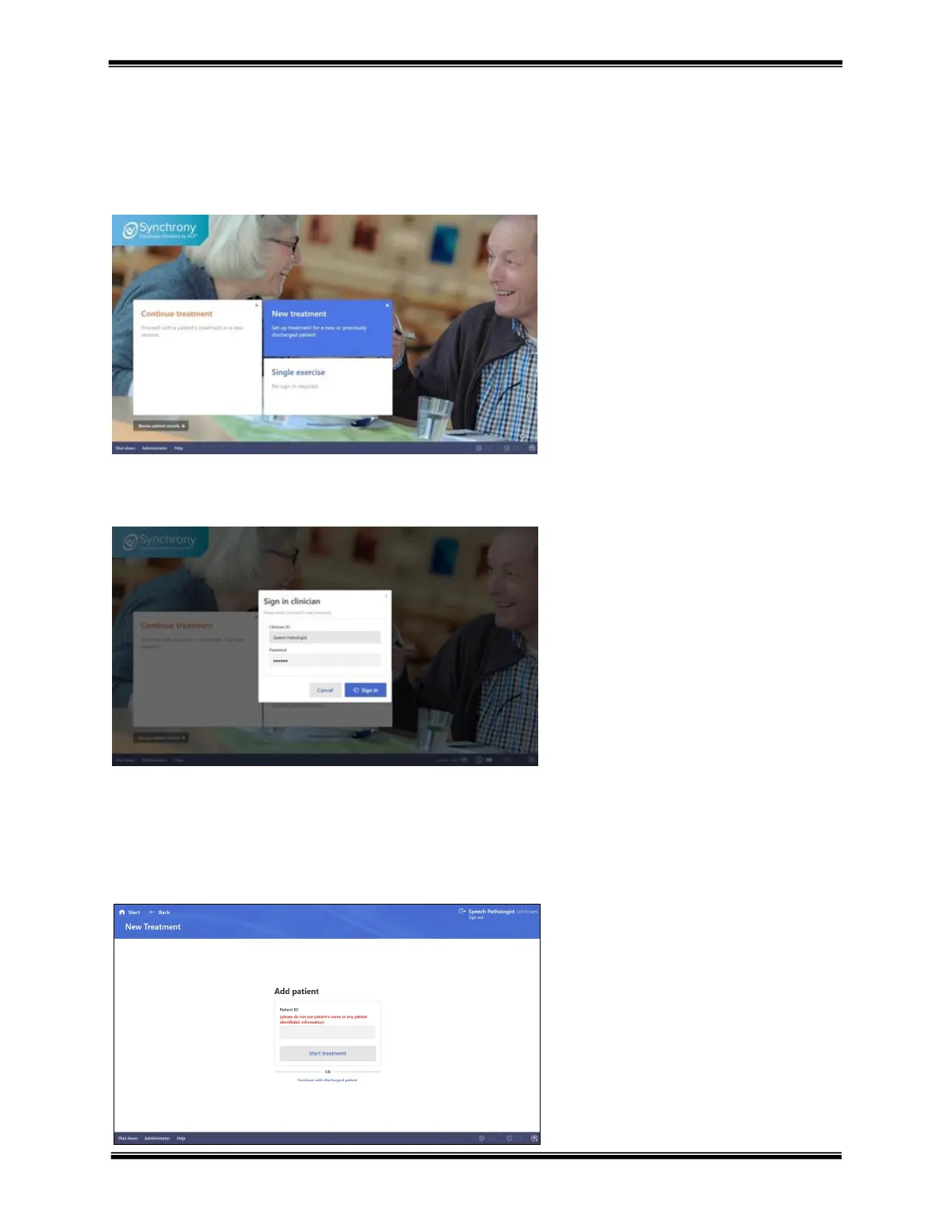
New treatment
“New treatment” allows the addition of a new patient into the Synchrony database. When selected, the therapist will
be prompted to sign-in if not already signed in. The process to add a new patient is simplified to only request the
minimum information to establish a record for each patient. The Patient record can be accessed throughout the
session or later to update all fields.
Sign in clinician
Add patient
Add patient requests the minimum amount of data to initiate a patient record. If the new patient is a patient
previously discharged from Synchrony, click the blue text below the Start treatment area “Continue with discharged
patients”. A list of discharged patients is provided to add onto caseload.
Hover the mouse (or use the touch
screen) over the New treatment section
and click
If not signed in a prompt will appear
requiring Clinician ID and Password
Enter assigned Clinician ID and
Password. When signed in, the current
database of patients is provided.
Note - clinician ID and Password are
case sensitive
Patient ID – please use a unique and HIPPA
compliant patient identification. Do not use any
patient identifiable information.
Start treatment – advance to the patient
dashboard.
Continue with discharged patient – presents a
list of previously discharged patients to add
back onto caseload.



 To Next Page