SYNCHRONY EQUIPMENT USER MANUAL 5
© COPYRIGHT 2015-2021, ACCELERATED CARE PLUS CORP., ALL RIGHTS RESERVED
CONFIDENTIAL AND PROPRIETARY
Main Menu – Software version v4.0
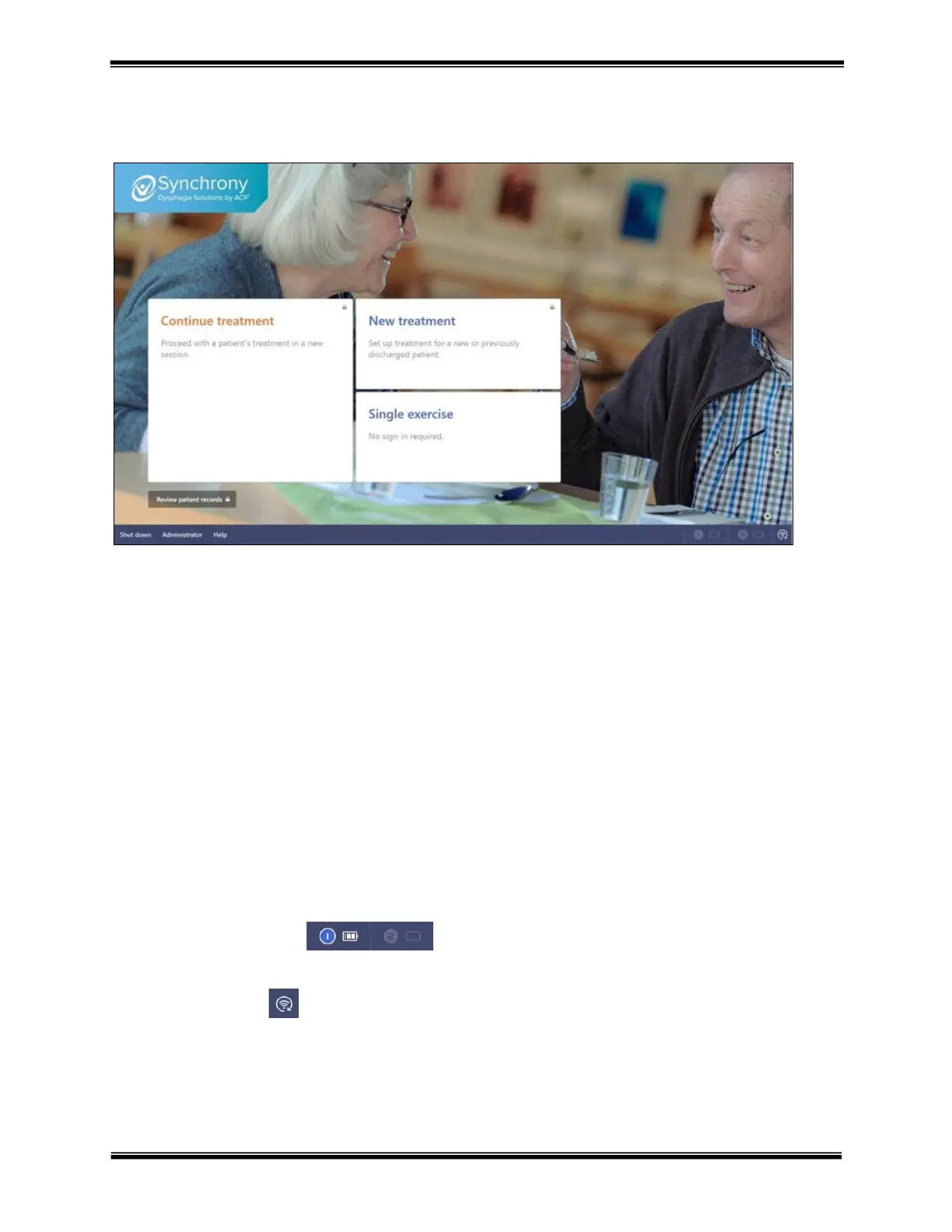
The Synchrony home screen is created in simple workflow modules explained below.
Continue treatment – selecting the intended patient to continue treatment. – continue an existing patient’s
treatment. Clinicians may be prompted to sign-in prior to selecting the intended patient to continue treatment.
New treatment – create a new patient for treatment with Synchrony. Clinician may be prompted to sign-in prior to
creating new patient treatment.
Single exercise – allows the user to perform an exercise and decide to save the data to a patient record during or at
the completion of the exercise session.
Review patient records – access to the Synchrony database of patients. Clinician will be promoted to sign-in prior
to accessing the database.
System tray items
Shut down – select to power down the Synchrony system
Administrator – provides access to the Synchrony Administrator
Help – provides access to informational items pertaining to the use and operation of Synchrony
Sensor 1 and 2 connections – when a sEMG sensor is connected its battery icon will display
with its current level of charge, as in sensor 1 example. If not connected, as in the example of sensor 2, the sensor
will appear faded out.
Improve connectivity – optimizes the Wi-Fi connection of the sEMG sensor to the computer.



 To Next Page