Installing the System Wiring Information and Procedures
Wiring Information and Procedures
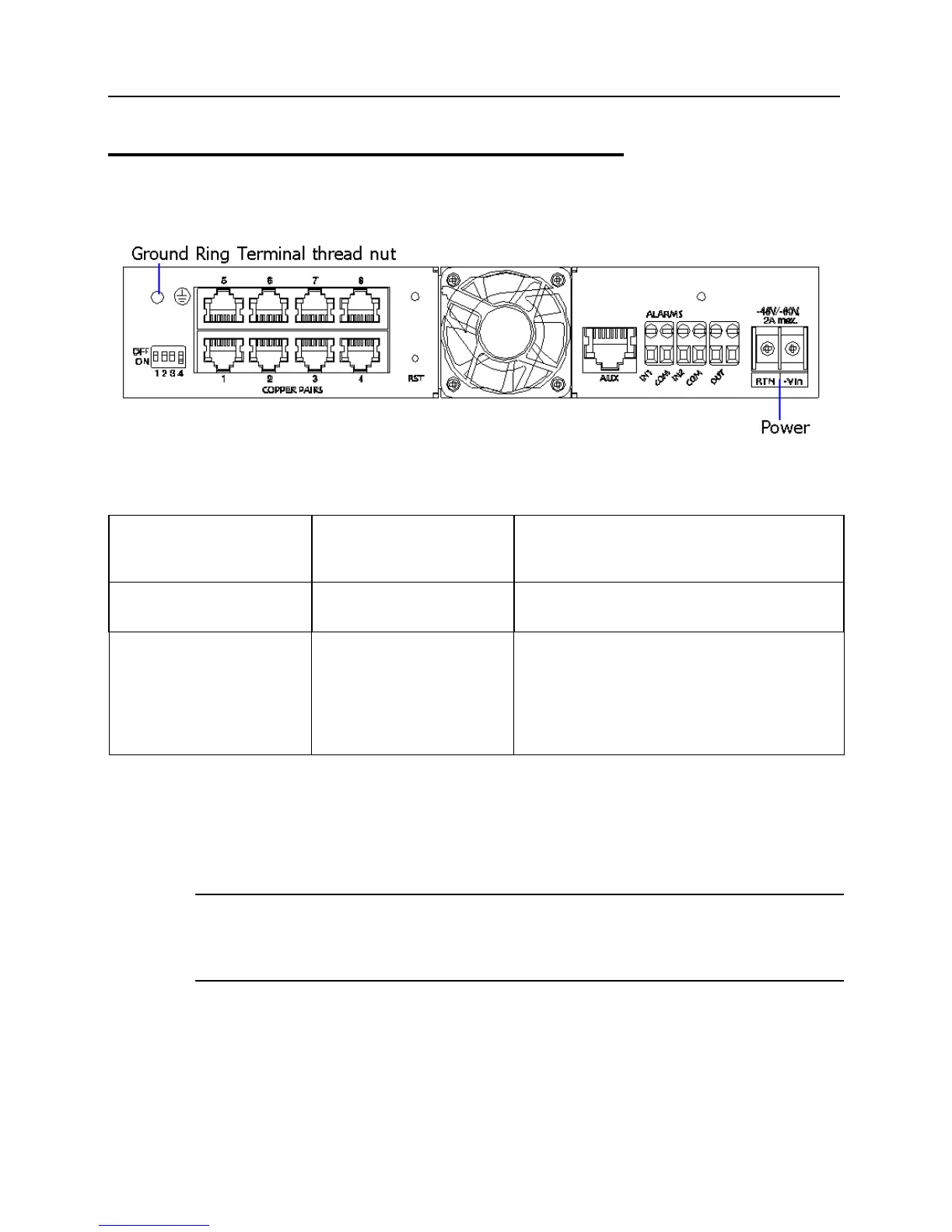
Figure 6: Power wiring accommodations on ML600 rear panel
Table 2: Wiring Table
To connect the ML600 to... Connect this wiring type To these locations on the ML600 rear panel
Electrical ground 14 AWG insulated wire
(green/yellow)
Frame/earth ground ring terminal
External power source 20 - 18 AWG:
Black wire for -48/-60
VDC -Vin;
Red wire for -48/-60
VDC RTN.
Connect DC inputs:
-Vin and RTN (+) to power source outputs.
Power Source
The ML600 requires an external DC power source of -48/-60 VDC nominal (-40 VDC to -72
VDC), rated at 24 Watts maximum. For AC supply, an AC power adapter is available, see
the ML600 User Manual.
Note: Use wire color codes in accordance with customer definitions. In this Quick Installation
Guide, red and black are used. Other color codes can be used such as gray instead of red.
Note: The Return (positive output) at the external DC power source must be grounded. This
enables Sealing Current operation.
12 ML600 Release 5.0a Quick Installation Guide


 To Next Page