Hardware Manual
15
Step 4: Waterproof and Connect the Cable
The camera and the pre-installed network cable, “pigtail”, are resistant to salt, water, weak acid,
alcohol, oil, grease and other common solvents. However, users must ensure that the cable
connection and the network side cable itself are also protected from different environmental
factors.
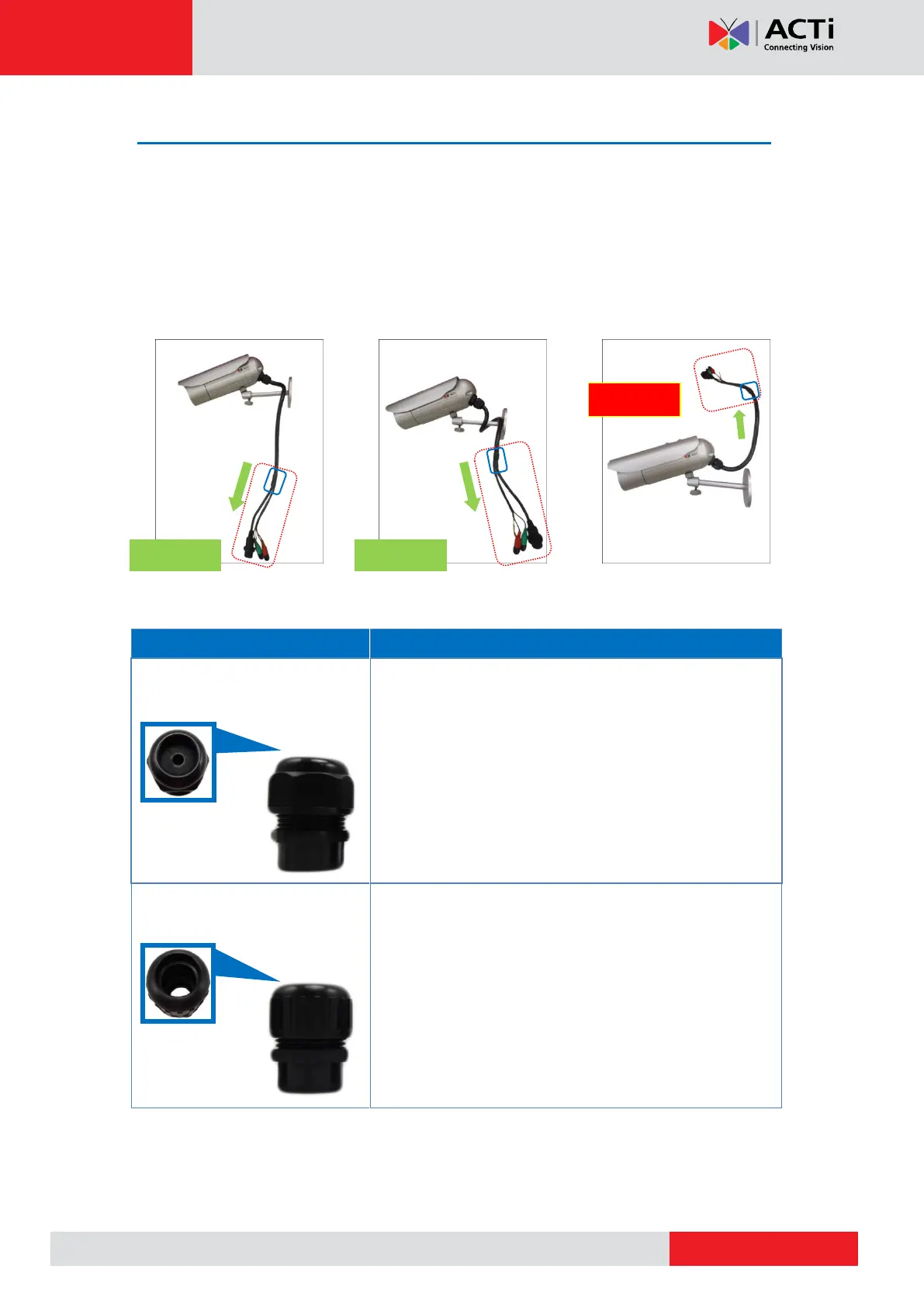
First, ensure that the pre-installed cable (from the area boxed in blue up to the connectors) as
marked below is routed downwards at all times after the installation. See examples below:
For Ethernet connection, there are two waterproofing methods.
Use this solution when connecting an Exterior-grade
Ethernet cable between the camera and a
Power-over-Ethernet (PoE) switch or injector. See How to
Use the Cable Gland on page 16.
Use this solution when connecting a standard indoor
Ethernet cable between the camera and a
Power-over-Ethernet (PoE) switch / injector. A flexible
conduit (trade size 1/2”) is required to house the Ethernet
cable. See How to Use the Conduit Gland on page 20.
NOTE: The flex conduit is not included in the package
and must be purchased separately.
Audio and digital input/output devices can be connected to the camera, for more information,
see Other Connections on page 25.



 To Next Page