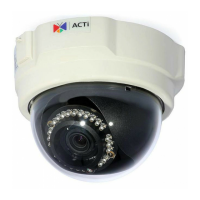
This document describes the ACTi Z71 Outdoor Dome Camera, a 4MP outdoor dome camera designed for surveillance applications. It features Day/Night functionality, Adaptive IR, Superior WDR (Wide Dynamic Range), SLLS (Superior Low Light Sensitivity), and a fixed lens.
Function Description:
The ACTi Z71 is an outdoor dome camera primarily used for video surveillance. It captures high-resolution 4-megapixel video, making it suitable for detailed monitoring in various outdoor environments. The camera's Day/Night feature allows it to operate effectively in both well-lit and low-light conditions, automatically switching between color and monochrome modes as ambient light changes. Adaptive IR (Infrared) ensures clear night vision by adjusting the intensity of infrared illumination to prevent overexposure of close-up objects and underexposure of distant objects. Superior WDR technology enables the camera to produce clear images even in scenes with extreme variations in lighting, such as strong backlighting or bright and dark areas simultaneously. SLLS enhances image quality in very dim lighting conditions, providing usable video where other cameras might struggle. The fixed lens simplifies installation and provides a consistent field of view. The camera is designed to be mounted on a ceiling and includes a built-in microphone for audio input. It supports local recording via a memory card (microSDHC and microSDXC cards). Network connectivity is provided via an Ethernet port, supporting both PoE (Power over Ethernet) and a DC 12V power input for non-PoE setups.
Important Technical Specifications:
- Model: Z71
- Resolution: 4MP (4 Megapixels)
- Imaging Features: Day/Night (D/N), Adaptive IR, Superior WDR, SLLS
- Lens Type: Fixed Lens
- Power Input: DC 12V Power Input Jack (for non-PoE connections)
- Network Connection: Ethernet Port (supports PoE)
- Local Storage: Memory Card Slot (supports microSDHC and microSDXC cards)
- Audio Input: Built-in Microphone
- Regulatory Compliance:
- FCC Part 15: Complies with limits for digital devices, designed to provide reasonable protection against harmful interference in commercial environments.
- LVD/EMC Directive (CE): Complies with European Low Voltage Directive 2014/35/EU and EMC Directive 2014/30/EU.
- WEEE Directive 2012/19/EU: Indicates responsible disposal of electrical and electronic equipment.
- Laser Product: Class 1 LASER PRODUCT (relevant for internal components, users should not look directly at transmit laser or fiber ports when powered on).
Usage Features:
- Installation: The camera is designed for ceiling mounting. The installation process involves locating and drilling holes using a provided template, inserting plastic anchors, and routing cables. The camera body detaches from the base for easier mounting. The lens can be adjusted for rotation (0°-360°) and viewing angle (0°-75°).
- Memory Card Installation (Optional): A memory card can be inserted for local recording. The process involves moving the camera body to access the slot, loosening screws to remove the cover, inserting the card with metal contacts facing the lens until it clicks, and then reattaching the cover.
- Cable Connections:
- RJ-45 Connector Waterproofing: For outdoor installations, the Ethernet connection must be waterproofed using the bundled cable gland. This involves detaching the clamping nut and sealing insert, inserting them onto the Ethernet cable, connecting the RJ-45, and then assembling the gland body and clamping nut tightly to ensure a waterproof seal.
- Power Cable Waterproofing (Optional): If a DC 12V power adapter is used (non-PoE), the power cable connection should be wrapped with waterproof tape to prevent short-circuiting and water damage. It is recommended to place cables in a separate waterproof junction box for added protection.
- IP Address Configuration:
- DHCP Server: If a DHCP server is present on the network, the camera will automatically obtain an IP address. The IP Utility tool can be used to discover the camera's IP address and other information, and to launch the web browser for access.
- Default IP Address: In networks without a DHCP server, the camera defaults to 192.168.0.100 (port 80). The PC's IP address must be manually configured to match the camera's network segment (e.g., 192.168.0.99) to access it.
- Manual IP Adjustment (Multiple Cameras): For multiple cameras in a non-DHCP network, the IP Utility can be used to assign unique static IP addresses, starting from a specified address (e.g., 192.168.0.101). Alternatively, cameras can be plugged in one at a time and their IP addresses changed via the web browser.
- Accessing the Camera: The camera is accessed via a web browser (Microsoft Internet Explorer is recommended for full functionality). Users type the camera's IP address (e.g.,
http://192.168.0.100) into the address bar.
- Login and Password: Upon first access, the default username is "admin" and the password is "123456". The system will prompt the user to change the administrator password to a strong one (9-32 characters, including letters, digits, and special characters).
Maintenance Features:
- General Care: Keep the camera away from excessive pressure, vibration, moisture, dust, and intensive electromagnetic radiation. Ensure the operating environment meets temperature and humidity requirements.
- Cable Protection: Do not hold the camera by its tail cable for weight bearing, as this can loosen connectors. Do not cut the tail cable, as exposed wires can cause short circuits and damage. Ensure external cable terminals are in good condition and properly fastened, with enough slack to prevent tension.
- Dome Cover Protection: During transportation and installation, protect the transparent dome cover from friction, scratches, and contamination. Keep the protective film on the cover until mounting is complete and before powering on the device.
- Cleaning:
- Dust: Gently remove dust from the front glass surface using an oil-free brush or a rubber dust blowing ball.
- Grease/Stains: Clean the glass surface gently from the center outward using anti-static gloves or an oil-free cloth. If stubborn, use anti-static gloves or an oil-free cloth dipped in detergent.
- Prohibited Cleaners: Do not use organic solvents like benzene or ethanol on the transparent dome cover.
- Servicing: Do not attempt to service the product yourself. Opening covers may expose users to dangerous voltages. Refer all servicing to qualified service personnel. ACTi will not be responsible for problems caused by unauthorized repair or maintenance.
- Laser Safety: Never look directly at the transmit laser, fiber ports, or fiber cable ends when the device is powered on, as this is a Class 1 LASER PRODUCT and may result in hazardous laser emissions.

 Need help?
 General

 To Next Page