11
THEACTIGRAPH.COM
CENTREPOINT INSIGHT WATCH | E.200.6002 | RELEASED: 01/09/2023 | REV: 7
Assignment | Continued
Assigning an CPW01 to an existing participant
To assign a CPW01 to an existing participant (such as in the case of a lost or broken device) or if the visit schedule requires
collection and reassignment. Follow these steps to assign a CPW01 to an existing participant (such as, in the case of a lost or
broken device) or if the visit schedule requires collection and reassignment:
• Complete steps 1- 6 above on page 8.
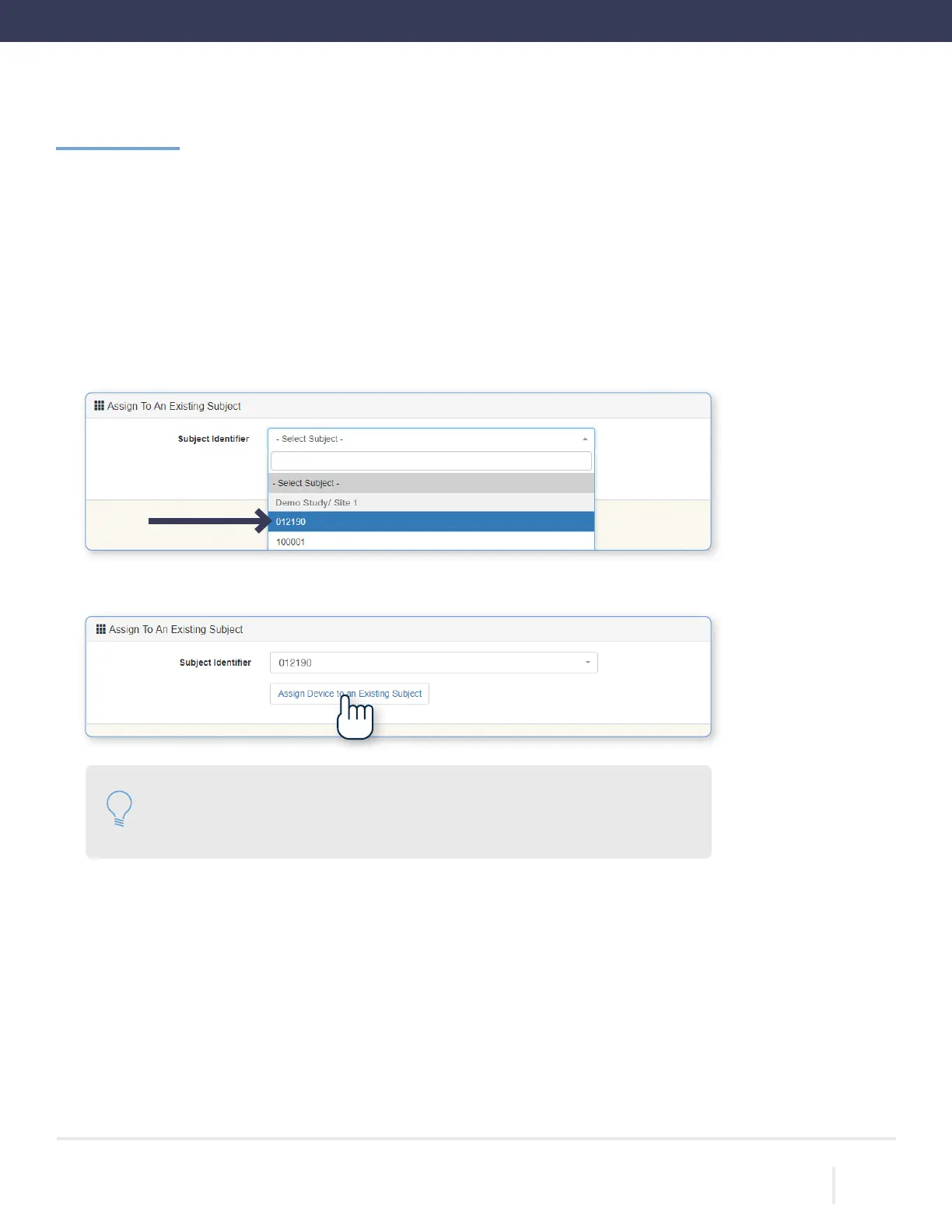
• Scroll to the bottom of the page and select the corresponding subject identier from the list.
• Select “Assign Device to an Existing Subject.” Wait for the progress bar to indicate that assignment is complete.
Please note: We encourage the reuse of the previously assigned CPW01 that the
participant used during the rst monitoring period. Otherwise, a new CPW01 and
watch band should be used.



 To Next Page