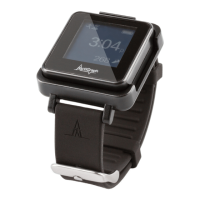
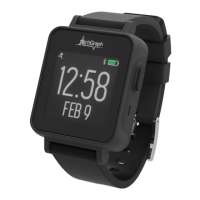
The ActiGraph LEAP (LEAP) is a small, medical-grade wearable activity monitor designed for documenting physical movement, primarily for applications in physiological monitoring, sleep activity, circadian rhythm analysis, and general physical motion assessment where quantifiable analysis is desired. It captures and records continuous, high-resolution acceleration data, which is then converted into objective physical activity and sleep measures within the cloud-based CentrePoint software system.
Function Description:
The LEAP device serves as a data collection tool in clinical research and academic studies, capturing real-world digital measures. It is intended to be worn by participants to continuously monitor their physical activity and sleep patterns. The collected data is uploaded to the CentrePoint software system for analysis. The device is designed for ease of use, with a focus on participant comfort and data accuracy. It is particularly useful for studies requiring long-term, continuous monitoring of movement.
Important Technical Specifications:
- Dimensions: 3.85 x 3.9 x 1.225 cm
- Weight: 24 grams
- Sample Rate: 32 Hertz (default) - 256 Hertz
- Battery Life: 30 days (at 32 Hz default sample rate)
- Data Storage: 30 days / 1 GB
- Dynamic Range: +/- 8G
- Communication: USB, Bluetooth® LE 5.3
- Water Resistance: 1 meter, 30 minutes
- Wear Location: Multiple (typically non-dominant wrist)
- Warranty: 1 year
- Operating Temperature Range: 0°C to 40°C
- Storage Temperature Range: -20°C to 55°C
- Humidity Range: 15% to 90% (non-condensing)
- Atmospheric Pressure: 700 hPa to 1060 hPa
- Power Supply: Charged via certified external power supply with input rated 90-264 Vac and output of up to 5Vdc.
- Compliance: FCC Part 15, IC RSS-102, CE marking (Medical Device Directive 93/42/EEC and Radio Equipment Directive 2014/53/EU), UKCA, ANATEL, CMIIT-ID. Type BF Applied Part compliant with IEC standards for user protection against electrical shock.
Usage Features:
- Assignment and Deployment: The LEAP is assigned to participants at Visit 1. This process involves connecting the device to a PC running ActiSync software, which then communicates with the CentrePoint web portal. During assignment, participant information (Subject Identifier, Date of Birth, Weight, Wear Position) is entered. The device should be fully charged before assignment, taking 2-3 hours.
- Charging: The LEAP is charged using a supplied charging dock and wall plug. The device snaps magnetically into the charger. A solid battery icon on the screen indicates a full charge. Participants are typically instructed to fully charge the LEAP once every 3 weeks, preferably at night.
- Data Upload: Data upload occurs automatically when the LEAP is connected to its charger, either directly to a computer via USB or through a CentrePoint Data Hub. A progress wheel appears on the screen during upload, followed by a check-mark upon completion.
- CentrePoint Data Hub (Optional): For continuous data upload without direct computer connection, an optional CentrePoint Data Hub can be used. The Hub connects to a wall outlet and the cellular network (indicated by a solid blue LED light), and the LEAP charger plugs into the Hub's USB port. This allows for automatic data uploads when the LEAP is placed on its charger at home.
- Wear Instructions: Participants are instructed to wear the LEAP on their non-dominant wrist, one finger width from the wrist bone, with the numbers on the screen oriented like a wristwatch. The strap should be tightened to be secure but comfortable, with no gaps between the strap and skin, but without compressing the skin. It should be worn 24 hours a day for the duration of the study, including during sleep and water activities (bathing/showering). However, it should be removed for water activities exceeding 1 meter depth for more than 30 minutes.
- Device Status Indicators:
- Halt Mode: A stop icon is displayed if the LEAP is not collecting data.
- Active Mode: A running person icon is displayed if the LEAP is collecting data. The device transitions from halt to active mode approximately 90 seconds after being removed from the charger.
- CP Data Hub LED: Blinking blue indicates connection attempt to cellular network; solid blue indicates successful connection; red indicates a problem.
- Unassignment: At the end of the study, the LEAP is unassigned. This involves a final data upload and then selecting "Stop Collecting Data" in the CentrePoint portal to remove the participant assignment.
- Lost or Broken Devices: If a LEAP is lost or broken, it must be disassociated from the participant in the CentrePoint system before a replacement can be assigned. Instructions are provided to select "Lost monitor" or "Broken/Damaged" in the "Subject Details" page.
Maintenance Features:
- Cleaning: LEAP devices and accessories should be cleaned with a non-abrasive cloth and an alcohol-based solution (70% Isopropyl alcohol is recommended). Apply alcohol to the cloth, clean the device for 15-20 seconds, and allow it to air dry for 10 minutes prior to re-use. Sterilization is not recommended as it may cause damage.
- Battery Life Expectancy: The battery has a life expectancy of five (5) years. The performances of the internal components do not degrade over time.
- Troubleshooting:
- Skin Reaction: If a participant reports a skin reaction or discomfort, they should stop wearing the LEAP immediately and return it to the site. The site team should contact ActiGraph Support.
- CP Data Hub Connection Issues: If the blue LED blinks intermittently or for an extended period, remove power, wait for the light to stop flashing, then reconnect. If the problem persists, move the Hub to an area with better cellular connection. If still unable to connect, contact the study team.
- LEAP Battery Dies in Field: Participants should bring the LEAP, charging dock, and USB cable back to the site for recharge and reinitialization using the CentrePoint system. After recharging and reinitialization, verify it is in "Active Mode" before returning it to the participant.
- Product Integrity: Modifications to ActiGraph products are not permitted and will void all warranties, as it can be unsafe for the end user.
- Safety: The device contains magnets that might interfere with medical devices like pacemakers and defibrillators. Users with such devices should keep the LEAP and charger at a safe distance (more than 6 inches / 15 cm) and consult their physician. Any swallowed parts require immediate medical attention.

 Need help?

 To Next Page
 General