Information for Participants
| Continued
You will be required to fully charge the LEAP once every 3 weeks, preferably at night time (e.g. before you go to bed). This takes
approximately 2-3 hours. Data will be uploaded each time the LEAP is connected to the CP Data Hub.
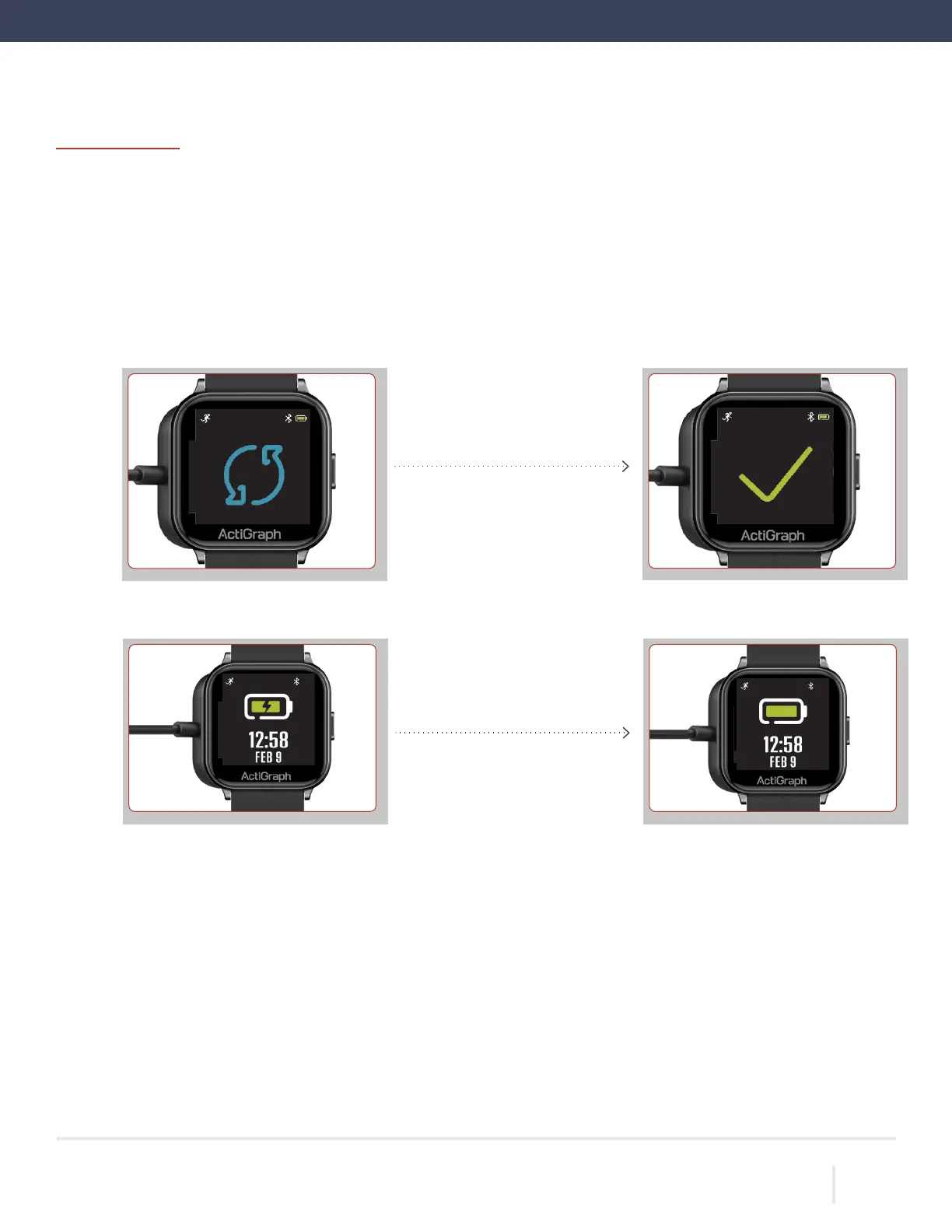
Place the LEAP on the charger by placing the LEAP on top of the charger. The LEAP will snap into place magnetically.
A progress wheel will appear on the screen indicating that an upload has begun. When the upload is complete, a check
mark will appear on the screen.
While the LEAP is connected to the charger, an animated battery icon will appear on the screen to indicate charging.
The LEAP is fully charged once a solid battery icon appears on the screen.
Remove the LEAP from the charger by pulling the LEAP away from the charger. Continue wearing the LEAP
according to instructions.
ACTIGRAPH LEAP™ | E.200.6025 | RELEASED: 10/09/2023 | REV: 0
THEACTIGRAPH.COM


 To Next Page