Navigation
Displays the navigation screen.
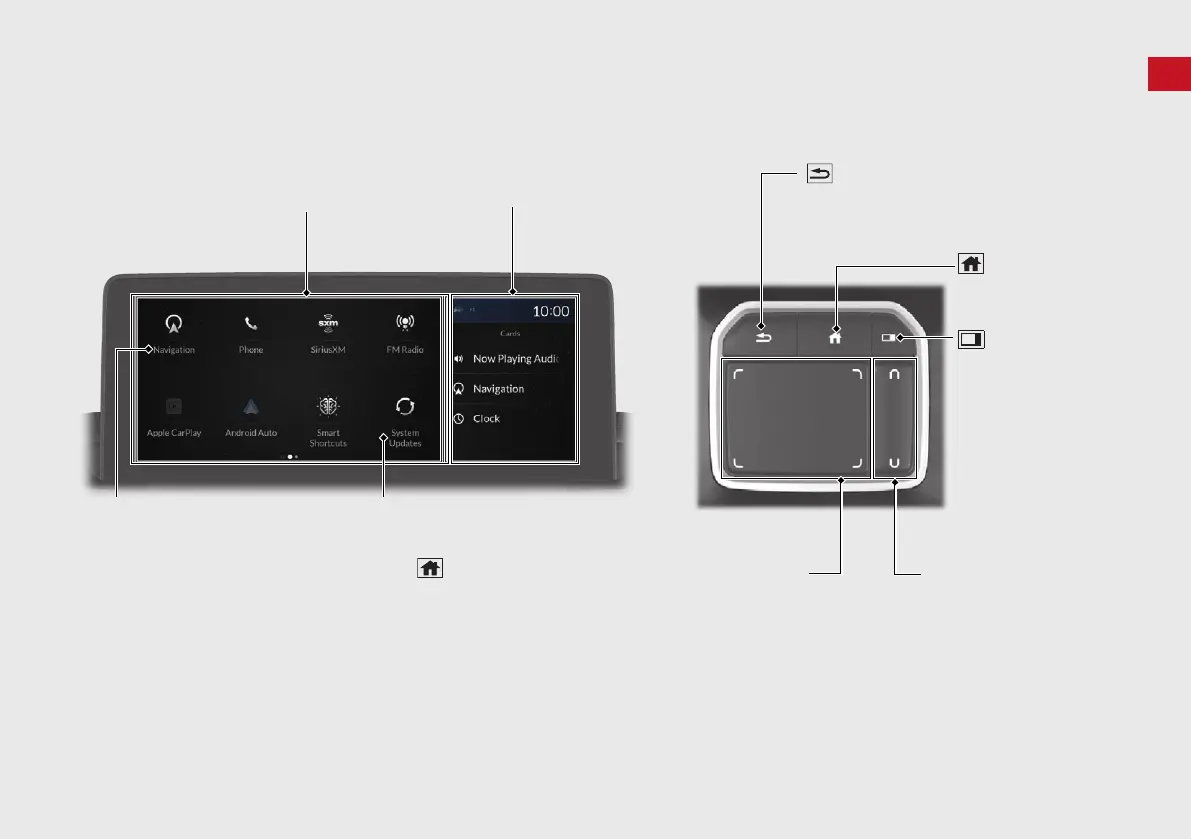
HOME Screen
The system displays various
functions from the HOME screen.
Press the (Home) button on the
True Touchpad Interface at any time
to return to the main HOME screen.
(Back) Button
Press to go back to
the previous screen.
(Home) Button
Press to display the
HOME screen.
A-Zone Touchpad
Tap or swipe the pad with your
finger, or move your finger along
the pad to operate the A-zone.
(P4 )
Audio/Information Screen
(Cards List)
Button
Press to display the
cards list of the B-
zone.
B-Zone Touchpad
Tap or swipe the pad with
your finger to operate the
B-zone.
True Touchpad Interface
A-Zone
B-Zone



 To Next Page
 Loading...