Features & Benets
15 14 13
1
2
3
4
5
OUTDOOR
low high
FUTURE FORECAST
LEARNING...
INDOOR
12
11
10
9
8
6 7
FRONT OF DISPLAY
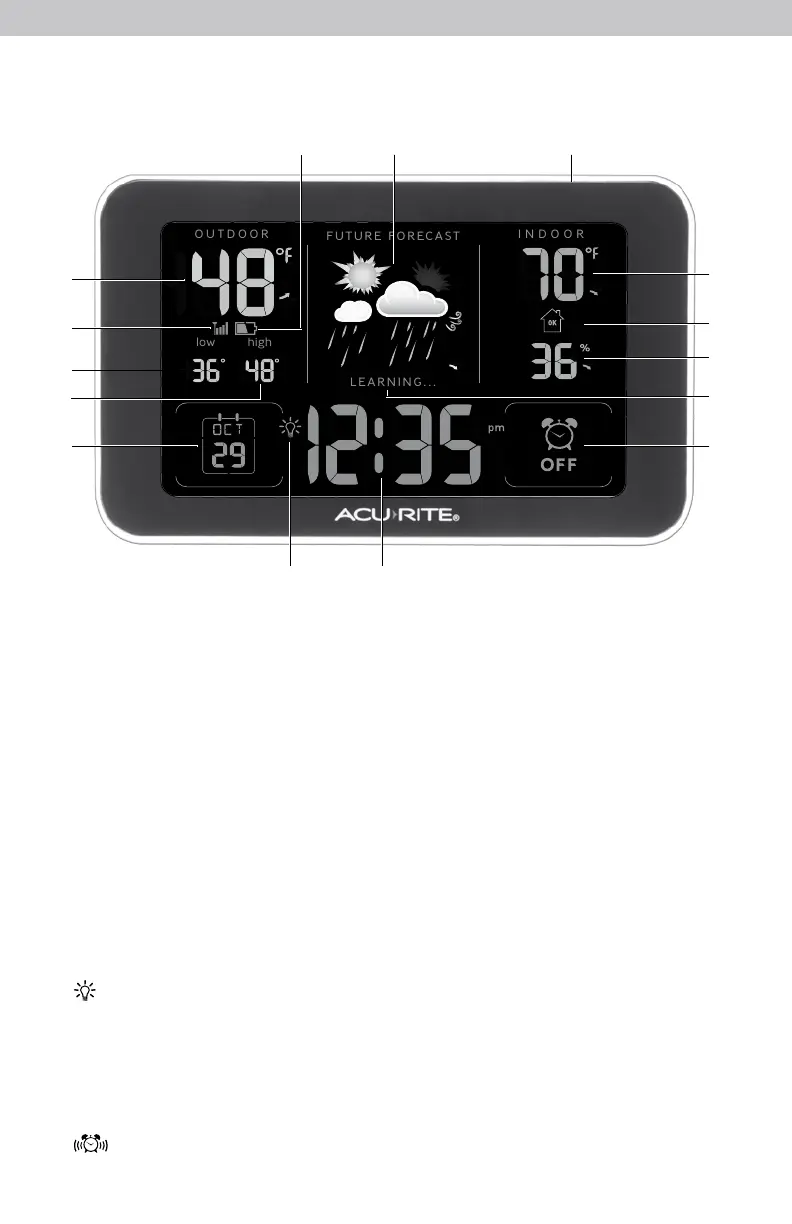
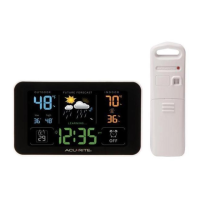
1. Current Outdoor Temperature
Arrow icon indicates the direction
temperature is trending.
2. Outdoor Sensor Signal Strength
3. Outdoor Low Temperature
Record
Lowest temperature recorded
since midnight.
4. Outdoor High Temperature
Record
Highest temperature recorded
since midnight.
5. Date
6. Icon
Indicates display is in auto-dimming
brightness mode (see page 10).
7. Intelli-Time
®
Clock
Automatically updates itself for
Daylight Saving Time.
8. Alarm ON/OFF Indicator
9. Learning Mode Icon
Disappears after weather forecast
self-calibration is complete.
10. Current Indoor Humidity
Arrow icon indicates the direction
humidity is trending.
11. Humidity Level Icon
Indicates a high, low or ideal
humidity comfort level.
12. Current Indoor Temperature
Arrow icon indicates the direction
temperature is trending.
13. SNOOZE Button
14. 12 to 24 Hour Weather Forecast
Self-Calibrating Forecasting pulls data
from the outdoor sensor to generate
your personal forecast.
15. Outdoor Sensor Low
Battery Indicator
3


 To Next Page