EasyManua.ls Logo

AcuRite 01010 - User Manual

AcuRite 01010
24 pages
Print Icon
To Next Page IconTo Next Page
Loading...
Professional Weather Center
Instruction Manual
CONTENTS
Unpacking Instructions ........... 2
Package Contents .................. 2
Product Registration ............... 2
Features & Benets: 5-in-1....... 3
Features: Display Unit ............ 4
Back of Display Unit............... 6
Setup .................................... 7
5-in-1 Sensor Setup ................ 7
Display Unit Setup ................. 8
Set the Time & Date ............... 9
Measurement Units ...............10
Placement Guidelines ............11
5-in-1 Sensor Installation........12
Using the Weather Center .....13
Programmable Alarms...........14
Troubleshooting ....................16
Care & Maintenance............. 18
Calibration ...........................18
Specications....................... 20
FCC Information .................. 20
Customer Support .................21
Warranty..............................21
model 01010
Questions? Contact Customer Support at
(877) 221-1252 or visit www.AcuRite.com.
SAVE THIS MANUAL FOR FUTURE REFERENCE.


Questions and Answers

Summary

Unpacking and Initial Setup

Unpacking Instructions

Remove the protective film from the LCD screen before use.

5-in-1 Sensor Setup

Display Unit Setup

Set the A-B-C Switch

Locate and set the A-B-C switch inside the battery compartment to match the sensor.

Install or Replace Batteries

Instructions for inserting 3x AA batteries into the display unit.

Time and Date Configuration

Measurement Unit Settings

Placement Guidelines

Display Unit Placement

Place display in a dry, dust-free area away from direct sunlight and heat sources.

5-in-1 Sensor Placement

Choose an open outdoor location with no obstructions for the sensor.

Important Placement Guidelines

Maximize wireless range, prevent interference, and avoid heat/moisture sources.

5-in-1 Sensor Installation

5-in-1 Sensor Installation Guidelines

Mount sensor 5 ft high, ensure level installation, and orient solar cell South.

Operation and Features

Using the Professional Weather Center

Explains Learning Mode, Weather Forecast icons, Weather Select, Barometric Pressure, and Rainfall Event.

Programmable Weather Alarms

Setting Weather Alarms

Troubleshooting Common Issues

No Outdoor Sensor Reception

Solutions for lost signal: relocation, interference checks, battery sync.

Outdoor Temperature Flashing;Dashes

Indicates wireless interference; check A-B-C switch and placement.

Troubleshooting Advanced Issues

Inaccurate Temperature or Humidity

Check placement away from sources, sensor height, and calibrate if necessary.

Overview

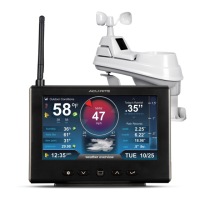
This document describes the AcuRite Professional Weather Center, model 01010, a device designed to provide comprehensive weather information and forecasting.

Function Description:

The AcuRite Professional Weather Center is a system consisting of a 5-in-1 outdoor sensor and an indoor display unit. It measures and displays various weather parameters, including outdoor and indoor temperature, outdoor and indoor humidity, wind speed, wind direction, barometric pressure, and rainfall. The system also provides a 12 to 24-hour weather forecast based on self-calibrating data collected from the 5-in-1 sensor. Users can set programmable alarms for specific weather conditions, such as outdoor humidity, outdoor temperature, storm alerts, indoor humidity, indoor temperature, wind chill, dew point, heat index, rain, and wind speed. The display unit records daily, monthly, and all-time highs and lows for various categories.

Important Technical Specifications:

  • Temperature Range:
    • Outdoor: -40°F to 158°F (-40°C to 70°C)
    • Indoor: 32°F to 122°F (0°C to 50°C)
  • Humidity Range:
    • Outdoor: 1% to 99%
    • Indoor: 16% to 98%
  • Wind Speed: 0 to 99 mph (0 to 159 kph)
  • Wind Direction Indicators: 16 points
  • Rainfall: 0 to 99.99 inches (0 to 99.99 mm)
  • Wireless Range: 330 ft (100 m), depending on home construction materials.
  • Operating Frequency: 433 MHz
  • Power:
    • Display: 3 x AA alkaline batteries
    • Sensor: 4 x AA alkaline or lithium batteries (lithium recommended for temperatures below -4°F / -20°C)
  • Data Reporting:
    • Wind Speed: 18-second updates
    • Wind Direction: 30-second updates
    • Outdoor Temperature & Humidity: 36-second updates
    • Indoor Temperature & Humidity: 60-second updates

Usage Features:

The system features a display unit with a tabletop stand and a wall-mountable option. The 5-in-1 sensor is designed for year-round outdoor use and should be installed in an open location, at least 5 feet (1.5 meters) off the ground, with the solar cell facing SOUTH for optimal performance and accurate wind direction. Both the sensor and display unit have an A-B-C switch that must be set to the same channel for synchronization.

The display unit allows users to:

  • Set Time & Date: Essential for accurate time-stamping of history records.
  • Select Measurement Units: Choose between standard (mph, °F) and metric (kph, °C) units.
  • View Weather Select Data: Toggle through heat index, dew point, wind chill, indoor temperature/humidity, and rainfall rate.
  • Monitor Barometric Pressure: Displays current pressure, trend (rising, steady, falling), and a pressure history graph.
  • Track Rainfall Events: Accumulates data for all-time, current month, and current rainfall events. An event clears after 8 hours of no rain, or 1 hour of no rain with a pressure rise of .03 inHg or more.
  • Programmable Alarms: Set custom alarms for various weather conditions. When an alarm sounds, the display unit beeps and flashes the affected category. The storm alarm triggers on a significant atmospheric pressure drop.
  • Record Highs and Lows: View all-time and daily high/low records for selected categories. These records can be cleared.
  • Learning Mode: The system undergoes a 14-day self-calibration period to determine altitude and fine-tune the weather forecast for the specific location. The "Learning Mode" icon disappears once calibration is complete.

Maintenance Features:

  • Display Unit Care: Clean with a soft, damp cloth. Avoid caustic cleaners, abrasives, dust, dirt, and moisture. Regularly clear ventilation ports.
  • 5-in-1 Sensor Care: Clean with a soft, damp cloth. Avoid caustic cleaners or abrasives that could damage the rain collection funnel or solar cell.
  • Insect Prevention: Spray the outside of the sensor with household insect repellent to prevent obstructions and data interruptions.
  • Snow & Freezing Weather: The sensor is designed to withstand freezing conditions. Melted snow in the rain collector cup will register as rain.
  • Clean Rain Collector Cup: Regularly remove and empty the debris filter located in the rain collector funnel.
  • Clean Wind Vane & Anemometer: Remove foreign matter to ensure free movement. Use a small amount of spray lubricant, clear silicone, or graphite powder if needed for improved movement.
  • Calibration:
    • Temperature & Humidity: Indoor and outdoor readings can be calibrated on the display unit to improve accuracy, especially if sensor placement or environmental factors affect data. This involves selecting the category, pressing and holding specific buttons to enter calibration mode, adjusting the value, and confirming.
    • Rain Gauge: The rain gauge can be calibrated for accuracy. This involves ensuring the sensor is level, performing a controlled water drip test (1 cup / 8oz of water over 20 minutes), and then adjusting calibration screws on the bottom of the sensor if the reading is not close to 1.06 inches. Turning screws clockwise increases rainfall; counter-clockwise decreases rainfall. Specific adjustments are provided for 2%, 4%, and 8% changes.
  • Troubleshooting: The manual provides solutions for common issues such as no outdoor sensor reception, flashing/dashing outdoor temperature, inaccurate forecasts, no rainfall, inaccurate wind readings, and a non-working display screen. This includes relocating units, checking battery types and charge, synchronizing units, checking A-B-C switch settings, clearing debris, and resetting the display unit.

AcuRite 01010 Specifications

General IconGeneral
BrandAcuRite
Model01010
CategoryWeather Station
LanguageEnglish

Related product manuals