EasyManua.ls Logo

AcuRite 01129 - User Manual

AcuRite 01129
16 pages
Print Icon
To Next Page IconTo Next Page
Loading...
Instruction Manual
SAVE THIS MANUAL FOR FUTURE REFERENCE.
Questions? Contact Customer Support at
(877) 221-1252 or visit www.AcuRite.com.
CONTENTS
Unpacking Instructions ........... 2
Package Contents .................. 2
Product Registration ............... 2
Features & Benets: Sensor ..... 2
Features & Benets: Display .... 3
Setup .................................... 5
Sensor Setup ......................... 5
Display Setup ........................ 6
Intelli-Time
®
Clock .................. 7
Set the Time, Date & Units ...... 7
Placement Guidelines ............. 8
Using the Weather Forecaster ... 9
Backlight Settings ..................10
USB Charging .......................11
Troubleshooting ....................12
Care & Maintenance ............. 13
Replace Intelli-Time
®
Battery ..13
Specications ........................14
FCC Information ...................14
Customer Support .................15
Warranty..............................15
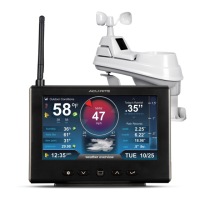
Alarm Clock Weather Station
model 01129

Questions and Answers

  • L
    lestermargaretAug 7, 2025
    Why is my AcuRite 01129 Weather Station outdoor temperature flashing?
    • S
      stephaniemendezAug 8, 2025
      Flashing outdoor temperature on your AcuRite Weather Station usually indicates wireless interference. To resolve this: * Bring both the sensor and display indoors, placing them side by side. Remove the power adapter/batteries from both units. * Ensure the A-B-C switch on both units match. * Reinstall the batteries in the outdoor sensor, and then reinstall the power adapter/batteries in the display. * Allow the units to sit within a couple of feet of each other for a few minutes to establish a strong connection.
  • D
    Danny ChambersAug 15, 2025
    What to do if my AcuRite 01129 has no outdoor sensor reception?
    • M
      Mr. Kenneth JonesAug 15, 2025
      If your AcuRite Weather Station shows no outdoor sensor reception (no bars), try the following: * Relocate the display and/or the outdoor sensor, ensuring they are within 330 ft (100 m) of each other. * Make sure both units are at least 3 feet (.9 m) away from electronics that may cause interference, such as TVs, microwaves, and computers. * Use standard alkaline batteries (or lithium batteries in the sensor when the temperature is below -4ºF/-20ºC). Avoid heavy-duty or rechargeable batteries. Note: Allow a few minutes for the display and sensor to synchronize after replacing batteries.
  • A
    Ann WadeAug 21, 2025
    Why is the temperature on my AcuRite 01129 inaccurate?
    • G
      george95Aug 22, 2025
      To ensure accurate temperature readings on your AcuRite Weather Station, make sure both the display and sensor are placed out of direct sunlight and away from any heat sources or vents.
  • A
    Anna CraigAug 30, 2025
    What to do if AcuRite 01129 display is too dark?
    • N
      nicholashartmanAug 30, 2025
      If the display on your AcuRite Weather Station is too dark, hard to read, or doesn’t work, you can try the following: * Verify that the power adapter is properly plugged in. * Adjust the backlight brightness using the or buttons. * Keep in mind that the optimal viewing angle for this product is from slightly above it.

Summary

Features & Benefits

Outdoor Sensor

Details about the outdoor sensor components and their functions.

Front of Display

Identifies and explains the various parts of the front display unit.

Display Back and Bottom

Identifies and explains the parts located on the back and bottom of the display unit.

Setup

Sensor Setup

Steps to set up the outdoor sensor, including A-B-C switch and battery installation.

Display Setup

Steps to set up the display unit, including power adapter and backup battery installation.

Intelli-Time Clock

Set Time, Date & Units

Guide to setting the clock's time zone, date, and preferred units (°F or °C).

Set Alarm Time

Instructions on how to set the alarm hour and minute on the clock.

Placement Guidelines

Display Placement

Guidance on where to place the display unit for optimal indoor measurements.

Sensor Placement & Guidelines

Guidance and key rules for optimal outdoor sensor placement and unit communication.

Operation & Weather Forecasting

Using the Weather Forecaster

Explains how to use the weather forecasting feature and the learning mode.

Weather Forecast & Trends

Details about self-calibrating forecasting and how weather trend icons indicate pressure changes.

Alarm & Display Settings

Alarm Clock SNOOZE

Explains the alarm snooze function, activation, and duration.

Backlight & Humidity Settings

Details on adjusting backlight brightness and understanding humidity level icons.

USB Charging

Troubleshooting

Sensor Reception Issues

Solutions for issues with the outdoor sensor not connecting or displaying signal.

Display Issues

Troubleshooting steps for display visibility, darkness, or functionality problems.

Time;Power & Temperature Accuracy

Resolving time inaccuracies after power loss and ensuring accurate temperature readings.

Care & Maintenance

Unit Cleaning

Instructions for cleaning and maintaining the display and outdoor sensor units.

Replace Intelli-Time Battery

Guide on how to replace the internal battery for Intelli-Time settings.

Specifications & Compliance

Product Specifications

Technical details and operating parameters of the weather station.

FCC Information

Regulatory compliance information regarding FCC rules for device operation.

Customer Support & Warranty

Customer Support Resources

Contact information and online resources for customer assistance.

Warranty & Policy Details

Information on the product's one-year warranty, policy applicability, and governing law.

AcuRite 01129 Specifications

General IconGeneral
BrandAcuRite
Model01129
CategoryWeather Station
LanguageEnglish

Related product manuals