EasyManua.ls Logo

AcuRite 01518 - User Manual

AcuRite 01518
20 pages
Print Icon
To Next Page IconTo Next Page
Loading...
Instruction Manual
CONTENTS
Unpacking Instructions ........... 2
Package Contents .................. 2
Product Registration ............... 2
Features & Benets: 5-in-1....... 3
Features & Benet: Display..... 4
Setup .................................... 7
5-in-1 Sensor Setup ................ 7
Display Setup ........................ 8
Set the Time, Date & Units ...... 9
Backlight Settings................... 9
Placement Guidelines ............10
5-in-1 Sensor Installation........ 11
Using the Weather Center .....12
Rainfall Tracking ...................13
Troubleshooting ....................14
Care & Maintenance.............16
Calibration ...........................16
Specications........................18
FCC Information ...................18
Customer Support .................19
Warranty..............................19
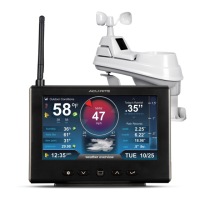
Professional Weather Center
model 01518
Questions? Contact Customer Support at
(877) 221-1252 or visit www.AcuRite.com.
SAVE THIS MANUAL FOR FUTURE REFERENCE.

Questions and Answers

  • S
    Stephanie BuckleyAug 10, 2025
    Why is my AcuRite 01518 showing inaccurate temperature or humidity?
    • M
      Michelle HuntAug 10, 2025
      If your AcuRite Weather Station is showing inaccurate temperature or humidity readings, ensure that both the display and 5-in-1 sensor are placed away from any heat sources or vents and also away from moisture sources. The 5-in-1 sensor should be mounted at least 5 ft off the ground. If the issue persists, you may need to calibrate the indoor and outdoor temperature and humidity.
  • R
    Richard LucasAug 15, 2025
    Why is my AcuRite 01518 Weather Station not registering rainfall?
    • F
      Felicia WilkinsAug 15, 2025
      If your AcuRite Weather Station is not registering rainfall, first check to ensure that the rain gauge stabilizer (plastic tab) has been removed from the bottom of the sensor. Next, clear any debris, such as leaves, out of the rain collector funnel and debris screen. You may also need to calibrate the rain gauge. Verify that the sensor’s internal tipping lever is moving freely by dripping a little water through the rain collector; if you don't hear it, you may need to clean inside the sensor.
  • A
    Ashley AllenAug 20, 2025
    What to do if the outdoor temperature on my AcuRite Weather Station is flashing or showing dashes?
    • C
      Connie CastilloAug 21, 2025
      If the outdoor temperature on your AcuRite Weather Station display is flashing or showing dashes, it could be due to wireless interference. Check that the A-B-C switch in the battery compartments of both the display and sensor are switched to the same letter. You can choose A, B, or C, but both units must match to sync up. Sometimes, changing to a different channel can also help.
  • M
    Michael LewisAug 26, 2025
    How to troubleshoot an AcuRite 01518 Weather Station display screen that is not working?
    • M
      Michael KnappAug 26, 2025
      If the display screen of your AcuRite Weather Station is not working, first check that the power adapter is properly plugged into both the display and an electrical outlet. Next, verify that the batteries are installed correctly and replace them if needed. If the screen still doesn't work, reset the display by pressing and holding the 'CLEAR RECORD /RESET' button on the back of the display. Note that you will need to enter the date and time after performing a reset.
  • M
    Mrs. Renee SmithAug 30, 2025
    Why are the wind readings on my AcuRite 01518 Weather Station inaccurate?
    • W
      William LeonardAug 30, 2025
      If you're getting inaccurate wind readings on your AcuRite Weather Station, consider what you are comparing the readings to. Professional weather stations are typically mounted at 30 ft high or more, so ensure you're comparing data from a sensor positioned at a similar mounting height. Also, check the location of the sensor, making sure it's mounted a minimum of 5 ft in the air with no obstructions around it within several feet. Finally, ensure the wind cups are spinning freely; if they hesitate or stop, try lubricating them with graphite powder or spray lubricant.
  • K
    Kristin BrownNov 4, 2025
    How to fix AcuRite Weather Station when there is no outdoor sensor reception?
    • Y
      yvettejenkinsNov 4, 2025
      If your AcuRite Weather Station isn't receiving the outdoor sensor signal, try these steps: First, relocate the display and the 5-in-1 sensor, ensuring they are within 330 feet (100 m) of each other. Keep both units at least 3 feet (0.9 m) away from electronics like TVs, microwaves, and computers that could cause interference. Use standard alkaline batteries (or lithium batteries in the sensor when temperatures are below -4ºF/-20ºC), avoiding heavy-duty or rechargeable batteries. If you've recently replaced the batteries, allow a few minutes for the display and sensor to synchronize. As a last resort, try synchronizing the units by bringing both the sensor and display indoors, removing the batteries from each, reinstalling the batteries in the outdoor sensor first, then the display, and le...

Summary

Unpacking and Registration

Package Contents

Lists all items included in the product box.

Product Registration

Instructions for registering the product online for warranty protection.

Product Features Overview

5-in-1 Sensor Details

Description of the components and functions of the 5-in-1 sensor.

Display Front Features

Overview of the display unit's front panel and its various readouts.

Display Back Features

Details on the rear panel features of the display unit, including mounting and connections.

Setup and Configuration

5-in-1 Sensor Setup

Step-by-step guide for setting up the 5-in-1 sensor, including battery installation.

Display Setup and Power

Guide for setting up the display unit, including power and battery installation.

Time, Date, and Unit Settings

Instructions for setting the clock, calendar, and measurement units.

Display Backlight Settings

Configuration options for the display's backlight brightness levels and auto-dim mode.

Placement and Installation

Optimal Placement Guidelines

Recommendations for placing the display and sensor for maximum accuracy.

5-in-1 Sensor Installation

Detailed instructions for physically installing the 5-in-1 sensor.

Using the Weather Center

Weather Forecasts and Learning Mode

Explanation of the self-calibrating forecast and the learning mode icon.

Data Display and Selection

How to view different data types like Weather Select, Barometric Pressure, and High/Low records.

Rainfall Tracking

Troubleshooting Common Issues

Sensor Communication Issues

Steps to resolve problems with no outdoor sensor reception or flashing temperature.

Data Accuracy and Display Problems

Solutions for inaccurate readings, no rainfall, wind issues, and display malfunctions.

Care and Maintenance

Component Cleaning and Protection

Instructions for cleaning the display and sensor, including insect prevention.

Calibration Procedures

Steps for calibrating temperature, humidity, and barometric pressure readings.

Rain Gauge Calibration

Detailed procedure for calibrating the rain gauge for accurate measurements.

Technical and Compliance Information

Product Specifications

Technical details and operating ranges of the weather center.

FCC Compliance Information

Regulatory information regarding FCC compliance and user guidelines.

Customer Support and Warranty

AcuRite 01518 Specifications

General IconGeneral
Display TypeLCD
Indoor Temperature Range32°F to 122°F (0°C to 50°C)
Outdoor Temperature Range-40°F to 158°F (-40°C to 70°C)
Humidity Range1% to 99%
Wireless Range330 ft (100 m)
Power Source (Sensor)2 AA batteries (included)
Display Weight0.4 lbs (0.2 kg)

Related product manuals