7
•
•
•
•
•
B~~f~~~s
@I• JR
#1'i
■
~--c:r_o_
0
c_>_1_5_8_o..:.F_I
ALKALINE
BATTERIES
It W iiM® (J0°C) 158°F I
SETUP
5-in-1 Sensor Setup
1
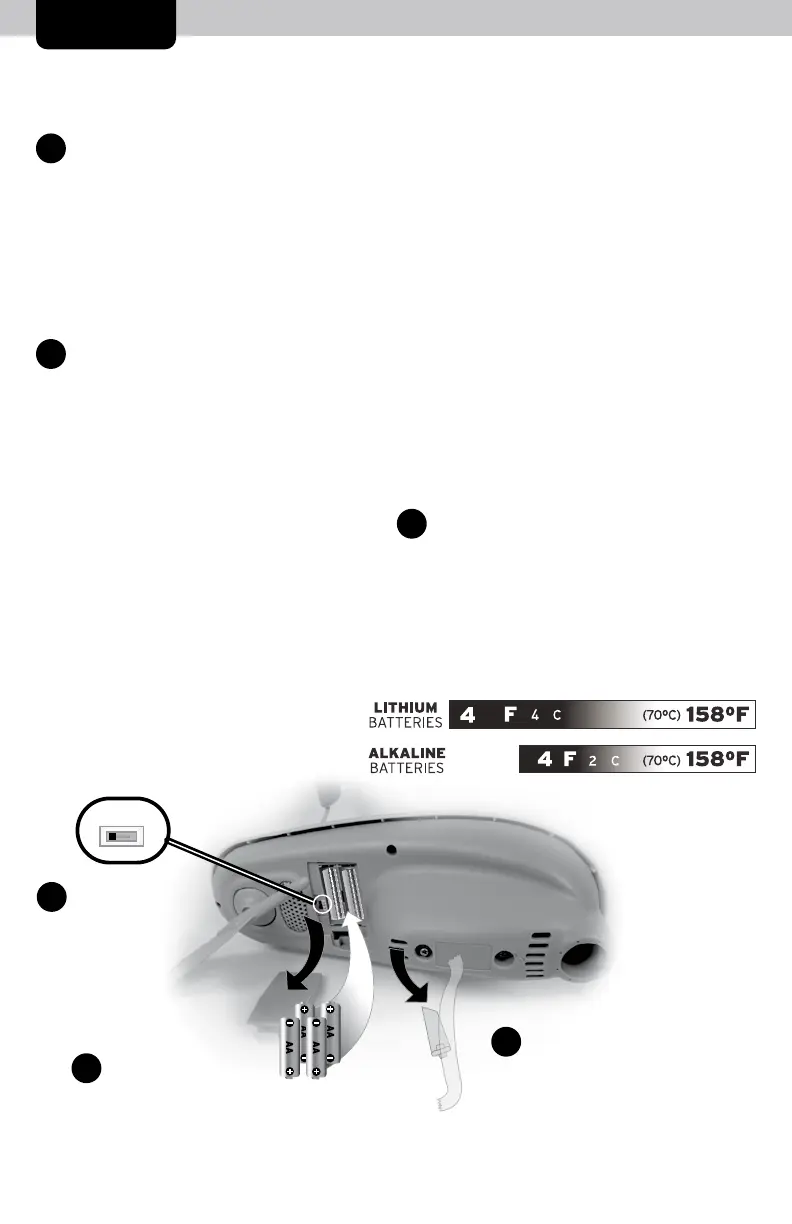
Set the A-B-C Switch
Locate the A-B-C switch inside the
battery compartment. Set the A-B-C
switch to A, B or C. You must select the
same letter choices for both the sensor
and the display in order for the units to
synchronize.
2
Install or Replace Batteries
Batteries MUST be installed for
this product to operate. AcuRite
recommends high quality alkaline
or lithium batteries for the best
product performance. Heavy duty
or rechargeable batteries are not
recommended.
3
The 5-in-1 sensor requires lithium
batteries in low temperature conditions.
Cold temperatures can cause alkaline
batteries to function improperly. Use
lithium batteries in the 5-in-1 sensor for
temperatures below -4ºF / -20ºC.
1. Slide off the battery
compartment cover.
2. Insert 4 x AA batteries into the
battery compartment, as
shown. Follow the polarity
(+/-) diagram in the battery
compartment.
3. Replace the battery cover.
Remove Rain Gauge Stabilizer
Locate and remove the rain gauge
stabilizer (plastic tab) taped into the
bottom of the sensor. The rain gauge
will not function until this is removed.
A B C
1
A-B-C Switch
Set to match
display
2
Install Batteries
4 AA Batteries
3
Rain Gauge Stabilizer
Remove and discard



 To Next Page