EasyManua.ls Logo

AcuRite 01120M - User Manual

AcuRite 01120M
16 pages
Print Icon
To Next Page IconTo Next Page
Loading...
Instruction Manual
SAVE THIS MANUAL FOR FUTURE REFERENCE.
Questions? Contact Customer Support at
877-221-1252 or visit www.AcuRite.com.
CONTENTS
Unpacking Instructions ........... 2
Package Contents .................. 2
Product Registration ............... 2
Features & Benets: Sensor ...... 2
Features & Benets: Display ..... 3
Setup .................................... 6
Sensor Setup ......................... 6
Display Setup ........................ 7
Set the Time, Date & Units ...... 8
Backlight Settings ................... 8
Placement Guidelines ............. 9
Using the Weather Station .....10
Programmable Alarms. ..........11
Troubleshooting ....................12
Care & Maintenance ............. 13
Calibration ...........................13
Specications ........................14
FCC Information ...................14
Customer Support .................15
Warranty..............................15
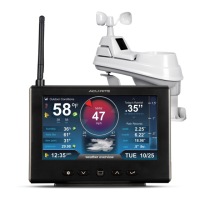
Weather Station
model 01120

Questions and Answers

Summary

Unpacking and Setup

Unpacking Instructions

Steps for removing protective film before using the product.

Package Contents

List of all items included in the product box.

Product Registration

Instructions on how to register the product to receive warranty protection.

Outdoor Sensor Features

Details on the outdoor sensor's components, including hanger and signal indicator.

Display Features

Back of Display Overview

Identification of components on the back of the display unit, such as power adapter port and A-B-C switch.

Display Front Layout

Overview of the main display screen, showing various readings and forecast icons.

Detailed Front Display Features

Explanations of specific front display elements and their functions.

Setup Procedures

Sensor Setup

Step-by-step guide for setting up the outdoor sensor, including A-B-C switch and battery installation.

Display Setup

Instructions for setting up the display unit, including A-B-C switch, backup batteries, and power adapter.

Time, Date, and Backlight Settings

Set Time, Date, and Units

Procedure to configure the clock, calendar, and measurement units (temperature, pressure).

Display Backlight Settings

How to adjust display brightness levels and enable AUTO-DIM mode.

Placement Guidelines

Maximum Accuracy Placement

Recommendations for optimal placement of display and sensor for accurate readings and wireless range.

Important Placement Considerations

Key factors to ensure proper wireless communication and accurate measurements.

Setup Completion

Confirmation of setup and initial synchronization process.

Operation and Features

Using the Weather Station

Explanation of the weather station's operational modes, including Learning Mode and Weather Forecast.

Barometric Pressure Trends

Understanding how to read barometric pressure and its trend indicators.

Moon Phase Display

Interpretation of the moon phase icons shown on the display.

High & Low Records

How to view and manually clear recorded high and low temperature/humidity data.

Programmable Alarms

Setup an Alarm

Step-by-step guide to configure custom alarms for temperature or humidity thresholds.

Disable an Alarm

Instructions for deactivating specific alarms or all alarms simultaneously.

Troubleshooting

No Outdoor Sensor Reception

Solutions for issues with the wireless signal between the sensor and the display unit.

Outdoor Temperature Issues

Troubleshooting steps for flashing or dashed outdoor temperature readings.

Inaccurate Forecast

Reasons and solutions for inaccurate weather forecast predictions.

Inaccurate Temperature or Humidity

Tips for ensuring accurate indoor/outdoor temperature and humidity readings.

Display Screen Not Working

Steps to resolve issues with a non-functional display screen.

Care and Maintenance

Display Care

Guidelines for cleaning and maintaining the display unit to ensure longevity.

Outdoor Sensor Care

Instructions for cleaning and maintaining the outdoor sensor.

Calibration

Procedure for calibrating temperature, humidity, and barometric pressure readings for accuracy.

Specifications and Compliance

Technical Specifications

Detailed technical data including temperature/humidity ranges, wireless range, and power requirements.

FCC Information

Information regarding FCC compliance, potential interference, and user warnings.

Customer Support and Warranty

Customer Support Contact

How to contact customer support for assistance with the product.

Limited 1-Year Warranty

Details on the product's warranty coverage, terms, conditions, and exclusions.

AcuRite 01120M Specifications

General IconGeneral
Product NameAcuRite 01120M
Display TypeLCD
Humidity Range1% to 99%
Forecast IconsYes
Temperature Range (Indoor)32°F to 122°F (0°C to 50°C)
Wireless Range330 ft (100 m)
Power Source (Sensor)2 x AA batteries (not included)
FeaturesTemperature and humidity monitoring, weather forecasting
Data UpdatesEvery 30 seconds
Temperature Range (Outdoor)-40°F to 158°F (-40°C to 70°C)

Related product manuals