EasyManua.ls Logo

AcuRite 01531 - User Manual

AcuRite 01531
24 pages
Print Icon
To Next Page IconTo Next Page
Loading...
Instruction Manual
Professional Weather Center
model 01512 / 01531
CONTENTS
Unpacking Instructions ........... 2
Package Contents .................. 2
Product Registration ............... 2
Features & Benets: 5-in-1....... 3
Features & Benets: Display.... 4
Back of Display...................... 6
Setup .................................... 7
5-in-1 Sensor Setup ................ 7
Display Setup ........................ 8
Set the Time, Date & Units ...... 9
Backlight Settings................... 9
Placement Guidelines ............10
5-in-1 Sensor Installation........11
Using the Weather Center .....12
Rainfall Tracking ...................13
Weather Ticker .....................14
Troubleshooting ....................15
Care & Maintenance............. 17
Calibration ...........................17
Specications........................19
FCC Information ...................19
Customer Support ................ 20
Warranty............................. 20
Questions? Contact Customer Support at
(877) 221-1252 or visit www.AcuRite.com.
SAVE THIS MANUAL FOR FUTURE REFERENCE.


Questions and Answers

Summary

Getting Started

Unpacking Instructions

Instructions for removing protective film from the LCD screen before use.

Package Contents

Lists all items included in the product package for the user.

Features and Benefits

5-in-1 Sensor Components

Details the parts of the 5-in-1 sensor, including collector funnel, solar panel, and A-B-C switch.

Display Unit Components

Identifies numbered components on the display unit, such as temperature, humidity, and forecast indicators.

Display Unit Back View

Rear Panel Components

Describes components on the back of the display, including hang hole, dimmer button, and battery compartment.

Setup and Configuration

5-in-1 Sensor Initial Setup

Steps for setting the A-B-C switch, installing batteries, and removing the rain gauge stabilizer.

Display Unit Setup & Power

Instructions for setting the display's A-B-C switch and connecting the power adapter and batteries.

Time, Date, and Backlight Settings

Guide to configuring clock, calendar, units, and display brightness levels via SET MODE.

Placement and Installation

Optimal Display and Sensor Placement

Guidance for dry display area and open outdoor sensor location for accurate measurements.

Wireless Range & Interference Prevention

Tips for maximizing signal range and avoiding interference from electronic devices.

5-in-1 Sensor Installation Guide

Covers mounting height, options, leveling, solar cell orientation, and fastening the sensor.

Operation and Features

Weather Forecast and Learning Mode

Explains the self-calibrating forecast, learning mode duration, and forecast icons.

Weather Select and Barometric Pressure

Details display modes like heat index, dew point, and barometric pressure trending.

Rainfall Tracking and History

How to review historical rainfall data for daily, monthly, yearly, and all-time periods.

Weather Ticker Alerts

Explains ticker messages for real-time weather info and alerts displayed on the screen.

Troubleshooting Guide

Sensor Communication Issues

Solutions for no outdoor sensor reception, including relocation and A-B-C switch checks.

Temperature and Forecast Accuracy

Addresses flashing outdoor temps, inaccurate forecasts, and learning mode calibration.

Environmental & Display Problems

Covers inaccurate temp/humidity, no rainfall, wind readings, and display not working.

Care and Maintenance

Cleaning and Protecting Your Device

Instructions for cleaning the display and sensor, including insect prevention and weather considerations.

Calibrating Temperature and Pressure

Steps to calibrate indoor/outdoor temp, humidity, and barometric pressure using specific button presses.

Rain Gauge Calibration Procedure

Detailed steps, tips, and adjustments for calibrating the rain gauge for accuracy.

Specifications and Compliance

Product Technical Specifications

Lists operational ranges for temp, humidity, wind, rainfall, wireless range, and power.

Regulatory Compliance (FCC)

Compliance statements, warnings, and guidelines related to FCC rules for the device.

Customer Support and Warranty

How to Get Assistance

Provides contact information (phone, website) for product support and troubleshooting.

Warranty Terms and Conditions

Details the limited one-year warranty, return policy, and governing law.

Overview

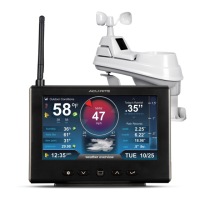
The AcuRite Professional Weather Center, models 01512 and 01531, is a comprehensive weather monitoring system designed to provide accurate, personalized weather information. It consists of a 5-in-1 outdoor sensor and a color display unit, offering a wide range of features for both real-time data and forecasting.

Function Description:

The core function of the AcuRite Professional Weather Center is to measure and display various environmental parameters, including outdoor and indoor temperature, humidity, wind speed, wind direction, and rainfall. It utilizes a patented Self-Calibrating Forecasting algorithm that analyzes pressure changes over time to generate a personalized 12 to 24-hour weather forecast specific to your backyard location. The system also includes a "Weather Ticker" feature that automatically flashes real-time weather information and alerts as text on the display screen. Historical data tracking for rainfall (today, previous events, month, year, all-time) is also a key feature.

Important Technical Specifications:

  • Temperature Range:
    • Outdoor: -40°F to 158°F (-40°C to 70°C)
    • Indoor: 32°F to 122°F (0°C to 50°C)
  • Humidity Range:
    • Outdoor: 1% to 99%
    • Indoor: 1% to 99%
  • Wind Speed: 0 to 99 mph (0 to 159 kph)
  • Wind Direction Indicators: 16 points
  • Rainfall Measurement: 0.01 inches (0.25 mm) and up
  • Wireless Range: 330ft / 100m (depending on home construction materials)
  • Operating Frequency: 433 MHz
  • Power:
    • Display: 4.5V, 250mA AC adapter (primary); 6 x AA alkaline batteries (optional backup)
    • Sensor: 4 x AA alkaline or lithium batteries
  • Data Reporting:
    • Wind Speed: 18 second updates
    • Wind Direction: 30 seconds
    • Outdoor temperature & humidity: 36 second updates
    • Indoor temperature & humidity: 60 second updates

Usage Features:

The display unit features a color LCD screen with adjustable backlight settings (High, Medium, Low, and Auto Dim mode). The Auto Dim mode automatically adjusts brightness based on the time of day and year, optimizing visibility and power consumption. Setup involves setting the A-B-C switch on both the sensor and display to the same channel for synchronization. Batteries are required for the 5-in-1 sensor, with lithium batteries recommended for temperatures below -4°F (-20°C). The display unit can be powered by the included AC adapter, with optional AA batteries for backup. The display allows users to set the time, date, and preferred units for temperature (°F or °C), wind speed (MPH, KPH, Knots), rainfall (in or mm), and pressure (inHg or hPa). The "Weather Select" button allows users to cycle through various data categories like heat index, dew point, wind chill, "feels like" temperature, days with rain this month, and days since last recorded rainfall. The "RAINFALL" button provides access to historical rainfall data. The "Learning Mode" icon on the display indicates the self-calibration process for the weather forecast, which typically disappears after 14 days, signifying that the unit is tuned to your location for accurate predictions. Alerts are provided for wind speed (over 50 mph), storm conditions (barometric pressure drops), and heat index/wind chill extremes. The "Weather Ticker" provides continuous updates and alerts in text format.

Maintenance Features:

  • Display Care: Clean with a soft, damp cloth. Avoid caustic cleaners or abrasives. Keep free of dust, dirt, and moisture. Regularly clean ventilation ports with a gentle puff of air.
  • 5-in-1 Sensor Care:
    • Cleaning: Clean with a soft, damp cloth. Avoid caustic cleaners or abrasives that could damage the rain collection funnel or solar cell.
    • Insect Prevention: To prevent obstructions and data interruptions, spray the sensor with a household insect repellent, following the repellent's instructions.
    • Snow & Freezing Weather: The sensor is designed to withstand freezing conditions. If the rain collector cup fills with snow and melts, it will register as rain.
    • Rain Collector Cup: Remove and empty the debris filter located in the rain collection funnel by gently squeezing and pulling it out from the top.
    • Wind Vane & Anemometer: Remove any foreign matter to ensure free movement. Lubricate with graphite powder or spray lubricant if needed.
  • Calibration: Indoor/outdoor temperature, humidity, and barometric pressure can be calibrated on the display to improve accuracy, especially if sensor placement or environmental factors affect data. The rain gauge can also be calibrated using a specific procedure involving a measured amount of water to ensure accurate rainfall readings. Calibration adjustments are made via screws on the bottom of the 5-in-1 sensor.
  • Troubleshooting: The manual provides solutions for common issues such as no outdoor sensor reception, flashing or dashed outdoor temperature, inaccurate forecasts, no rainfall readings, inaccurate wind readings, and a non-working display screen. These solutions often involve relocating units, checking batteries, ensuring proper A-B-C switch settings, clearing debris, and resetting the display.

The AcuRite Professional Weather Center is designed for ease of use and provides comprehensive weather data to help users plan their day with confidence.

AcuRite 01531 Specifications

General IconGeneral
Display TypeLCD
Indoor Temperature Range32°F to 122°F (0°C to 50°C)
Outdoor Temperature Range-40°F to 158°F (-40°C to 70°C)
Humidity Range1% to 99%
Wireless Range330 ft (100 m)

Related product manuals