11
t
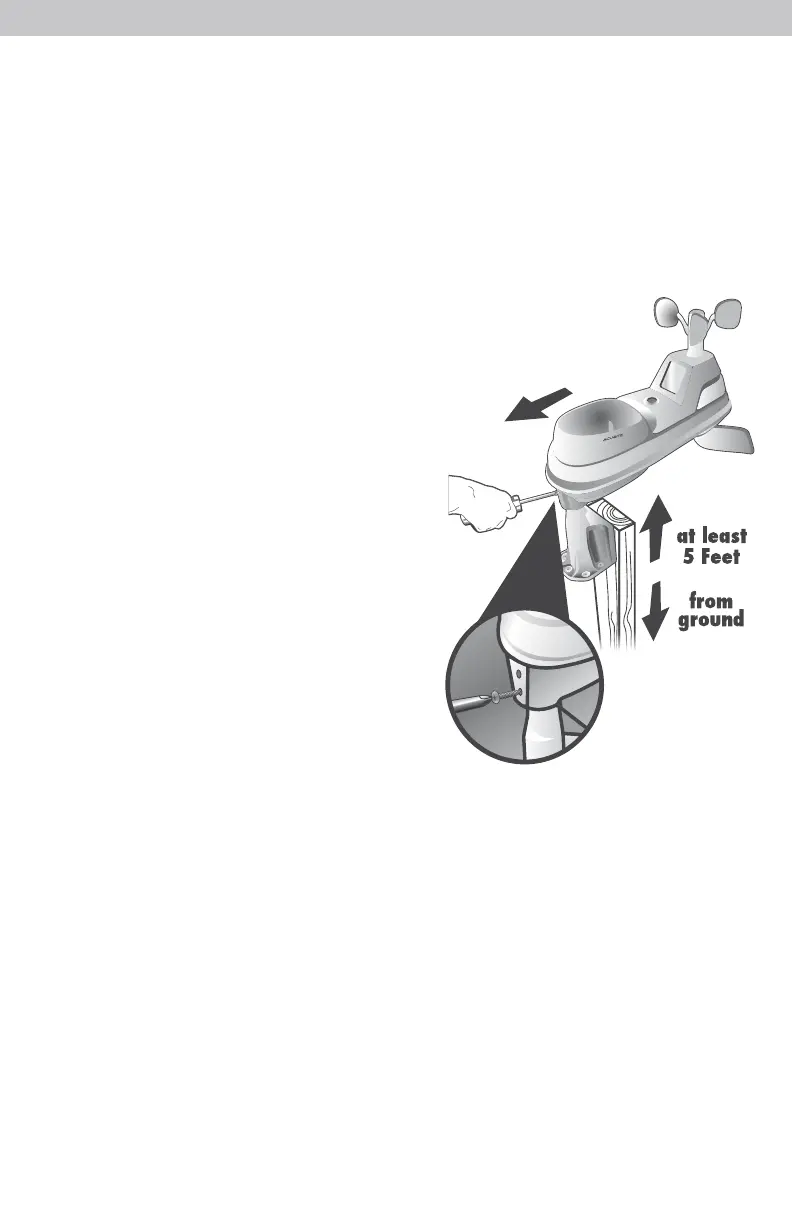
at least
5 Feet
l from
~
'f ground
SOUTH
(1.5 meters)
NO OBSTRUCTIONS
ABOVE OR AROUND
5-in-1 Sensor Installation Guidelines
INSTALLATION HEIGHT Mount the sensor at a minimum height of 5 feet (1.5 meters)
off the ground, in an open area. Higher is better for wind measurements - The National
Weather Service recommends 33 feet (10 meters) high!
MOUNTING OPTIONS The included mounting bracket it designed to screw directly
onto wooden posts or surfaces that are 2x4 (
4.5cm x 9.5cm) or larger. The sensor can
also be mounted directly to common 3/4” (
20mm) steel pipe (available at hardware
stores and home centers).
LEVEL INSTALLATION Use the bubble level
(included on top of sensor) to ensure level
installation for accurate wind measurement.
SOLAR CELL INSTALLATION Install the sensor
with the solar cell facing SOUTH. This ensures
the cell receives as much sun as possible and
orients wind direction.
5-in-1 Sensor Installation
1. Fasten mounting base (included) to a post or
pole (not included) using the 4 longer screws
included in the hardware bag.
2. Insert the mounting base into the hole on the
bottom of the sensor.
3. Make sure the arrows on the top of the sensor
are pointed in the proper direction and the
bubble level is centered. The solar cell should
be facing south to properly orient the wind
direction.
4. Fasten the sensor into the mounting base
using the 2 shorter screws included in the hardware bag.
The 5-in-1 sensor is now
ready to use.
Clear Data Collected During Installation
When installation is complete, press and release the “CLEAR RECORD/RESET” button,
located on the back of the display inside the battery compartment, to clear erroneous
data from the display.
Basic Setup is Complete
The 5-in-1 sensor will now synchronize with the display. It may take a few minutes
for synchronization to complete. If both or one of the units appear to be functioning
improperly, please refer to the troubleshooting section.



 To Next Page