12
A 2 0 0 0 - S E R I E S A M P L I F I E R U S E R G U I D E
©2012 Indy Audio Labs, LLC all rights reserved / Revision20120420
Document No. 1000571
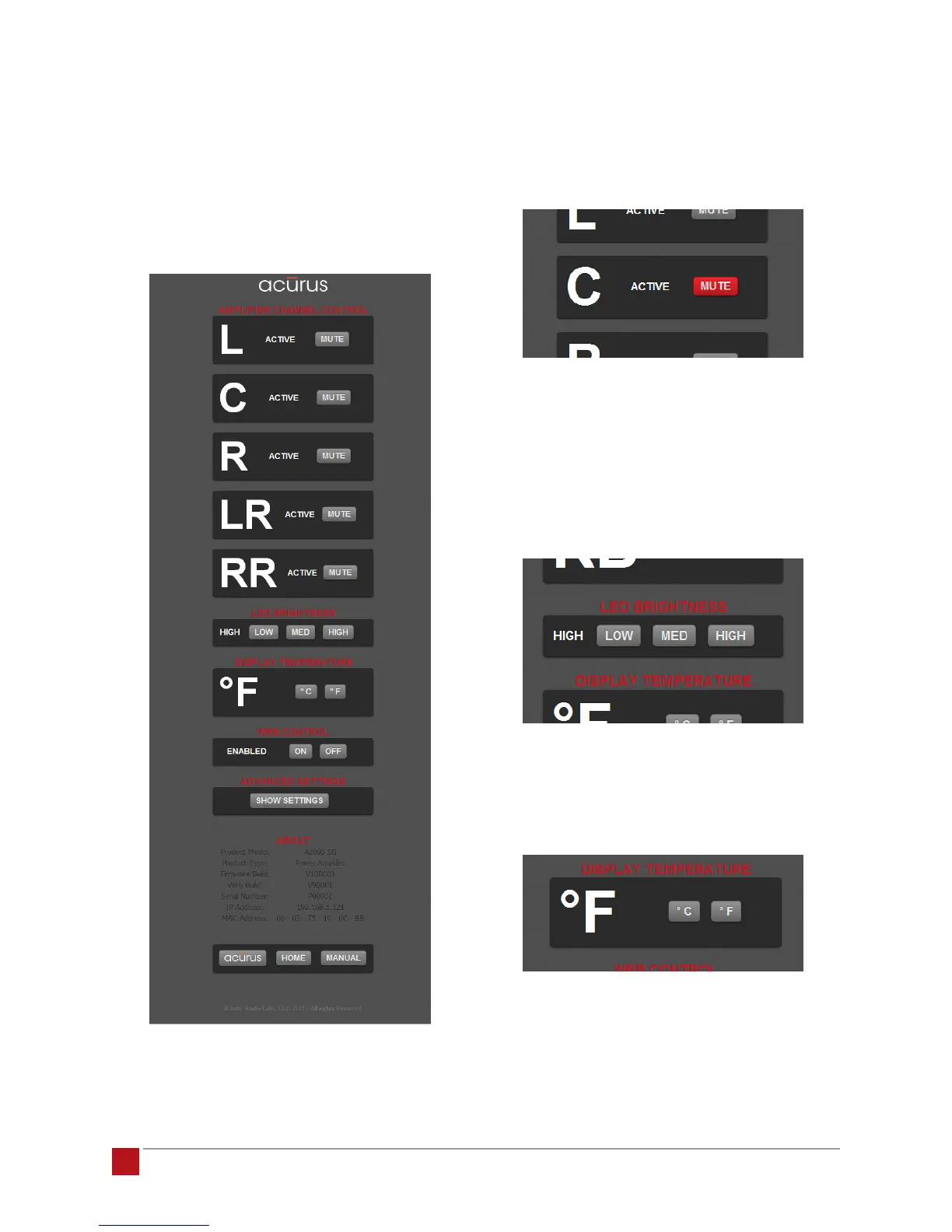
Settings Page: The top section of the settings page
shows each channel’s functional status (either “AC-
TIVE” or “PROTECT”) along with an individual channel
mute button. A channel reports PROTECT status if an
overtemp condition is encountered. The channel input is
automatically disconnected until the temperature sensed
is back within operating range.
Individual Channel Mute: The individual channel mutes
allow for simple troubleshooting and setup of individual
channels, particularly in a multi-channel surround setup.
When muted, the mute button illuminates red as below:
Front Panel Illumination Brightness Control: The front
panel status ring may be too bright for installations with
low lighting levels or more dimly illuminated companion
equipment. This section of the control interface allows
the default brightness level to be customized from high
to medium or low.
Temperature Display Units: This section toggles the
displayed temperature units from degrees F to degrees
C and vice versa.


 To Next Page