1
2
3
4 5 6 7 8
en
5
EN
660Y1400 - A
APPLIANCE DESCRIPTION
Description
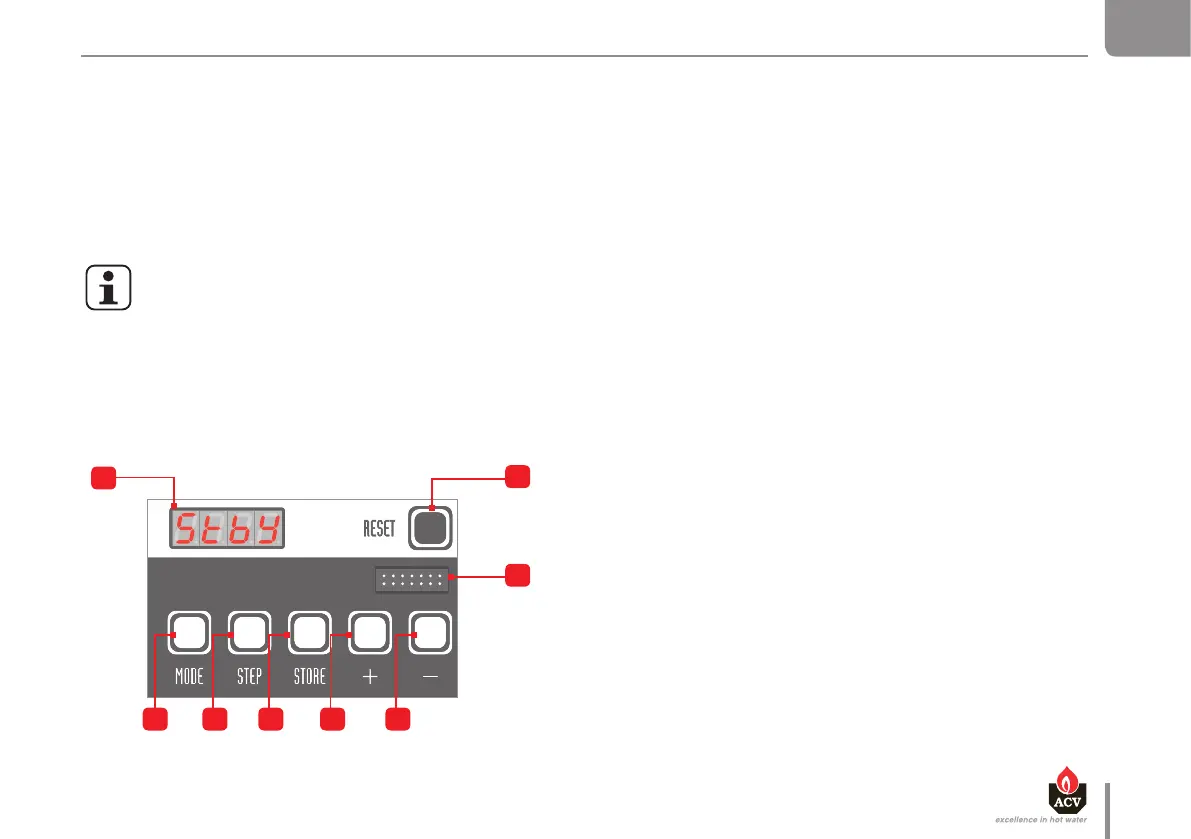
MCBA - Allows to set-up the boiler operation and more specically, to dene the
required temperature of the Domestic Hot Water (DHW) and the Central Heating
(CH) and to activate/deactivate the DHW and heating modes using the display
and the following keys:
1. Display: Indicates the modes and appliance settings through the use
of various codes.
2. "Reset" key: Allows to reset the appliance.
3. Connector: Allows to connect a laptop equipped with the appropriate
software to the MCBA.
4. "Mode" key: Allows to toggle the modes and dene various parameters.
5. "Step" key: Allows to scroll through the various functions of a mode.
6. "Store" key: Allows to save the dened settings.
7. "+" key: Allows to increase the displayed value.
8. "-" key: Allows to decrease the displayed value.
MCBA INTERFACE
The MCBA is an electronic control module and a regulator for gas boilers, developed by Honeywell and tted with a microprocessor.
It includes several basic functions: temperature control, ame monitoring, heating pump control, fan control, 3-way valve control, electrical ignition and boiler
control.
Its control panel also displays, through codes, the boiler operational condition, the mode in which it is operating and the possible faults in the system. Finally,
it allows to set the system up according to the type of installation.
Using a special maintenance code to be entered in the MCBA interface, the qualied installers can access parameters and therefore adjust the boiler settings
to specic requirements. The parameters are normally factory-preset for all normal applications.
For more information on how to use the MCBA and on the specic settings, refer to the section "MCBA Parameters for the Specialist", page 14 of this manual.
General remarks
If a fault occurs, the MCBA disables the appliance and displays an error code: the display flashes and the first character is "E" followed by the fault
number.
- Reset the appliance by pressing the "RESET" key of the MCBA interface.
- If the error code displays again, refer to the section "Blockage and Error Codes", page 30 of this manual


 To Next Page