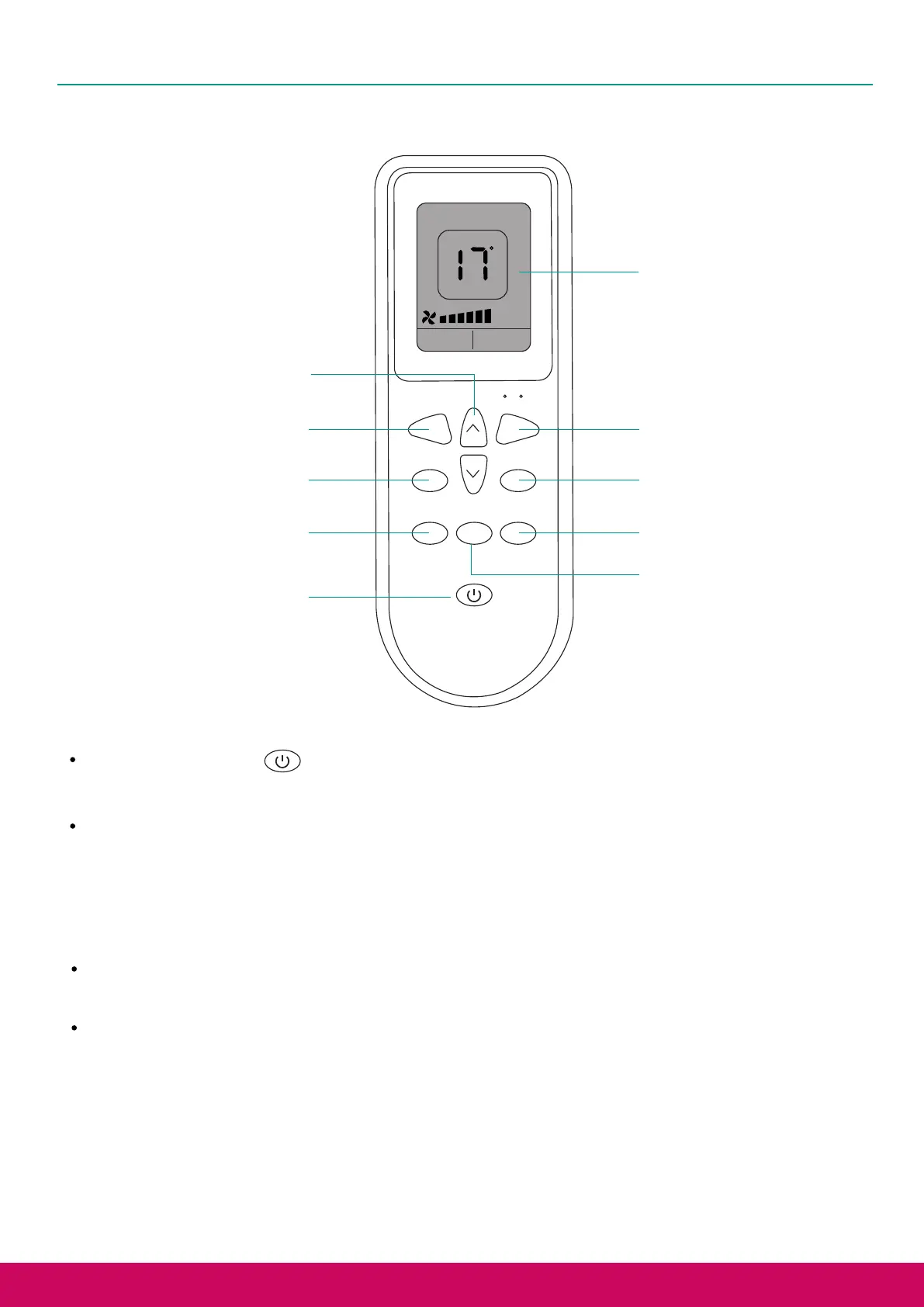
Remote Control
C
LED
SWING MODE
SPEED TIMERSLEED
C/ F
Display
Celsius/Fahrenheit
Switch
Mode Switch
Timer Setting
Wind Speed Adjustment
LED Wake Up
Swing Mode
Power ON/OFF
Air volume
adjustment
Temperature Adjustment
Push the power button on the remote control, to turn the power of the Air Conditioner on.
Push the power button again to turn it off.
Push the "MODE" button to switch between the four modes of
Cooler/Dehumidication/Fan/Heater. On the Air Conditioner control panel, the corresponding
function indicator lights will turn on.
Push the "SWING" button to make the air outlet swing from left to right. Push the “SWING” button
again to turn this mode off.
Push the "SPEED" button to switch between high speed and low speed. The corresponding speed
will be displayed at the bottom of the remote control display (high speed is displayed as 5 bars
where low air speed is displayed as 2 bars), and the corresponding indicator light will be
displayed on the Air Conditioner.
This function can only be used in the 3 modes of cooling/natural air/hot air.
11
Power on/off and Mode Switch
Swing Mode



 To Next Page