ADJ Products, LLC - www.adj.com - Element QA User Manual Page 24
Element QA UC IR & Airstream Control
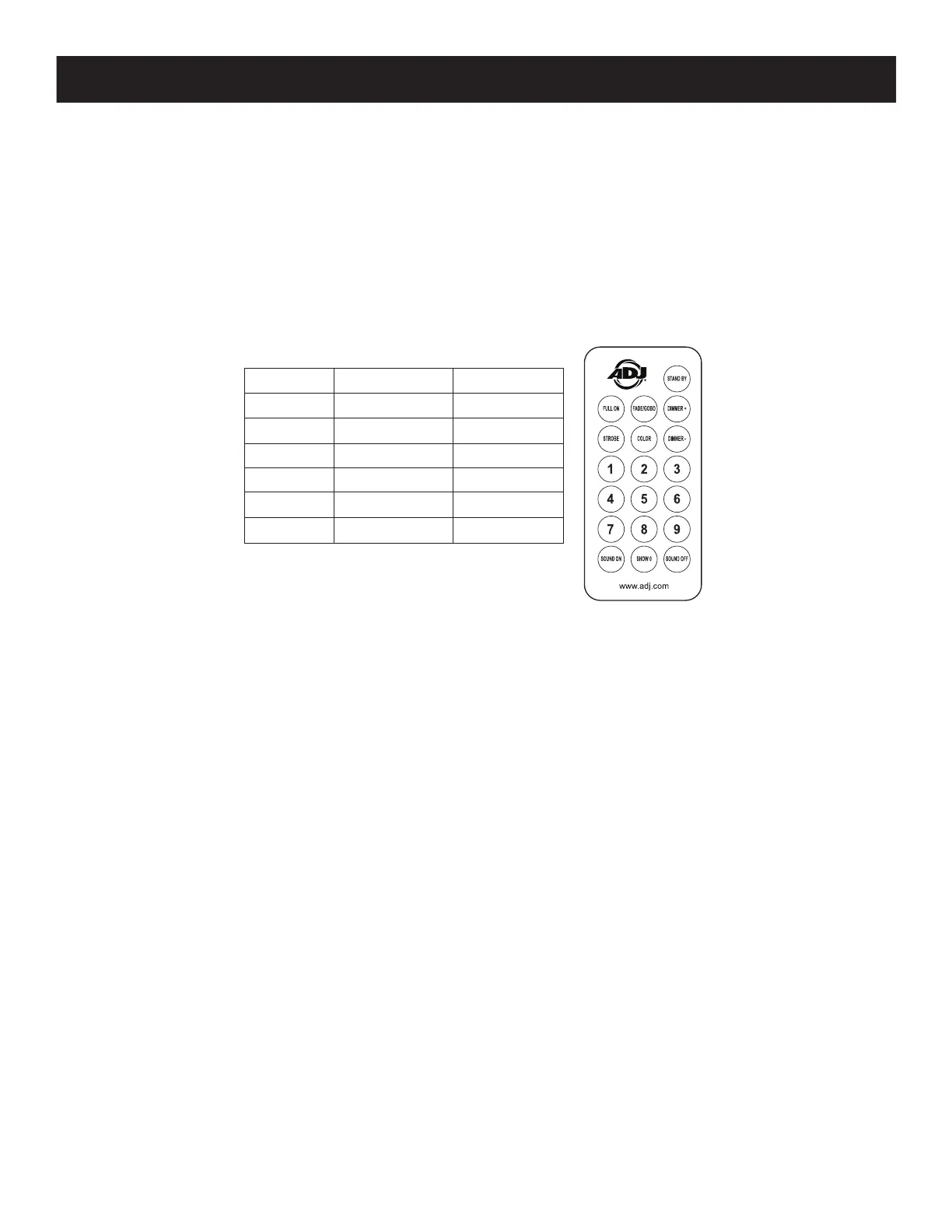
The UC IR (sold separately) infrared remote gives you control of various functions (See below). To
control the fixture you must aim the remote at the front of the fixture and be no more than 30 feet
away. To use the ADJ UC IR you must first activate the fixtures infrared sensor, to activate the sensor
please see the instructions on page 22.
The Airstream IR (sold separately) remote transmitter plugs into the headphone jack of your iOS
phone or tablet. To control your IR fixture you must raise the volume to the maximum on your iOS
phone or tablet and aim the transmitter at the fixture sensor and be no more than 15 feet away. After
you have purchased the Airstream IR transmitters, the app is a free download from the app store for
your iOS phone or tablet. The app comes with 3 pages of control depending on the fixture you are
using. Please see below for the IR functions including the corresponding app page.
Standby
FullON Fade/Gobo
Strobe Color
1 2 3
4 5 6
7 8 9
SoundOn Show0 SoundO
Works with App page 1.
STAND BY - Pressing this button will blackout the fixture. Press the button again to return to the initial
state.
FULL ON - Press this button to fully light up the unit.
FADE/GOBO - This button can activate color change mode, color fade mode, or combination color
change and fade mode. Each press of the button will switch through the 3 different modes. Use the numeral
buttons 1-9 to select the program number within your desired mode. Use the dimmer buttons to adjust
the output intensity. Note: Running speed is not adjustable using the IR control functions.
Example: In color change mode (AJXX), press the numeral buttons “1+3” to run color change program “13”.
In color fade mode (AFXX), press the numeral button “7” to run color fade program “7”.
Note: Color change and fade combination mode has only one program.
“DIMMER +” and “DIMMER -” - Use these buttons to adjust the output intensity in operating mode.
STROBE - Press this button to activate strobing. Use buttons 1-4 to adjust the strobe speed. “1”
being the slowest, “4” being the fastest.
COLOR - Press this button to activate color macro mode. Use the numeral buttons 1-9 to select your
desired color. Use the dimmer buttons to adjust the output intensity.
Numeral Buttons 1-9 - Use buttons 1-9 to select your desired color in static color mode, or your desired
program in color fade mode and color change mode. In static color mode, color fade mode, or color
change mode, press the corresponding numeral buttons to select your desired color or program.
SOUND ON & OFF - Use the buttons to activate and deactivate sound active mode.
SHOW 0 - Press this button along with any single numeral button to access a static color, or program
within color change mode and color fade mode.







 To Next Page