ADJ Products, LLC - www.adj.com - Element QA User Manual Page 8
Element QA Overview
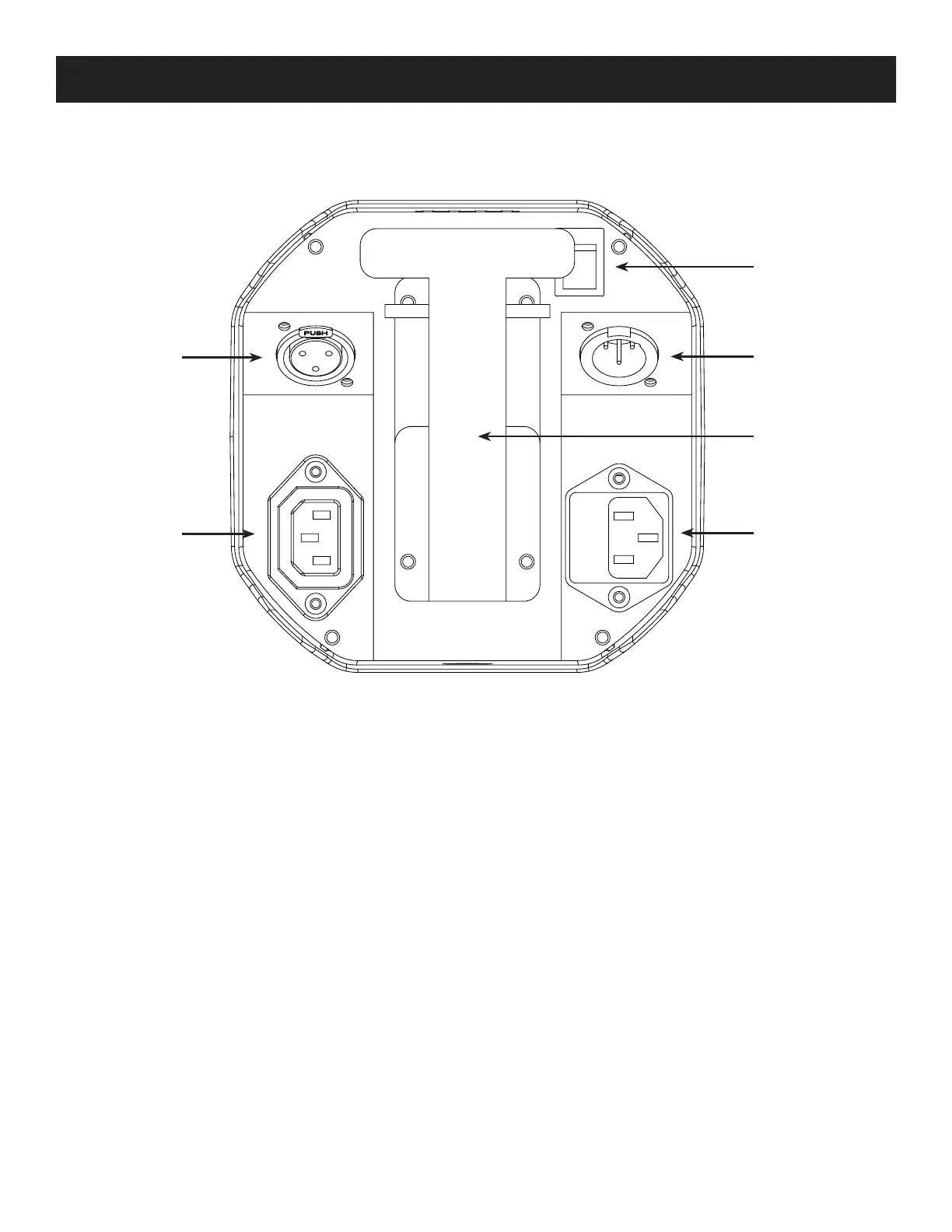
1. Battery On/Off Switch: This switch is used to turn ON battery power and also turn ON the PCB
output. See page 19 “LOAD SETTING”
to activate.
2. 3-Pin DMX In: This input is used to send a DMX signal to a connected unit or for primary-
secondary set up.
3. Kickstand: This kickstand is used to angle the unit to various degrees. There are 3 different
degree levels. Note: Be very cautious at the degree in which you angle the unit at, due to the fact
that it could fall over.
4. Power Input & Fuse Holder: This input is used to connect the included I.E.C. power cord. After
connecting the power cord, plug the other end into a matching power source. Located inside the
power socket is the fuse housing. See page 27 for fuse replacement.
5. Power Output: This connection is used to receive a incoming power source from another unit.
6. 3-Pin DMX Out: This output is used to send a signal to a connected unit.
1
5
6
4
3
2
DMX Connections and Power Connections: All connections are located underneath the unit.
You will nd all connections and other features pointed out below.







 To Next Page