The ADJ Micro Galaxian II is a compact, bright, green and red laser fixture designed for entertainment purposes. It operates as a standalone unit with two primary operating modes: Sound Active Mode and Auto Mode. For optimal visual effects, the use of fog or special effects smoke is recommended to enhance the beam projections.
Function Description:
The Micro Galaxian II projects patterns of green and red laser light. It features a 30mW green laser and an 80mW red laser, producing an 82-degree beam angle. The device includes a microphone to detect music beats for Sound Active Mode, allowing the laser patterns to synchronize with the rhythm. In Auto Mode, the unit cycles through pre-programmed patterns at either a fast or slow speed. Control over the fixture's functions, including mode selection, rotation, speed, color, and strobe effects, is provided via the included UC Laser IR wireless remote control. An optional Airstream IR remote transmitter (sold separately) can also be used with an iOS phone or tablet for control, utilizing a dedicated app.
Important Technical Specifications:
- Model: Micro Galaxian II
- Voltage: 100~250V, 50/60 Hz (Auto Sensing Voltage)
- Power Consumption: 9W
- Lasers: 30mW Green Diode, 80mW Red Diode
- Beam Angle: 82 Degrees
- Dimensions: 5" (L) x 6.75" (W) x 5" (H) / 130mm (L) x 172mm (W) x 130mm (H)
- Colors: Red & Green
- Weight: 2 lbs / 0.6 kgs
- Duty Cycle: None
- Sound Active: Yes
- Working Position: Any Safe, Secure Position
- Warranty: 1 Year (365 Days)
- Laser Accession Number: 1020658-000
- Laser Classification: Class IIIa Laser Product (Max Output: <4.9mW, Wavelength: 635~650 nm) - Note: Internally, the laser uses Class 3B levels before splitting into multiple Class 3R beams.
Usage Features:
- Operating Modes:
- Sound Active Mode: The unit responds to the beat of music. A status LED on the front of the unit flashes with each beat or sound when this mode is active. The microphone sensitivity can be adjusted using a small screwdriver.
- Auto Mode: Offers two sub-modes:
- Fast Auto Mode: Laser patterns cycle quickly. The red LED on the front of the unit flashes quickly.
- Slow Auto Mode: Laser patterns cycle slowly. The red LED on the front of the unit flashes slowly.
- Control Interface:
- On-board Buttons: "Mode" button to switch between operating modes, "ON/OFF" button to power the unit on or off.
- LED Indicators: "Status LED" indicates the active operating mode, "Power LED" indicates power activation.
- IR Sensor: Receives signals from the UC Laser IR remote control.
- UC Laser IR Control (Included):
- STAND BY: Blackouts the fixture.
- PATTERN: Activates random rotation.
- PATTERN "+": Activates clockwise rotation.
- PATTERN "-": Activates counter-clockwise rotation.
- SPEED: Activates random rotation speed.
- SPEED "+": Increases rotation speed.
- SPEED "-": Decreases rotation speed.
- COLOR BUTTONS (R, G, R+G): Selects desired laser colors. (Note: B, G+B, B+R, and R+G+B buttons have no active function for this fixture).
- STROBE: Activates the strobe effect (press and hold).
- SOUND: Activates sound active mode.
- AUTO FAST: Activates fast auto mode.
- AUTO SLOW: Activates slow auto mode.
- Operating Range: Up to 30 feet when aiming the remote at the fixture's front.
- Airstream IR Remote Transmitter (Optional, Sold Separately):
- Plugs into the headphone jack of an iOS phone or tablet.
- Requires the Airstream IR app (free download).
- Volume on the iOS device must be set to maximum.
- Aim the transmitter at the fixture sensor.
- Operating range up to 15 feet.
- This unit works with App page 3 of the Airstream IR app.
- Mounting: Includes a dual hanging bracket for secure installation. Always use proper lighting safety cables when hanging overhead.
- Safety Precautions:
- Mount the device to prevent direct eye exposure to the laser beam.
- Ensure proper ventilation (at least 6 inches/15cm clearance from walls).
- Do not operate if damaged, frayed power cord, or if the housing is open.
- Intended for indoor use only.
- Disconnect from main power during long periods of non-use.
- Never point lasers at people, animals, aircraft, or highly reflective surfaces.
- Do not use if the laser emits only one or two beams, as this may indicate damage to the diffraction grating optic, potentially leading to higher laser levels.
- Always set up laser effects so that all laser light is aimed at least 3 meters (9.8 feet) above the floor where people may be standing.
Maintenance Features:
- Cleaning:
- Periodic cleaning of internal and external lenses is necessary to optimize light output, especially due to fog residue, smoke, and dust.
- Use normal glass cleaner and a soft cloth for the outside casing.
- Clean external optics with a microfiber cloth.
- Ensure all parts are completely dry before reconnecting power.
- Cleaning frequency depends on the operating environment; monthly cleaning is recommended for heavy usage to ensure longevity and crisp beam output.
- Troubleshooting:
- No laser output: Check power connection, ensure unit is not in blackout mode. In cold temperatures, the laser diode may require 3-5 minutes to generate a beam.
- No response to sound: Sound reaction is primarily triggered by low frequencies (bass); quiet or high-pitched sounds may not trigger a response.
- Service: There are no user-serviceable parts inside. Do not attempt repairs yourself, as this will void the warranty. Contact ADJ customer support for service needs.

 Need help?
 General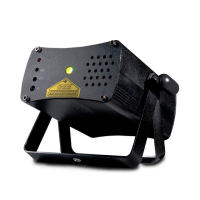

 To Next Page