
 Need help?
Do you have a question about the ADJ PinPoint Gobo COLOR and is the answer not in the manual?
Contact information for product service, support, questions, and suggestions.
Outlines specific warranty durations for different product types, including LED products.
Guidelines for safely handling batteries, including avoiding short circuits and mechanical shock.
Explains the three LED modes and how to switch between them using the control panel or remotes.
Describes using the X-Clip for ceiling installation, including safety cable requirements.
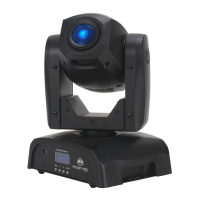
The ADJ PinPoint Gobo Color is a versatile, battery-powered GOBO projector designed for a variety of lighting applications. Its primary function is to project custom or pre-designed gobos, allowing users to create specific patterns, logos, or atmospheric effects. Beyond gobo projection, the unit can also function as a pinspot, ideal for highlighting tables, decor, architecture, or for generating special effects in various settings.
One of the key usage features of this device is its power flexibility. It can operate on either DC power, by plugging into a DC power source, or on battery power, offering portability and convenience for events where power outlets are scarce or undesirable. The unit incorporates a 10-Watt Quad (RGBA 4-in-1) LED, providing a wide range of color options for both gobo projection and pinspot applications.
The PinPoint Gobo Color includes four standard removable gobos, offering immediate creative options. A significant design feature is its easy replaceable gobo holder, which allows users to quickly interchange the supplied gobos or insert custom gobos. This flexibility makes the device adaptable to different themes and events. Additionally, a frost filter is included, which can be installed to diffuse the beam, transforming the unit from a sharp gobo projector or pinspot into a wider wash light. This expands its utility for broader area illumination or softer ambient effects.
Adjustability is another prominent feature. Sliders located on the side of the fixture enable manual adjustment of both focus and beam angle. For a tighter, narrower beam, the first/front knob should be moved towards the front of the fixture, and the second knob towards the rear. Conversely, for a wider beam, both knobs should be moved towards the middle of the fixture. This manual control allows for precise tailoring of the light output to suit specific needs.
The device offers multiple operating modes to conserve battery life and adapt to different performance requirements. These include a "full on" mode, a "3.3W" mode, and an "energy saving" mode. In energy saving mode, the LED brightness gradually decreases when the battery life falls below 80%, effectively extending the operational time. This mode is particularly useful for longer events where consistent brightness is not critical, or where battery life needs to be maximized. When operating on DC power, the energy saving mode is not available. The unit provides visual cues (LED flashes) to indicate which operating mode is active.
For user convenience, the PinPoint Gobo Color features a "Mode Button Lock." After 30 seconds of inactivity, the MODE button locks itself to prevent accidental changes. To unlock, the MODE button must be pressed and held for 3 seconds. The operating modes cycle through a sequence of 64 Color Macros, Fast Fade, Fast Change, Slow Fade, Slow Change, and LED Off. The unit remembers the last operating mode when powered off and back on.
Remote control capabilities further enhance the device's usability. It is compatible with both the ADJ UC IR remote and the ADJ LED RC2 infrared remote (both sold separately). These remotes provide comprehensive control over various functions, including blackout, full on, fade/gobo modes, dimmer adjustments, strobe effects, static color selection, and show modes. The UC IR remote allows for switching between operating modes by holding the STAND BY button for 5 seconds, while the ADJ LED RC2 uses the BLACKOUT button for the same purpose. The remotes must be aimed towards the front of the fixture, with a maximum range of 30 feet.
Installation options are designed for flexibility. The unit comes with an X-Clip for installation from drop-down ceilings, ensuring secure mounting. For magnetic surfaces, the X-Clip base can be removed by unscrewing an eye-hole bolt, allowing the unit's magnetic base to adhere directly. Regardless of the method, professional installation is recommended, and the device should be placed out of reach of the general public. Safety cables are advised for suspended installations.
The device also incorporates a low battery warning system. When the battery power drops below 30%, the red and blue LEDs will alternately flash rapidly for 5 seconds each time the unit is switched ON, signaling that charging is required.
Maintenance features are straightforward. To optimize light output and prolong the device's life, periodic cleaning of the internal and external optical lenses is necessary. This involves using normal glass cleaner and a soft cloth to wipe down both the outside casing and the external optics. It is crucial to ensure all parts are completely dry before reconnecting the unit to power. The frequency of cleaning depends on the operating environment, with factors like smoke, fog residue, dust, and dew influencing how often maintenance is needed.
Battery charging is simple: plug the included power supply into the unit's input and then into a matching power supply. A full charge takes approximately 6.5 hours when the power switch is off. Proper battery storage is also emphasized; during long periods of non-use, the battery should be stored at room temperature with at least a 50% charge and recharged every 6 months to prolong its life and prevent the charge from falling below 30%. The manual also provides detailed battery precautions, including warnings against short-circuiting, mechanical shock, disassembly, exposure to heat, fire, or liquids, and the importance of proper disposal. It advises against using damaged batteries and recommends contacting ADJ customer support for battery replacement.
 General
| LED | 1 x 10W 4-in-1 RGBA LED |
|---|---|
| Beam Angle | 12-25 Degrees |
| Power Adapter | DC8.7V 1A |
| Power Consumption | 11W |
| Battery Charge Time | 6.5 Hours |
| Battery Life (Full On) | 5 Hours |
| Battery Life (3.3W Mode) | 10 Hours |
| Battery Life (Energy Saving Mode) | 18 Hours |
| Gobo Size Outer | 25.8mm |
| Gobo Size Inner | 19mm |
| Gobo Thickness | 0.2mm |
 Weight and Dimensions
| Weight | 3 lbs./ 1.1 Kgs. |
|---|---|
| Dimensions | 9.75”(L) x 2.75”(W) x 4”(H) 245 x 70 x 102mm |









 To Next Page
