102
Chapter 7: Applying effects
Shared effects controls
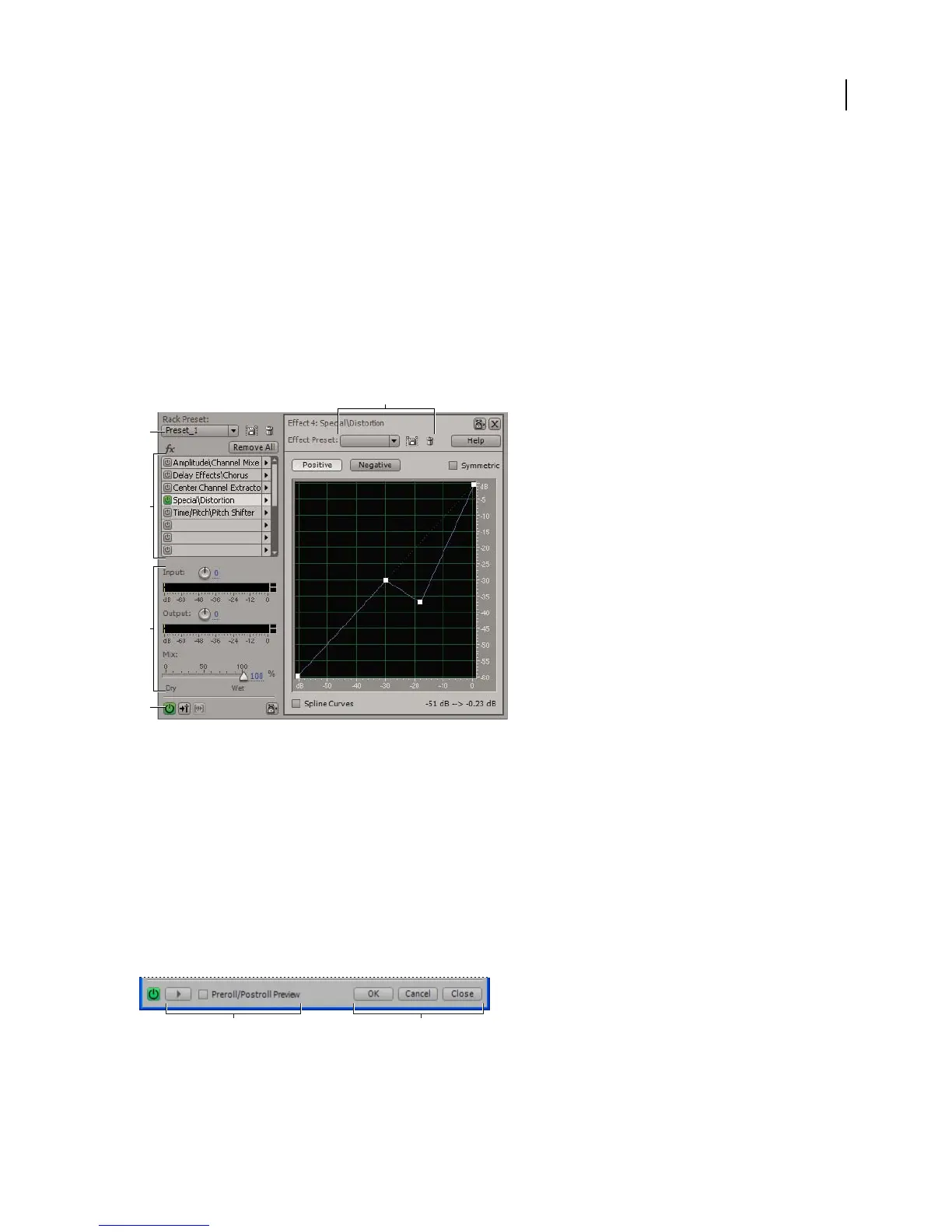
Mastering Rack and Effects Rack overview
Two similar features let you apply groups of effects: the Mastering Rack in Edit View, and the Effects Rack in Multi-
track View. In both racks, you can insert, edit, and reorder up to 16 effects, optimize mix levels, and store favorite
presets.
Controls shared by the Mastering Rack and Effects Rack
A. Effect Preset controls B. Rack Preset controls C. Effect slots D. Level controls E. Main Power button
See also
“Apply groups of effects in Edit View” on page 106
“Apply effects in Multitrack View” on page 107
“Comparing Edit View and Multitrack View” on page 20
Controls unique to the Mastering Rack and Edit View
In Edit View, the Mastering Rack provides Preview and OK buttons that you use to hear and permanently apply
effects. If you click OK or Close, the Mastering Rack stores your settings so you can quickly reapply them.
Controls unique to the Mastering Rack and Edit View
A. Preview button with Preroll/Postroll option B. Buttons that apply or cancel permanent edits
B
A
D
C
E
A B



 To Next Page