ADOBE AUDITION 3.0
User Guide
119
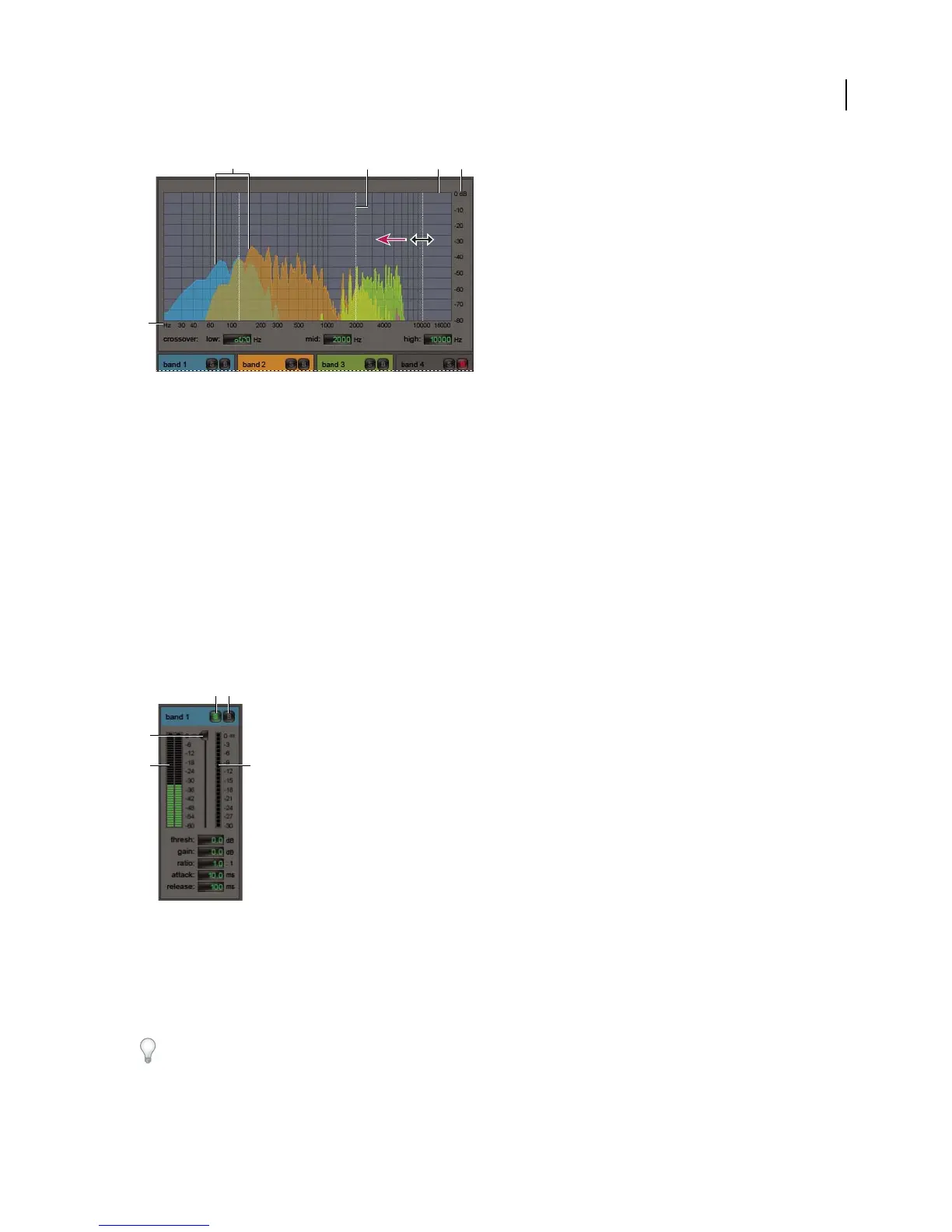
Adjusting a crossover frequency in the Multiband Compressor
A. Frequency bands B. Crossover markers C. Bypassed band (no processing applied) D. Amplitude scale E. Frequency scale
See also
“Mastering effect” on page 161
“Applying effects in Edit View” on page 106
“Applying effects in Multitrack View” on page 107
“Use effect presets” on page 104
“Add preroll and postroll to effects previews” on page 107
Multiband Compressor options
Crossover Sets the crossover frequencies, which determine the width of each band. Either enter specific Low,
Midrange, and High frequencies, or drag the crossover markers above the graph.
Band-specific controls in the Multiband Compressor
A. Solo B. Bypass C. Threshold slider D. Input Level meters E. Gain Reduction meters
Solo buttons Let you hear specific frequency bands. Enable one Solo button at a time to hear bands in isolation, or
enable multiple buttons to hear two or more bands together.
Bypass buttons Bypass individual bands so they pass through without processing.
Alt-clickSoloorBypassbuttonstoquicklyapplyauniquesettingtooneband.
A B C D
E
C
D
E
A B



 To Next Page