ADOBE FRAMEMAKER 10
MIF Reference
13
<Pgf
<
property value
>
<
property value
>
...
>
A Pgf statement is quite long, so learning how to relate its substatements to the paragraph’s properties may take some
practice. Usually a MIF statement name is similar to the name of the setting within a dialog box. The following
examples show the property dialog boxes from the Paragraph Designer with the related
Pgf substatements.
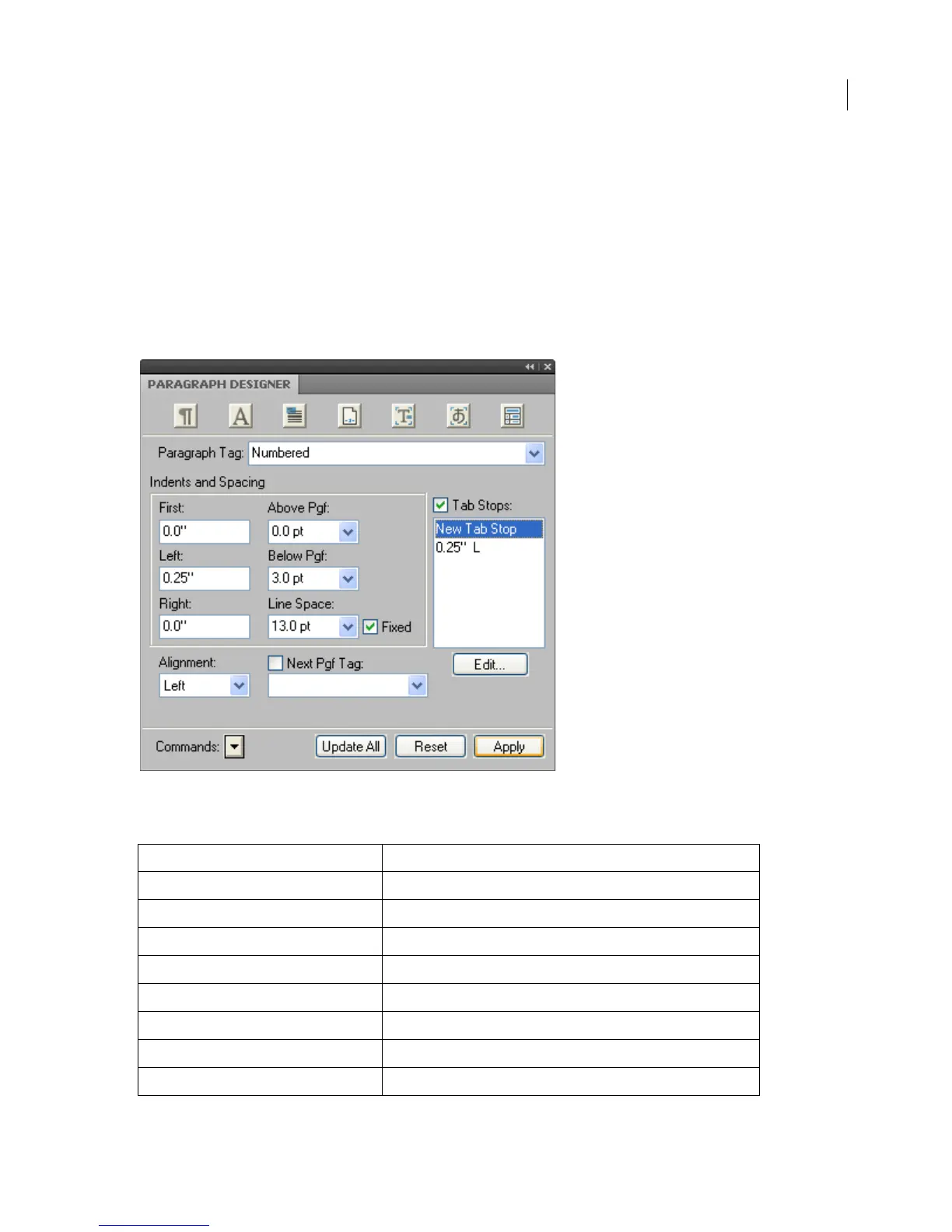
Suppose you have created a paragraph format for a numbered list item with Basic properties defined as follows in
the Paragraph Designer.
Basic properties
The following table shows the corresponding MIF statements:
In MIF file In Paragraph Designer
<PgfTag `Numbered'>
Paragraph Tag
<PgfFIndent 0.0">
First Indent
<PgfLIndent 0.25">
Left Indent
<PgfRIndent 0.0">
Right Indent
<PgfAlignment Left >
Alignment
<PgfSpBefore 0.0 pt>
Space Above 
<PgfSpAfter 0.0 pt>
Space Below 
<PgfLeading 2.0 pt>
Line Spacing (leading is added to font size)



 To Next Page