19
aee.com
DE
EN
ES
PT
IT
EL
FR
NL
PL
CS
HU
SV
FI
NO
RU
DA
1.Total number of files
2.Wi-Fi status
3.Battery status
4.Remaining recording time
5.Recording Duration
6.Videorecordingmode
7.Single shot mode
8.Maximizepreview
9.Currentstateicon/Start/Stopbutton
10.Parametersettings
11.Zoom out
12.Zoom in
13.Playbackmode
14.Fast shot mode
In case of synchronous operation of the camera and the Wi-Fi based remote control,
hosts will give priority to the operation command from the camera.
Aboveimagesforreferenceonly,subjecttoouravailableApp.
The mobile device must be used within a distance of max. 100 meters from the S50+
inanobstacle-freeandhorizontalangle.
Thereal-timepreviewisunavailableforvideorecording720P100f/120fmodes.
2. Operating Instructions for Wi-Fi Control Interface
a.VideoRecording
- ClicktheVideorecordingmodeicon" ". The current state icon will display as " ",
click it to start / stop video recording.
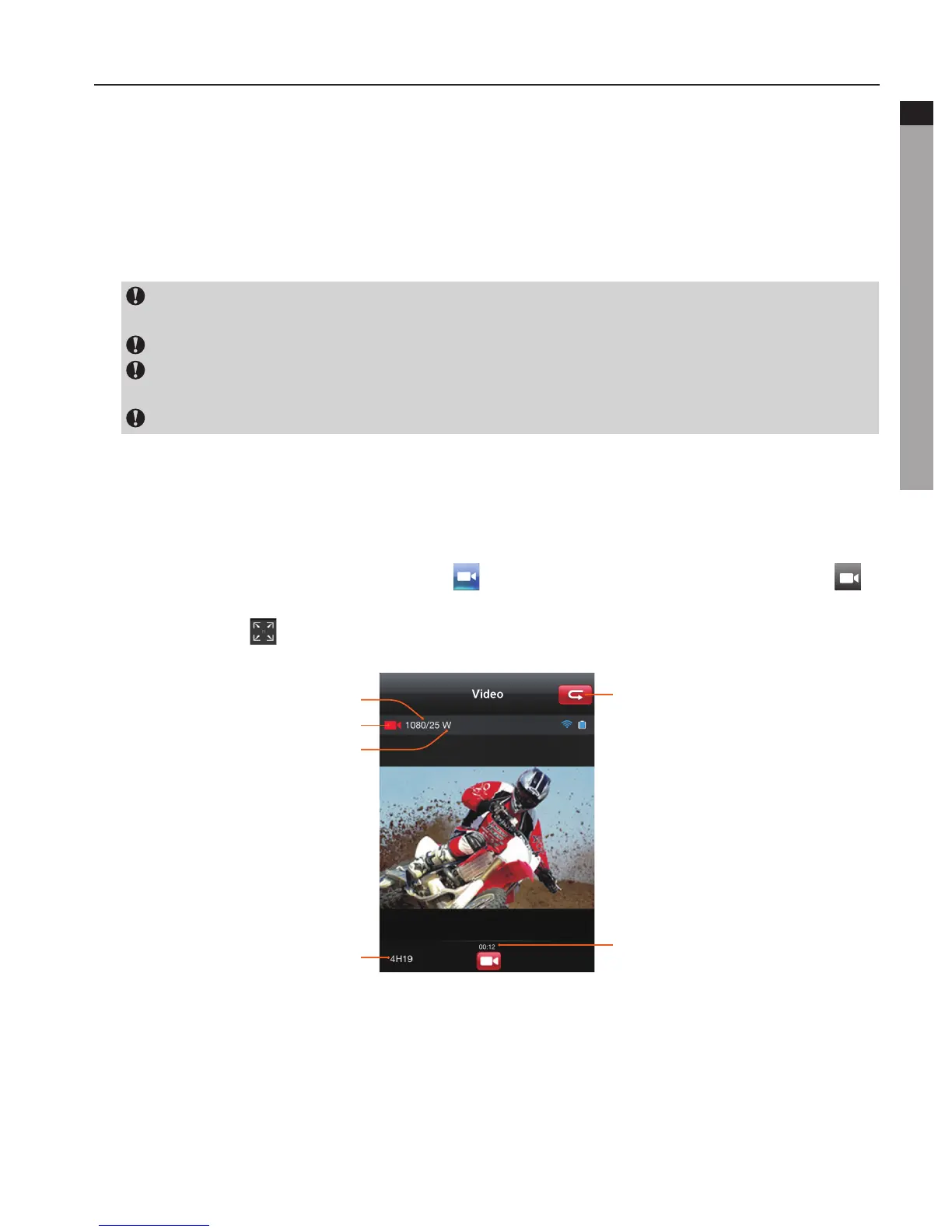
- Click the icon " "tomaximizethepreview:
Return to main interface
Resolution and frame rate
Current state
Angle
Remaining recording time
Recording duration
You can set up your desired video resolution in the parameter setting interface.



 To Next Page