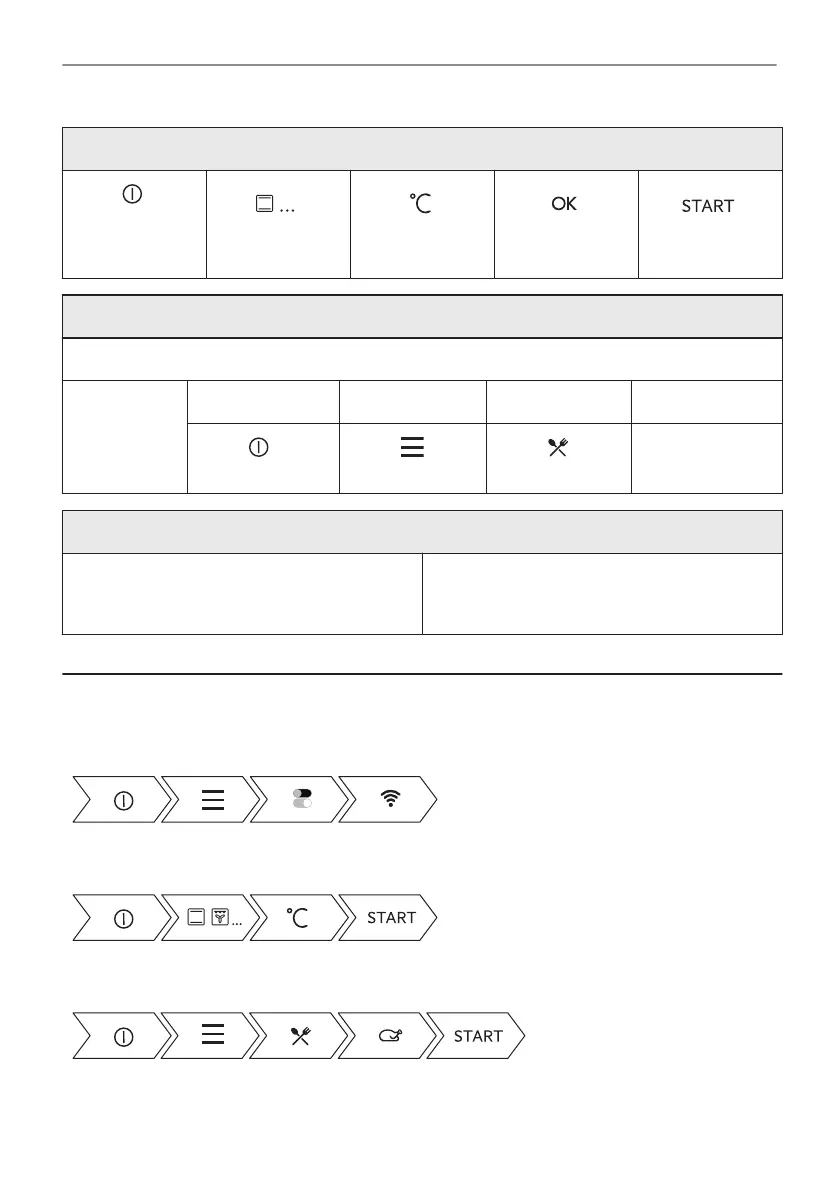
Start cooking
- press to turn
on the appli‐
ance.
- select the heat‐
ing function.
- set the temper‐
ature.
- press to con‐
firm.
- press to start
cooking.
Get to know how to cook quickly
Use the automatic programmes to prepare a dish quickly with the default settings:
Assisted
Cooking
Step 1 Step 2 Step 3 Step 4
Press: . Press: . Press: As‐
sisted Cooking.
Choose the dish.
Use quick functions to set the cooking time
10% Finish assist
Use 10% Finish assist to add extra time when
10% of the cooking time is left.
To extend the cooking time press +1min.
16. TAKE A SHORTCUT!
Here you can see all the useful shortcuts. You can also find them in the dedicated chapters in
the user manual.
Wireless connection
How to set: Heating functions
How to set: Assisted cooking
112/344
IT'S EASY!


 To Next Page